







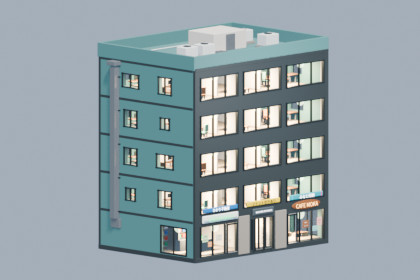
World3DWorks 日本の地方都市 無料サンプル建物 A / Free Sample Building A日本の地方都市をイメージした、建物1棟の無料お試し3Dモデルです。外観、窓越しに見える家具付き内装、昼夜の照明と窓まわりの操作を、有料セットの購入前にお試しいただけます。【三角形数・プレハブ・デモ】測定条件:建物1棟、日中・窓まわり全開、内装・家具・看板を含む表示メッシュ。High:344,996(三角形、100%)Mid:245,516(三角形、71.16%)Low:169,692(三角形、49.19%)建物プレハブ:Built-in 1個/URP 1個。各プレハブ内でHigh・Mid・Lowを手動切替できます。デモ:Built-in 5シーン/URP 5シーン(操作用・昼・夜・全棟配置の昼夜デモ)。三角形数は負荷を比較する目安です。実際の負荷は表示棟数、ライト数、影、描画設定によって変わります。【照明・窓まわりの操作】・室内灯・玄関灯・発光看板など、設置された灯りの一括/個別ON・OFF・全体/個別の光量調整(0〜4倍)・設置されたカーテン・ブラインドの一括/個別切替:開/半開/閉・昼夜・点灯・窓まわり4設定と、外壁10種類の計14設定・High/Mid/Lowの3段階を手動切替個別に消灯した灯りは、全体の光量を変えても消灯状態を保ちます。全体光量を0にした状態でもON/OFFを指定でき、光量を戻すと設定が反映されます。太陽光・環境光・利用者が追加したライトは対象外です。カーテン・ブラインドの切替は窓のサッシやガラス自体の開閉ではありません。【外壁・フレーム設定】外壁の色・素材表現を10種類から選択できます。Blenderはタイムライン、Unityは同梱デモまたはPrefabのExterior Finishから切り替えます。外壁用の材質が対象で、窓・看板・内装は別の設定です。1:昼・全灯・全開2:昼・全灯・全閉3:夜・全灯・全開4:夜・全灯・全閉5〜14:昼・全灯・全開で外壁10種類を選択自動で再抽選するランダム設定はありません。照明の「個別」は部屋・共用部・看板などの照明グループ単位です。窓まわりは各窓のカーテン・ブラインドを個別に設定できます。【収録内容】・独立した建物1棟。有料Volとは別の建物です。・各棟High/Mid/LowのBlender原本・静的FBX・Unity Built-in/URP対応Prefabと操作用デモシーン・日本語/英語の導入・操作説明、利用規約Unityで照明や窓まわりを操作する場合は同梱Prefabを使用してください。FBXは昼・窓まわり全開時の静的交換用モデルです。BlenderやFBXの編集内容はUnity専用メッシュへ自動反映されません。【確認環境】macOS/Windows:Unity 6000.3.27f2、Built-in/URP 17.3.0、Color Space:Linear。Blender原本:Blender 5.2.2 LTS。掲載画像はBlenderでの表示例です。描画方式やシーン設定によって見た目は異なります。【用途・利用範囲】ゲーム背景、映像、静止画、街並みづくりなどに使える背景用モデルです。室内は窓越しの演出用で、建物内を歩き回る完成内装ではありません。扉・サッシの開閉、エレベーター動作は含みません。複数棟や多数のライト・影には描画負荷があります。対象PCに合わせて詳細度や点灯数を調整してください。HDRP、VRChat実機、Unreal Engine、モバイルは未検証です。独立したPBR画像マップは同梱していません。【利用規約】Unity Asset Storeでの取得には、Unity Asset Store標準EULAが適用されます。紹介動画(X)https://x.com/oV3G7P39YiDq4UC/status/2123242574563651652【English】A free standalone building inspired by Japanese regional cities. Try the exterior, furnishings visible through windows, day/night lighting, and window-covering controls before purchasing a five-building set.TRIANGLE COUNTS / PREFABS / DEMOSMeasured per building in daytime with coverings open, including visible interiors, furniture and signs.High: 344,996 triangles (100%). Mid: 245,516 (71.16%). Low: 169,692 (49.19%).Building prefabs: 1 for Built-in and 1 for URP, each containing three manually selectable detail levels.Demo scenes: 5 per pipeline (interactive viewer, daytime, nighttime, and two all-buildings showcase scenes).Triangle counts support comparison; actual performance also depends on building instances, active lights, shadows and rendering settings.FEATURES• Switch all included lights on/off together, or control each lighting channel individually. This covers room lights, entrance lights and emissive signs where present.• Master and individual brightness multipliers from 0 to 4. Individual OFF states remain OFF when master brightness changes. ON/OFF states can be set while master brightness is zero and are applied when brightness is restored.• Switch installed curtains/blinds together or individually between Open, Half and Closed. These controls do not open glass panes or window sashes.• Four day/night and lighting/covering presets plus ten exterior finishes (14 settings in total).• Manual High/Mid/Low detail selection. Unity prefabs also include automatic distance-based LOD switching through LODGroup.EXTERIOR FINISHES / PRESETSChoose from 10 exterior color/material finishes in the Blender timeline or through Exterior Finish in the Unity demo/prefab Inspector. Finishes apply to exterior-wall materials; windows, signs and interiors have separate settings.1: Day / all lights on / coverings open2: Day / all lights on / coverings closed3: Night / all lights on / coverings open4: Night / all lights on / coverings closed5–14: Day / all lights on / coverings open, selecting one of ten exterior finishes. There is no automatic random preset.Individual brightness controls operate per lighting group, such as a room, shared area or sign. Installed coverings can be set per window.CONTENTSOne standalone building, separate from the paid Vol. sets.High/Mid/Low Blender sources, static FBX meshes, Unity Built-in and URP prefabs, interactive demo scenes, Japanese/English instructions, and the license.Use the supplied Unity prefabs for lighting and covering controls. FBX files are static daytime/open-covering interchange models. Editing Blender/FBX sources does not automatically regenerate the Unity-native meshes.TESTED ENVIRONMENTSmacOS and Windows: Unity 6000.3.27f2, Built-in and URP 17.3.0, Linear color space. Blender sources: Blender 5.2.2 LTS. Product images show Blender rendering; appearance varies with pipeline and scene settings.USAGEExterior scenery with furnishings visible through windows, for game backgrounds, films and still images. Walkable interiors, opening doors/window sashes, and working elevators are not included. Sunlight, ambient lighting and user-added lights are separate from the included lighting controls.Adjust detail, active lights and shadows for your target PC. HDRP, VRChat runtime, Unreal Engine and mobile are not tested. Standalone PBR texture maps are not included.LICENSEThe Unity Asset Store Standard EULA applies to acquisitions from the Unity Asset Store.Preview video on Xhttps://x.com/oV3G7P39YiDq4UC/status/2123242574563651652

