






Japanese Convenience Store (Konbini) - Modular Interior & Props
BytesWeavers
$32.99
(no ratings)
Jump AssetStore
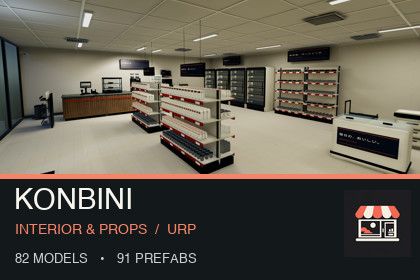
Build a Japanese-inspired convenience store in URP with 82 models, 91 prefabs, 24 fictional products, stocked displays, a demo shop and interaction examples.Tested with Unity 6000.3.21f1 and Universal Render Pipeline 17.3.0. Use a URP project and apply the included demo settings via Tools > BytesWeavers > KonbiniStore > Use Included URP Demo Settings. Sample controls require Input Manager (Old) or Both. Built-in and HDRP are unsupported. No paid Asset Store dependencies. Re-bake lighting after changing the showcase layout.Build a Japanese convenience-store simulator with stocked aisles, specialist shop fixtures and a furnished URP interior. Start from the included Konbini showcase, customize the layout and test the door, product interaction and shelf-restocking examples.INCLUDED IN THE KIT• 82 FBX models and 91 ready-to-place prefabs• 24 fictional convenience-store product designs• Modular floors, walls and storefront architecture• Stocked shelving, checkout fixtures, refrigerated displays and food-shop props• Visual ATM, copier, microwave, coffee-machine and POS props• Furnished Showcase scene, Asset Gallery scene and reusable shop prefab• Three LOD levels, URP PBR materials and setup documentationDESIGN YOUR OWN KONBINIMetric 2 x 2 m floors and 2 x 3 m walls support custom shop layouts. Customize the fictional labels and materials for a neighborhood store, Japanese-inspired town scene or retail management game. Browse pieces in the gallery or use the finished demonstration shop as your starting point.INTERACTION EXAMPLESIncluded C# scripts demonstrate supported doors, product interaction and shelf restocking. ATM, copier, microwave, coffee machine and POS equipment are visual props; banking, appliance or payment simulations are outside the scope. A complete economy, NPC, inventory or save system is not included. All product brands are fictional.COMPATIBILITYUnity 6000.3.21f1 with URP 17.3.0. Sample controls require Input Manager (Old) or Both. The kit uses a clean stylized PBR art direction. General architecture and retail prop designs are shared with our Pharmacy kit; specialist fixtures and product graphics differ.View the trailer and screenshots for actual Unity renders of the included content.Publisher and support: https://bytesweavers.tech82 FBX models, 91 prefabs, 24 fictional product designs. 249 mesh parts across all LODs.LOD0 library total: 180,330 triangles; LOD1: 129,370; LOD2: 88,602.LOD0 minimum: 12 triangles (Floor_Entry_2x2). Maximum: 24,672 triangles (Bean_to_Cup_Coffee_Machine).Unity: 6000.3.21f1; Universal Render Pipeline 17.3.0. Built-in and HDRP are not supported. Input Manager (Old) or Both is required by the sample controls. No paid Asset Store dependencies.Textures: 25 authored PNG files. Seven native 2048 x 2048 PBR sets each contain Base Color, Normal and Metallic/Smoothness maps (21 files). Additional atlases: products 4096 x 2048, signage 2048 x 2048, shelf prices 1024 x 1024 and POS screen 1024 x 768. Baked lighting and reflection data are additional. Materials use URP shaders.UV mapping: yes (UV1); generated UV2 for lightmapping. Rigging: no skeletal rigs. Animation clips: 0. Door and drawer motion uses scripts, not animation clips. Three LOD levels per model; low-complexity models may retain the same triangle counts.Scale: meters, 2 x 2 m floor modules and 2 x 3 m wall modules. Architecture uses corner pivots; loose props use base-center pivots. Prefab roots have zero position/rotation and unit scale. Open static fixtures use non-convex MeshColliders; moving pieces and products use primitive colliders.Scenes: furnished Showcase and Asset Gallery. Controls: right mouse + WASD; Q/E vertical movement; click supported doors/products; R at supported displays to restock. Apply included URP demo settings and rebake lighting after layout changes.Validation: fresh Unity import and Play Mode checks on macOS. Earlier native development-player checks ran on Apple M4. No Windows, mobile or console performance certification is claimed. Documentation includes setup, controls and scope limits.AI assistance was used to write procedural Blender modeling scripts, Unity C# interaction/editor code, texture-generation code and documentation. Meshes were generated and refined in Blender; textures and fictional labels were drawn procedurally at their native resolutions with Python/NumPy/Pillow. No photoscans, stock photos or generative-image raster textures are included. Assets were inspected through actual Unity renders, LOD comparisons, import checks and runtime tests. This disclosure applies to asset creation, not an AI service required by the end user.

