




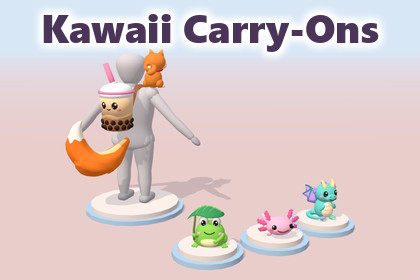
23 cute low poly shoulder pets, backpacks, wings, tails and charms, each in 3 colorways, with a mannequin, attach sockets, 69 icons and 2 URP demo scenes.Built and tested with Unity 6000.3.6f1 (Unity 6.3).URP (default): tested. All materials use URP/Lit.Built-in: tested. Import Support/BuiltInRP_Materials.unitypackage to switch the materials to Standard; prefabs and demo scenes keep working.HDRP: not included or tested. Use HDRP/Lit with the palette texture as Base Map.No code, plugins or dependencies beyond your render pipeline package.Kawaii Carry-Ons is a set of 23 low poly items that stylized characters wear or carry: shoulder pets, backpacks, back items, mini wings, tails, hip charms and cat-ear headphones. Use them as character cosmetics, shop items or rewards in a cute or casual game.Every item comes in its original colors and 2 color themes, each with its own prefab: 69 looks in total. The included mannequin shows where each item goes, and the documentation lists every item's attach offset, so it fits the matching socket on your own character without trial and error.WHAT'S INCLUDED23 item models (FBX), one prefab each46 color-theme prefab variants, 2 per itemDisplay mannequin prefab: 1.68 m tall, 2,824 triangles, 8 attach sockets69 item icons, 512 x 512 PNG with transparent background, imported as UI sprites2 demo scenes, no scriptsDocumentation: README (Markdown), PDF contents sheet, attach-point data (JSON)THE 23 ITEMSShoulder pets (9): Capybara, Frog, Axolotl, Loaf Cat, Chick Egg, Pumpkin, Ghost, Dragon, ShibaBackpacks (3): Capybara Backpack, Boba Tea Backpack, Mushroom BackpackBack items (3): Duck Float, Katana, Fishing RodMini wings (2): Angel Wings, Bat WingsTails (2): Devil Tail, Fox TailHip charms (3): Kitsune Mask, Omamori Charms, Candy BucketNeck (1): Cat-Ear HeadphonesPumpkin, Ghost, Candy Bucket, Bat Wings and Devil Tail work together as a Halloween set.TECHNICAL DETAILS1,988 to 3,974 triangles per item, 73,912 for all 23 itemsOne mesh, one material and one 256 x 256 palette texture per item. No LODs.Base color (albedo) only: no normal, metallic or roughness maps. Point filtering and no mipmaps keep the flat color cells crisp.1 unit = 1 meter, Y up, front +Z, pivot at the bottom center of each modelSized for a stylized character about 1.7 m tall with a large head, like the mannequin. The README explains how to scale items and offsets for other characters.Static meshes: no rigs, animations, colliders or scriptsPer-item triangle counts, sizes and socket positions are listed under Technical details.ATTACH SOCKETSThe mannequin has 8 empty socket objects: head, neck, both shoulders, back, lower back and both hips. Each item prefab has an empty AttachPoint child, and the documentation names the socket the item goes on.To attach an item, make it a child of that socket with rotation 0 and scale 1, and set its local position to minus its AttachPoint position. The README lists every offset, and the JSON file has the same numbers for your own tools.RENDER PIPELINESURP (default): all materials use Universal Render Pipeline/Lit.Built-in Render Pipeline: import the included Support/BuiltInRP_Materials.unitypackage. It switches the same material files to the Standard shader, so every prefab and both demo scenes keep working.HDRP: not included and not tested. Each material has a single base color texture, so you can switch it to HDRP/Lit and assign the palette texture as its Base Map.DEMO SCENESDemo_KawaiiCarryOns_Showcase: all 23 items on plinths grouped by category, and every item in all 3 colorwaysDemo_KawaiiCarryOns_Mannequins: 5 mannequins in different outfits, and 1 mannequin with a marker on each socketHOW WE MADE ITThe models were built by procedural Blender Python scripts that we wrote with the help of Anthropic's Claude, an AI coding assistant. No AI image or 3D generators were used.The store images are Unity (URP) renders of the package content. Some have text labels.SUPPORTQuestions, bug reports and requests: contact@tiltshift.xyzCompatibility:Unity 6000.3.6f1 (Unity 6.3) or newer.Render pipelines: URP (default); Built-in through the included Support/BuiltInRP_Materials.unitypackage; HDRP not included.No scripts, no Package Manager dependencies.Contents:23 item models (FBX) and 1 mannequin model (FBX).70 prefabs: 23 items, 46 color-theme prefab variants (2 per item), 1 mannequin.71 materials: 66 palette materials (URP Lit), 5 demo-scene materials.66 palette textures, 256 x 256 PNG: 21 original, 44 color-theme, 1 mannequin.69 item icons, 512 x 512 PNG with transparent background, imported as Sprite (2D and UI).2 demo scenes: Demo_KawaiiCarryOns_Showcase, Demo_KawaiiCarryOns_Mannequins.Documentation: README.md, KawaiiCarryOns_Contents.pdf, KawaiiCarryOns_AttachPoints.json.Geometry:Triangles per item: 1,988 to 3,974. All 23 items: 73,912.Mannequin: 2,824 triangles, 1.68 m tall, 8 attach sockets.One mesh and one material per item. No LODs, rigs, animations, blend shapes or colliders. Prefabs are not marked static.Textures and materials:Base color (albedo) palette only: no normal, metallic, roughness or occlusion maps.Each palette is 8 x 8 cells of 32 px, and UVs sit at cell centers. Import settings: Point filter, no mipmaps, no compression.A color theme is another palette with the same layout, so it uses the same mesh and UVs.Scale, orientation and pivots:1 unit = 1 meter, Y up, front +Z.Pivot at the bottom center of each model's bounding box.Prefab roots at position 0, rotation 0, scale 1; the model is a nested child.Each item prefab has an empty AttachPoint child that marks where it attaches.Items are sized for a stylized character about 1.7 m tall, like the mannequin.Mannequin sockets (position on the mannequin in meters, all with zero rotation):Socket_Head (0, 1.68, 0): spareSocket_Neck (0, 1.316, 0): headphonesSocket_Shoulder_R (0.28, 1.316, 0): all 9 petsSocket_Shoulder_L (-0.28, 1.316, 0): spare, for pets on the left shoulderSocket_Back (0, 1.0556, -0.14): backpacks, back items, wingsSocket_Hip_Back (0, 0.686, -0.14): tailsSocket_Hip_L (-0.196, 0.686, 0.14): Kitsune Mask, Candy BucketSocket_Hip_R (0.196, 0.686, 0.14): Omamori CharmsItems (triangles; size W x H x D in meters; color themes):Pet_Capybara: 2,124; 0.27 x 0.44 x 0.61; Chocolate, GoldenPet_Frog: 3,692; 0.38 x 0.38 x 0.27; Blue, PinkPet_Axolotl: 3,888; 0.43 x 0.27 x 0.49; Gold, LavenderPet_LoafCat: 2,552; 0.27 x 0.27 x 0.37; Grey, BrownPet_ChickEgg: 3,254; 0.28 x 0.36 x 0.27; Blue, ChocoPet_Pumpkin: 3,910; 0.31 x 0.28 x 0.31; White, GreenPet_Ghost: 3,400; 0.30 x 0.32 x 0.38; Mint, LilacPet_Dragon: 3,820; 0.31 x 0.43 x 0.37; Red, GreenPet_Shiba: 3,676; 0.24 x 0.41 x 0.30; BlackTan, CreamBackpack_Capybara: 2,780; 0.35 x 0.58 x 0.62; Chocolate, GoldenBackpack_Boba: 3,856; 0.38 x 0.71 x 0.68; Matcha, TaroBackpack_Mushroom: 3,028; 0.51 x 0.50 x 0.75; Blue, BrownBack_DuckFloat: 3,834; 0.57 x 0.65 x 0.53; Pink, MintBack_Katana: 3,740; 0.80 x 0.93 x 0.17; Sakura, AoBack_FishingRod: 3,066; 1.00 x 1.21 x 0.18; Pink, GreenWings_Angel: 2,728; 0.91 x 0.59 x 0.24; Pink, SkyWings_Bat: 1,988; 0.88 x 0.47 x 0.20; Pink, MintTail_Devil: 2,264; 0.45 x 0.53 x 0.51; Black, RedTail_Fox: 3,600; 0.54 x 0.61 x 0.57; Silver, PinkHip_KitsuneMask: 1,988; 0.28 x 0.40 x 0.20; Kuro, AoHip_Omamori: 3,514; 0.26 x 0.28 x 0.11; Pastel, NightHip_CandyBucket: 3,974; 0.29 x 0.40 x 0.29; White, PurpleNeck_Headphones: 3,236; 0.53 x 0.18 x 0.27; Mint, MidnightDemo scenes:Solid pastel background, directional lights, gradient ambient light, fog.No skybox, post-processing, baked lighting or scripts.Lit for the Linear color space (the URP default). In a Gamma project they render brighter.The models were built by procedural Blender Python scripts that we wrote with the help of Anthropic's Claude, an AI coding assistant (a large language model). No AI image or 3D generators were used.What we used Claude for:The Blender Python scripts that build the models. They create every mesh, its UV layout and its 256 x 256 palette texture, including the color-theme palettes and the display mannequin. We ran the scripts in Blender and exported the results to FBX and PNG.The Blender script that renders the 69 item icons from those models.The Unity editor scripts we used to set up the materials, prefabs and demo scenes and to render the store images. These scripts are not part of the package.The documentation and the store texts. Claude drafted them, and we reviewed them.What we did not use: no text-to-3D, image-to-3D, diffusion or other AI image, texture or 3D-model generator. No AI-generated image is used as a texture, icon or store image.

