




Hit and Dissolve 2D Shader & System
SR Studios Kerala
$8.25
$16.50
50%OFF
(no ratings)
Jump AssetStore
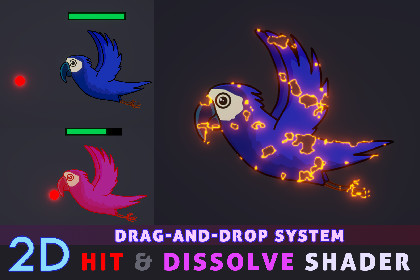
Customizable Hit and Dissolve Shader and drag-and-drop system that allows you to quickly create interactive hit, health, and dissolve effects in your project.This pack contains a customizable Hit and Dissolve Shader designed for 2D characters, enemies, and props. It also includes a simple drag-and-drop system that allows you to quickly create interactive hit, health, and dissolve effects in your project. The package can be used in both commercial and non-commercial projects.How to use?- Simply drag and drop the Hit and Dissolve material onto your 2D objects (Characters, Props, Enemies, etc.).- Use the Dissolve Amount slider in the material to gradually reveal or dissolve your object.- Customize the dissolve effect using the available shader properties.- Use the included scripts to create hit interactions with obstacles or enemies.- The included example system allows you to use a health bar and trigger the dissolve effect when the object's health is depleted.Extras:- The package includes a complete example system with a health bar, health reduction, hit detection, and dissolve effects.- Demo scenes and guides are included to help you get started quickly.Technical Details:-- Material Used : Hit and Dissolve (Custom Shader Graph material)- Characters Included : Parrot x 5 (comes with 1 animation)Resolution - 4930 x 4020Format - PNG- Scripts :Hit and Dissolve : Allows your 2D objects to interact with obstacles/enemies, reduce health, and trigger hit and dissolve effects.Enemy Spawn : Simple script for spawning enemies or obstacles at a selected location with a customizable spawn interval.Enemy Movement : Simple script for moving enemies or obstacles in a selected direction with a customizable movement speed.Sprite Sheet Info : Supporting script that helps configure sprite sheet information for use with the dissolve shader.Features:-- Customizable Hit and Dissolve material- Adjustable dissolve amount- Customizable dissolve edge color- Adjustable edge thickness & noise scale- Customizable hit/overlay color- Supports sliced and animated sprite sheets- Characters and prefabs included- Drag-and-drop workflow- Demo scenes and guides included- Beginner-friendly setupDissolve Shader Features:Dissolve Amount – Control the progression of the dissolve effect.Edge Color – Add a customizable colored edge to the dissolve effect.Edge Thickness – Adjust the thickness of the dissolve edge.Noise Scale – Control the scale of the dissolve pattern.Hit Color – Customize the color overlay used for the hit effect.Sprite Sheet Support – Works with sliced and animated sprite sheets.Custom Sheet Size – Set the Columns × Rows values for different sprite sheet layouts.FAQ?Is this shader supported in Built-in, URP, and HDRP?- Yes. Open the Shader Graph, go to Graph Inspector → Graph Settings → Active Targets, and select the render pipeline used by your project.About Me : "SR Studios Kerala", Indie Game Developer and 2D/3D Generalist Artist from Alappuzha, Kerala, India.Contact : srstudioskerala@gmail.com................Thank you for choosing this package!................................Material Used : Hit and Dissolve (Custom Shader Graph material)- Characters Included : Parrot x 5 (comes with 1 animation)Resolution - 4930 x 4020Format - PNGAI was used to assist with the development of some code included in this package. The AI-generated code was manually reviewed and tested to ensure it works correctly with the asset.

