




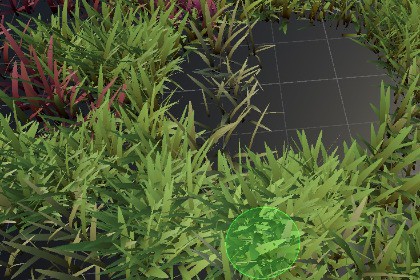
A grass shader + grass drawing on terrain tool built in Unity 6 URP.FEATURES1. Customizable color gradients.2. Customizable grass shape and variation.3. Customizable wind parameters.4. Interaction with player.5. Painting tool to draw grass in your desired places.HOW TO USE THE TOOL1. Drag and drop any of the three prefabs in your scene.2. Select the prefab from the hierarcy (for example "Grass System").3. In inspector, make sure you have "Enable Paint Mode" button pressed if its not already in paint mode.4. Try painting in your scene with LMB and to erase the grass, press RMP. Use scroll wheel to change paint radius.5. There are some other properties too that you can tweak.6. Finally, make sure to save your scene.If you want to go one step further, you can replace default grass mesh, and wind texture with your own. You can change material properties to make the grass appear as you want.LIMITATIONSThis tool does not have undo option, so you must erase the grass they you created with RMP stroke. The reason for its removal is the performance issues that come when drawing thousands of instances of grass.PACKAGE CONTENTS1. One Grass Shader2. Three Prefabs (for Demo)3. Pre-configured Materials4. A Demo SceneUnity Version: Unity 6Requires: Universal Render Pipeline (URP).Third-party Assets: NoneMeshes: 1Shaders: 1Materials: 3Textures: 1Prefabs: 3Scripts: 2 (Editor, and Instancer)Demo Scenes: 1

