






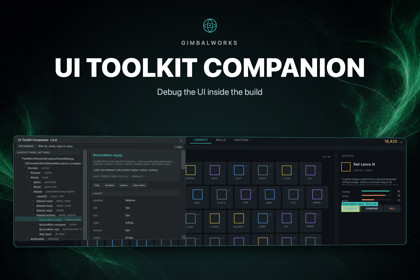
Debug your UI inside the build. Plus the layer around UI Toolkit everyone writes themselves: typed views from UXML, bindings without reflection, box shadows, tooltips, modals and gamepad focus.Unity's UI Toolkit Debugger lives in the editor. The moment a layout misbehaves on a phone — or only in a signed release build — the tooling stops at the edge of the device.UI Toolkit Companion puts the debugger inside your game. Press F8 in any build that carries it: the element tree, every resolved style property, the four boxes of the layout model drawn over the element, and a picker that finds what is actually under your finger.Then it fills in the rest of what UI Toolkit does not give you.THE DEBUGGER, WHEREVER YOUR GAME RUNSElement tree of every live panel, filtered by name, type or class. Pick by tapping the screen. Every resolved property, updating while the game runs. Margin, border, padding and content drawn over the selection. Live edits: hide, make invisible, outline, clear inline styles. Opens on F8 or four fingers, under either input backend, and is compiled out of release builds unless you tick it in.TYPED VIEWS FROM YOUR UXMLA partial class beside each watched .uxml, with a field per named element, a Bind and a Validate that names whatever went missing. A file you can read and step into — not a source generator that takes every generated symbol in the project down with it when it breaks.BINDINGS WITHOUT REFLECTIONObservables, observable lists that say which row changed, and commands that carry their own can-run. One Binder holds every subscription and releases them all at once. No property paths, no reflection: it survives managed stripping under IL2CPP, and a renamed member is a compile error rather than a binding that quietly stops working.WHAT USS DOES NOT HAVEBox shadow from a single nine-sliced texture — one draw call at any size, and exact rather than banded. Draw order that sorts the drawing without touching the tree. Aspect ratio, text that shrinks to fit, and alignment to whole pixels for pixel art.CONTROLS UI TOOLKIT LACKSAccordion, a tooltip that works in a build (VisualElement.tooltip is drawn by the editor and shows nothing in a player), toasts that clear themselves, and a modal stack whose scrim stops a click reaching the screen behind it.GAMEPAD AND KEYBOARD FOCUSDirectional focus decided by geometry, wired by hand where the geometry reads it wrong, and held inside a region so the stick cannot walk out of a dialog onto the screen it is covering.WHAT YOU GETFull C# source. No DLL, no third-party code, no additional package required. 355 tests, run against Unity 6000.4 and 6000.6. A sample: a ship loadout screen built with the package, carrying two planted layout faults for the debugger to find in a minute. Works with every render pipeline. IL2CPP and managed stripping are safe.USS+, A PREPROCESSORA .ussx file compiles to an ordinary .uss beside it, rebuilt on every save. Nesting with &, @tokens and $name resolved while compiling, calc() worked out at compile time, @scope, the inset and size shorthands, and @use for a shared palette. Errors name the line you wrote. @breakpoint and gap are the two USS cannot express at all: each compiles to something plain and is finished by one line of C#.COMING FROM uGUIA window that reads a Canvas and writes a .uxml with a stylesheet beside it. Nothing in the scene is touched. Anchors and stretching become the USS edges that behave the same way, including the flip from counting up to counting down. What it cannot carry it lists, with the path and the reason.PANEL PREVIEW AND TOKENSUI Builder shows a layout at the size of its own canvas, not the size the panel runs at. Panel Preview asks a PanelSettings what it would do on a chosen screen and lays the markup out at that point size. Token Palette lists every $token in the project with a swatch.Features• Runtime UI debugger: element tree, resolved styles, layout boxes, pick by tapping, live hide / invisible / outline / clear inline• Opens on F8 or a four-finger tap; works under the old Input Manager and the new Input System• Compiled out of release builds unless you opt in• Typed C# views generated from UXML, with Bind and Validate• Observables, observable lists and commands with their own can-run; one Binder releases every subscription• Box shadow, draw order, aspect ratio, text that shrinks to fit, pixel snapping• Accordion, build-safe tooltips, self-clearing toasts, a modal stack with a click-blocking scrim• Directional gamepad and keyboard focus, with focus held inside a region• USS+ preprocessor: a .ussx file compiles to ordinary .uss on every save - nesting, @tokens and $name, calc(), @scope, @use, plus @breakpoint and gap, which USS cannot express• uGUI converter: reads a Canvas and writes a .uxml with a stylesheet, listing whatever it could not carry with the path and the reason• UI Builder: Panel Preview at the point size a PanelSettings would really give, and a Token Palette with swatches• Full C# source, 12 assemblies, no DLLs, no third-party code, no external dependencies• 355 tests, passing on Unity 6000.4 and 6000.6Supported OSEvery platform Unity 6 targets. No native code and no platform-specific dependencies. IL2CPP and managed code stripping are safe.Link to documentationDocumentation.html ships inside the package, beside package.json.The C# source, the documentation, the sample scene and the store copy were written with the help of an AI coding assistant (Anthropic Claude), used the way a pair programmer would be: it drafted and revised code under direction, and every piece was read, corrected and kept or thrown out by the publisher.No generated art, audio, textures or models are included — the package contains no art assets at all. The demo screen is built from UI Toolkit primitives and colour, and its one texture is generated at runtime by the package's own shadow code.Correctness was established by running the package, not by trusting the assistant: 187 automated tests ship with it and pass on Unity 6000.4, and the shipped .unitypackage was imported into an empty project and tested from there before submission.

