






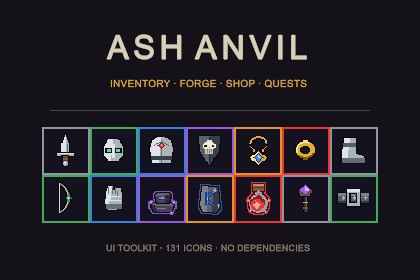
Dark fantasy inventory, forge, merchant and quest board built on Unity UI Toolkit. 131 pixel-art icons, 6 rarity tiers, click-to-carry equipment, one-click demo scene. No dependencies.Render pipeline independent: the UI is built on UI Toolkit (UXML/USS/C#), not Canvas/uGUI, and ships no shaders, materials or meshes — nothing to convert between Built-in, URP and HDRP. No package dependencies; verified in an empty project with no 2D, Input System or uGUI packages. Works on all three Active Input Handling settings. Fast Enter Play mode supported.A complete dark fantasy inventory interface for Unity, built on UI Toolkit (UXML + USS + C#). Four screens that already talk to each other, 131 pixel-art icons drawn for the package, and a setup wizard that leaves you with a working demo scene in one click.Four screens, one shared bagInventory — 10 equipment slots on a paper-doll grid, 36 bag slots per page, up to 6 pages (2 unlocked, the rest bought with gold). A live affix digest lists every affix on everything you are wearing, in one column.Forge — four operations on a single bench: add socket, upgrade item, salvage item, extract rune. Material and gold costs rise with the item's rarity and upgrade level, and the whole cost table is one file.Merchant — buy and sell tabs over a 36-slot stock grid, with prices derived from base price, rarity and upgrade level.Quest board — quest list, detail pane, objective, gold and item rewards, accept and turn in.Every screen reads one shared inventory model, so an item salvaged in the forge disappears from the bag as well.What is in the box131 pixel-art icons: 52 equipment pieces, 33 items with per-rarity variants, 9 empty-slot glyphs, 4 forge action icons, 10 tab icons, 23 nine-slice panel pieces6 rarity tiers, Common to Mythic, driving stat multipliers, affix counts and socket limits from one tableClick to pick up, click to drop, occupied slots swap; invalid drops flash and keep the item in handItem tooltips with rarity-scaled stats, affixes and socket countSeeded stat and affix generation: the same item shows the same values every session with nothing persisted — or fill in your own rolled values and the generator steps asideA setup wizard that creates the PanelSettings, fills a sprite catalogue, generates 57 item definitions and 4 sample quests, and builds the demo sceneSeparate assembly definitions for Runtime and EditorChange most of it without writing codeColours, borders and spacing live in one :root block in Theme.uss. Panel layout, headers and buttons are UXML you can open in UI Builder. Item names, icons, stats, prices, quest text, rewards, merchant stock, starting gold and the keyboard shortcuts are all Inspector fields. On Unity 6 the slot is a registered UXML element, so you can drag a Slot straight into a layout of your own.Rarity tiers, which equipment slots exist, forge recipes and bag page size are code — one small file each, and the UI redraws itself around whatever you put there.Technical notesUI Toolkit, not uGUI. No Canvas, no Image components, no prefabs to reskin — UXML, USS and C#.No dependencies. UI Toolkit ships with Unity. Verified against an empty project with no 2D packages, no Input System package and no uGUI.Every input backend. Input Manager (Old), Input System Package (New) and Both. The Input System is reached optionally, so nothing breaks if the package is not installed.No fonts shipped. Unity's default font is used; add your own with a -unity-font-definition rule.The equipment grid and bag are filled from code, not laid out in UXML. You can move, resize and restyle the containers in UI Builder; the slot count and order come from the two files named above.Nothing outside Assets/AshAnvil/ is written to, and the wizard asks before it replaces the scene you have open.Documentation, changelog and third-party notices are included. The package contains no third-party code, art or fonts.Verified onUnity 6000.6. Nothing in the source uses an API newer than Unity 2021.3, but 2021.3 to 2023 are not part of the test matrix.Suggested keywordsinventory, RPG inventory, UI Toolkit, forge, crafting, equipment, loot, rarity, pixel art, dark fantasy, quest, shop, merchant, tooltip, UXML, USS, inventory system, gear, item, RPG UIBuilt on UI Toolkit — UXML, USS and C#. No Canvas, no uGUI components, no prefabs. Renders independently of the render pipeline, so it works the same on Built-in, URP and HDRP with no setup and no shader variants.Contents23 runtime C# files and 3 editor C# files, ~3,000 lines, fully commented4 UXML layouts, 1 USS stylesheet, 1 theme stylesheet (.tss)131 pixel-art PNG sprites, imported automatically with Point filter, no compression and no mipmapsGenerated by the setup wizard: 57 ItemDef assets, 4 QuestDef assets, a PanelSettings, a sprite catalogue and a working demo sceneDocumentation, changelog and third-party notices232 files, 2.5 MBArchitectureTwo assembly definitions, AshAnvil.Runtime and AshAnvil.Editor, so editor code is never compiled into a buildOne InventoryModel shared through GameSession; screens subscribe to its change event and redraw themselvesSlot clearing happens in exactly one place (DragCarry.ReturnToSource), so item duplication is closed off by design rather than patched per call siteStats and affixes are derived from an item's identity with FNV-1a + xorshift, so the same item shows the same values every session with nothing persisted. Fill in ItemStack.affixes from your own server or save data and the generator steps aside.One rarity table drives USS class, colour, stat multiplier, affix count and socket limit; add a tier by adding one entry per arrayDependencies — none. UI Toolkit ships with Unity. Verified against an empty project with no 2D packages, no Input System package and no uGUI installed.Input — works on all three settings of Active Input Handling: Input Manager (Old), Input System Package (New) and Both. The Input System is reached optionally, so the package neither requires nor breaks without it.Fast Enter Play mode — supported. The package keeps one mutable static, the shared inventory, and clears it on entry to Play mode. Everything else static is immutable table data or a self-revalidating cache.Fonts — none shipped. Unity's default font is used; supply your own with a -unity-font-definition rule in Theme.uss.Verified on Unity 6000.6, with an automated test suite covering setup, screen rendering, screen re-opening, the shared model, carry handling and key mapping on every input backend. Nothing in the source uses an API newer than Unity 2021.3, but 2021.3 to 2023 are not part of the test matrix.Scope — this is a UI package. It draws, edits and reacts to an inventory model; it is not a save system, a combat system or a character controller. GameSession.Inventory is the single hand-off point to your own game.Art. The 131 pixel-art sprites in this package were produced with AI image generation tools and then edited by hand — cleaned up, recoloured, resized and made consistent as a set — before being included. They are not taken from any third-party art pack and carry no third-party licence.Code. The C# implementation was written partly by hand and partly with AI assistance. Every file was reviewed and run in the Unity Editor.Debugging, testing and documentation. An AI coding assistant (Anthropic Claude) was used in a later development pass to review the package, diagnose defects and build an automated test suite. Specifically it:diagnosed and fixed four defects: a setup-wizard asset load order that left every UIDocument without its PanelSettings; keyboard shortcuts that were compiled out on projects using the Input System package; a ScriptableObject type sharing a file with another class, which caused every generated quest asset to be saved without a script reference; and panels that bound once while UIDocument re-clones its visual tree on every enablewrote three new source files (InputBridge.cs, PanelHostUtil.cs, QuestDef.cs) and edited the existing ones to fix the abovewrote and ran an automated test suite in Unity Test Framework, verifying the package in a clean project with no dependencies installed and on all three input backendswrote the documentation, the changelog and this listing textAll AI-assisted output — art, code and text — was reviewed, edited and verified in the Unity Editor before release.

