






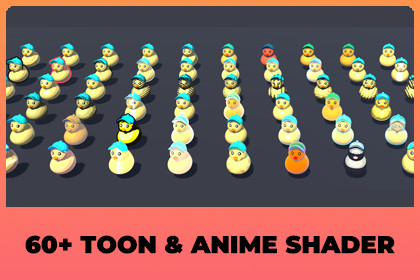
Sixty toon and anime looks for URP, built in Shader Graph. Drop a material on a mesh and it looks hand drawn. Lit, UnLit and outline shaders included, all tuned and ready to use.Advanced Toon And Anime Shader gives you sixty toon and anime looks in one URP shader. Drop a material on your mesh and it looks drawn. Pick another mode and it looks drawn in a different way.Every look ships already tuned, so you do not have to hunt for the right numbers before it looks good. Pick a mode, then change whatever you like from there.What is inside the sixty looks:- Classic cel shading, from two tone to soft painted bands- Colour ramps for warm, illustrated scenes- Ink outlines, inner crease lines and rim lights- Cartoon highlights: dots, streaks, stars and glossy shine- Pen and ink hatching and comic print halftone- Toon metal, plastic, velvet, ceramic, wax and watercolour- Poster styles, flat stickers and comic ink- Hologram, galaxy, crystal and other glowing effects- Anime styles for characters (skin, hair ring, silk, pastel) and scenes (Ghibli paint, sunset, mech armor, sparkle, candy jelly)Made for a real project, not just a screenshot. It works with your scene lights and shadows, and with point and spot lights on every URP rendering path. There is also an UnLit version for UI models, previews and scenes where you want every object lit the same way.The shaders are Shader Graph files, so you can open them, read them and change them. Two demo scenes are included. The Demo scene shows one duck and lets you step through all sixty looks with live sliders. The Gallery scene puts all sixty side by side so you can find the one you want quickly.Switching a look from code is one line:duck.Mode = ToonMode.AnimeSkin;Requires Unity 6 and the Universal Render Pipeline. The Built-in Render Pipeline and HDRP are not supported.- 60 toon and anime modes in one shader, each with tuned default values- 3 shaders: AdvancedToonLit, AdvancedToonUnLit and AdvancedToonOutline- Lit uses the main light with shadows, ambient light, and all point and spot lights- UnLit ignores scene lights and uses a Light Direction and Light Color set on the material, no shadows- Outline shader draws an ink line on a second material slot, with width, color and distance fade- Lit and UnLit have the same sixty modes and the same settings, so you can switch a material between them- Works with Forward, Forward+, Deferred and Deferred+ rendering paths- Built in Shader Graph, with every shading stage kept as its own sub graph- Small HLSL file for reading the main light with shadows and looping over point and spot lights- Ready-made materials: Toon 00 to Toon 59, plus outline materials- Settings: Base Map, Base Color, Normal Map, Steps, Band Softness, Threshold, Light Wrap, Shade Color, Second Tint, Rim Color/Power/Strength, Specular Color/Power/Strength, Pattern Scale and Angle, Outline Color, Speed- Animated modes (Scan Lines, Iridescent, Hologram, Galaxy, Anime Sparkle) with adjustable speed- Screen space patterns (hatching, halftone, dither) cost a few extra shader instructions and no extra textures or passes- Outline modes add one extra draw call, other modes are a single draw like a normal lit material- Only the modes your materials use are compiled into a build, which keeps build time and size down- Component: Roam Moon > Advanced Toon And Anime Shader, with Mode, Base Color per object, Apply Preset On Enable and Outline Material- Code API: AdvancedToonRenderer.Mode, ToonPresets.Apply, ToonPresets.ApplyOutline, ToonPresets.For, ToonPresets.NameOf, ToonPresets.Count- Demo scene with a duck and a UI for all sixty modes, and a Gallery scene showing all sixty side by side- Includes its own URP asset, renderer and volume for the demo scenes- Written documentation (README and PDF) with a table for every mode- Requirements: Unity 6 (built and tested on 6000.6 with URP 17.6), Universal Render Pipeline

