






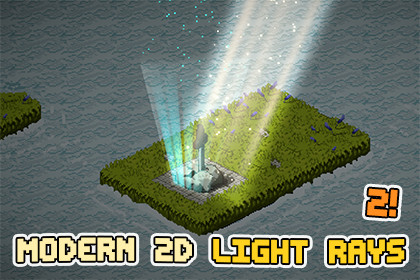
Bring beautiful light into your 2D game with an easy-to-use tool for creating customizable god rays, light shafts, atmospheric beams, and glowing particle effects.🔥 | Documentation | Publisher Website | Support🔥⚡ SUPPORTED RENDER PIPELINEUniversal Render Pipeline (URP)Supports Unity 2022.3 LTS through Unity 6.x+Designed for both URP 2D and mixed 2D / 3D projects🌀 MODERN 2D LIGHT RAYSBring atmospheric lighting into your 2D game with an easy-to-use tool for creating god rays, light shafts, window beams, volumetric-looking lighting and glowing particle effects.Modern 2D Light Rays works well in:PlatformersTop-down gamesIsometric gamesPixel-art projects2.5D and mixed 2D / 3D scenes📚 LIGHT RAY CUSTOMIZATIONCustomize:ColorHDR-friendly colorsColor gradientsOpacity / intensityRay densityRay animation speedWavinessEdge softnessDirectional edge falloffRay shapeCustom ray texturesPixel-art renderingParticle effectsDust motesSorting Layer / Order22 blend modes🎮 KEY FEATURESEditable Ray ShapesLight rays are rendered on an editable shape that can be adjusted directly in the Scene View. Create narrow shafts, wide window beams, angled rays or large environmental lighting zones.You can also drive the ray shape from a:Manual editable quadSpriteRendererCollider2D💡 URP 2D LIGHT INTEGRATIONOptionally create a matching URP Light2D directly from the light-ray shape.The Light2D can follow the ray perimeter and optionally synchronize:ColorIntensityBlend StyleShadowsThis makes it easy to combine the visual ray effect with actual URP 2D scene lighting.✨ PARTICLES & DUST MOTESAdd atmospheric particles directly to a light ray.Included particle modes:SurfaceSurface ClimbingTop FallingBottom ClimbingDust Motes🎨 22 BLEND MODESChoose from a large set of light, dark and stylized blending options, including:NormalScreenMultiplyLinear DodgeDodgeLightenDarkenDifferenceExclusionHard LightSoft LightOverlayLinear LightBurnSubtractand more🌈 GRADIENT COLORINGUse corner colors or two-axis gradientsSeveral ready-to-use gradient presets are included.🟪 PIXEL ART MODEDedicated pixel-art controls help light rays fit naturally into pixel-art scenes.🌬️ ANIMATED RAYSCreate moving rays using:Procedural ray layersWavinessDifferent layer speedsDensity controlsCustom scrolling textures🌐 GLOBAL & GROUP CONTROLSControl multiple Light Rays together using:Light Rays GroupGlobal ControllerAdjust global:IntensityTintAnimation speedUseful for:Day / night transitionsCutscenesWeather changesDungeon lightingGlobal atmosphere changes💻 RUNTIME APILight Rays can also be controlled through code.Runtime controls include:IntensityColorBlend ModeVisibilityPixel ArtDust MotesLight2DGradient presetsMotion presetsEmitter sourcesGroup modifiers💬 Support:- Average 24h response time and dedicated discord server for fixing bugs and suggesting new features👷 SUPPORTED PLATFORMSDesigned for URP-supported platforms including:WindowsmacOSLinuxAndroidiOSWebGLConsoles📖 DOCUMENTATIONIncluded:Offline documentationGetting Started guideWorkflow tutorialsInspector referenceParticle & Dust guideLight2D guideRuntime API referenceUpgrade & troubleshooting guideTested and Works Perfectly on all versions of Unity from 2022.3 and up*all simple Demo Scenes were made to show off assets!*All Screenshots and videos were captured on PC build!*Music and sounds from the video are not included!

