






BT-Animation Converter Pro: Humanoid ⇄ Generic ⇄ Legacy Converter
Barkin Tufan
$13.70
$27.39
50%OFF
(no ratings)
Jump AssetStore
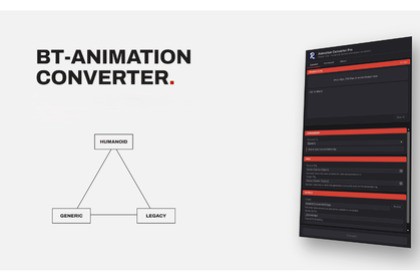
Convert Unity animation clips between Humanoid, Generic and Legacy in any direction, batch-process entire folders, bone, and pose limit involved automatic bone mapping included.Stop Re-Animating What You Already OwnEvery Unity developer eventually hits the same wall: a beautiful animation library that's the wrong type for the rig you actually need it on. A Mixamo pack that's Generic when your character needs Humanoid retargeting. A Humanoid clip you need baked down to a fixed Legacy skeleton for an old Animation-component system. Re-animating from scratch isn't an option, and hand-converting curve by curve is a professional's afternoon gone.BT-Animation Converter Pro handles all six conversion directions between Humanoid, Generic and Legacy from inside the editor, with the honesty most tools skip: every loss, every clamp, every unmapped bone is reported, not hidden.🎯 Core Conversion EngineDirectPath Lossless Legacy ↔ GenericLegacy and Generic clips share the same transform-path curve layout, so this conversion is a direct copy, not a re-sampleEvents, loop settings, and object reference curves carry over automaticallyQuadSample — Humanoid ↔ Generic/Legacy BakingBakes the source clip onto a live instance of your rig and rebuilds it as transform curves, frame by frameQuaternion continuity is enforced during sampling no hemisphere flips, no wrist-snapping on fast rotationsAdaptive keyframe reduction (Douglas-Peucker on position, rotation and scale independently) shrinks file size without visible driftConstant tracks collapse to a single key automatically, cutting file size hard on rigs with dozens of static bonesMuscleBridge — Generic/Legacy → Humanoid RetargetingReads the source animation back through a real Humanoid avatar via Unity's own HumanPoseHandler, so results stay compatible with Mecanim, Animator Controllers and retargeting to other Humanoid rigsRoot motion is measured, never assumed travel gets divided by the avatar's human scale so the output plays correctly on differently sized characters🦴 Bone Mapping & AvatarsAutoRig — Automatic Bone MatchingRecognizes and normalizes naming conventions from Mixamo, 3ds Max Biped, Blender Rigify, Character Creator, and Daz out of the boxTwo-pass matching (exact, then partial) so accessory bones never steal a slot meant for a core jointFull finger support across all five fingers, both hands, every common naming schemeMissing required bones stop the conversion with a named list instead of producing a silently broken clipAvatar Priority ChainUses a supplied Humanoid avatar first, falls back to one already on the source rig, and only builds one automatically as a last resort because an auto-built avatar treats the rig's current pose as T-pose, which distorts results on animation-only FBX files that don't rest in T-pose🎬 Movement ControlThree Root Motion ModesKeep Movement travel stored in the clip becomes permanent in the resultLock In Place — removes horizontal travel and turning while preserving vertical motion like jumps and body bob (the most common choice)Lock Completely freezes the movement node entirelyConfigurable Movement SourcePoint the tool at the model root or a specific bone (hips, pelvis) for rigs that accumulate travel somewhere other than the rootThe model root itself is never animated directly, preventing the "snaps to world origin" bug that naive bakers produce📊 Batch Processing & ReportingDrag in single clips, whole FBX files, or entire folders folders are scanned recursivelyCancellable progress bar for large batchesPer-clip report cards: curves transferred, curves dropped, events carried over, every warning explained in plain languageOne-click ping to select any converted clip directly in the Project window🛠 Built for Real ProductionClean, branded editor window with drag-and-drop, live validation, and a system folder browser for output pathsMissing output folders are created automaticallyAdjustable precision: sample rate, position/rotation/muscle tolerances, all exposed on the Advanced tabEvery conversion writes a new .anim file your source clips, including ones embedded in FBX files, are never modifiedWhat You GetComplete, commented editor-only source codeFull documentation covering every setting, every conversion route, and what each one costsEditor & Version RequirementsEditor-only tool all code lives in an editor assembly definition, nothing is included in player buildsUnity 2022.3 LTS and newerNo runtime dependencies, no third-party packages requiredConversion RequirementsLegacy ↔ Generic: no rig required, curves are copied directlyHumanoid as source or target: requires a reference rig matching the clip's original skeletonHumanoid as target: requires a Humanoid avatar, supplied via a target rig or built automatically from bone name matchingSampling & PrecisionConfigurable sample rate from 12 to 120 fpsIndependent tolerance controls for position, rotation and muscle curvesOptional scale curve inclusion (off by default, since Humanoid sources carry none)Optional constant-track collapsing for file size reductionPackage Contents20+ C# editor scripts (conversion services, sampling engine, bone matcher, avatar factory, UI Toolkit window)1 USS stylesheet for the custom editor interfaceFully commented source, organized into Core, Converters and UI folders under a single rootPlatform SupportWorks in any Unity project targeting any platform the tool itself never ships in a build, so target platform is irrelevant to compatibility

