






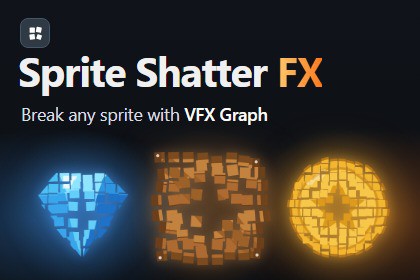
Break any sprite into up to 1,024 GPU shards with VFX Graph. Live-preview designer, 8 presets, floor bounce and a one-line Spawn API for URP 2D and 3D.Sprite Shatter FX (VFX Graph) breaks any sprite into pieces on the GPU. Pick a sprite, choose how it breaks, watch it in the live preview, and place it in your scene or spawn it from code with one line.Every effect is a single VFX Graph system. Each shard is a particle, not a GameObject, so you can break dozens of sprites at the same moment without spikes. In a Windows build on an RTX 3070 Laptop GPU, 60 effects at once (15,360 shards) ran at about 1 ms per frame.DESIGN IT IN THE EDITOROpen Tools > CoreBit > Sprite Shatter FX (VFX Graph), drop in a sprite and press Play. Every change shows up right away in the live preview. Start from one of 8 built-in presets (Default, Hard Crash, Gentle Fade, Fire Burst, Ice Break, Pixel Dust, Tumble Shards, Floor Bounce), then tune the grid, direction, force, gravity, spin, 3D tumble, colour, turbulence, speed limit, floor bounce and shard masks. Save your own presets and move them between machines as JSON. When it looks right, press Shatter & Bake to put it in the scene, or Save as Prefab to spawn it at runtime.ONE LINE AT RUNTIMESpriteShatterVFX.Spawn(prefab, spriteRenderer) copies the sprite, position, rotation, scale, flip, colour and sorting, hides the renderer, bursts, and cleans itself up when the last shard is gone. Call Prewarm while a level loads to skip the first-spawn setup cost.FULLY CUSTOMIZABLEEvery value of the designer is also available from code. Use your own mask shapes for the shard edges. The full C#, HLSL and Shader Graph source is included if you want to extend the effect.GOOD FORPlatformers, arcade and action games, shooters, puzzle and match-3 games, and casual mobile games on devices with compute shader support. Break enemies, crates, rocks, gems, coins, UI-style sprites and pickups.Already using Sprite Shatter FX (Particle System)? Its exported JSON presets load straight into this edition. For WebGL or the Built-in render pipeline, use the Particle System edition.Includes a demo scene, a PDF guide and an in-editor help window. The designer window has three themes: Midnight, Graphite and Daylight.Key features• Breaks a sprite into up to 32 x 32 = 1,024 shards in one VFX Graph system• Each shard is a GPU particle; no GameObjects per shard• Designer window with live preview, Shatter & Bake and Save as Prefab• 8 built-in presets; save, edit, import and export your own (JSON)• Loads JSON presets exported from Sprite Shatter FX (Particle System)• Radial or 8-direction bursts with a spread cone• Force, gravity, speed modifier, up kick, burst impulse, decay, velocity retention• Spin over lifetime, random start rotation and 3D tumble• Colour tint, HDR flash on burst, scale on impact• Turbulence, speed limit, floor bounce with bounce and friction• Shard masks (soft or crumbled edges): random, sequential or single, or your own Texture2DArray• Trim Empty Space skips transparent cells on the GPU (no Read/Write needed)• Loop mode with its own interval• Works with single sprites, sprite-sheet slices and atlas sprites• Keeps the Sprite Renderer's colour, flip and sorting layer/order• Runtime API: Spawn, Shatter, Play, Prewarm, Clear, Apply, CopyFrom, Finished event• Inspector with Preview, Clear and Open in Designer• Three window themes: Midnight, Graphite, Daylight• Demo scene (works with the Input Manager and the Input System package)• PDF documentation and in-editor help• Full C#, HLSL and Shader Graph source, with assembly definitionsRequirements• Unity 6 (6000.0) or newer• Universal Render Pipeline (2D Renderer or Universal 3D Renderer)• Visual Effect Graph and Shader Graph packages• A platform with compute shader support (desktop, consoles, most current mobile GPUs)• Not supported: WebGL, Built-in render pipeline (use Sprite Shatter FX (Particle System))Notes• Shards do not collide with Physics 2D colliders; they bounce on a horizontal floor line (sprite bottom or a world Y)• Tested on Unity 6.0 and 6.3, URP 2D and 3D, and in Windows builds (Direct3D 11)Some parts of the marketing materials were created with the help of AI tools.The store description draft was AI-assisted and then fully rewritten by the publisher.

