






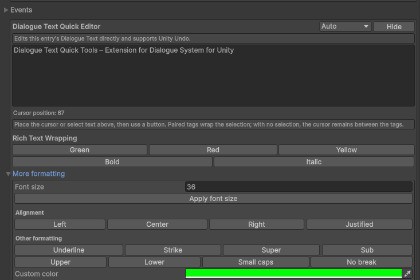
Edit dialogue text faster with selection-based Rich Text formatting, Lua insertion helpers, multilingual UI, and Undo support. Requires Dialogue System for Unity, sold separately.Dialogue Text Quick Tools is an Editor-only extension. It contains no shaders, materials, lighting, or render-pipeline assets and requires no pipeline-specific setup. It supports Built-in, URP, HDRP, and custom SRPs. Dialogue System for Unity by Pixel Crushers is required and sold separately. Rich Text display depends on the project's subtitle UI, not the render pipeline.Requires Dialogue System for Unity by Pixel Crushers. This dependency is not included and must be purchased, licensed, and installed separately.Dialogue Text Quick Tools is an independent extension developed by Dragon's Workshop. It is not affiliated with, endorsed by, sponsored by, or officially supported by Pixel Crushers or Unity Technologies. Support for this extension is provided by Dragon's Workshop.Dialogue Text Quick Tools adds a compact editing panel below each Dialogue Entry inspector in the required dialogue editor.Edit Dialogue Text in a larger multiline field, format selected text with Rich Text tags, and insert expressions without repeatedly typing complex syntax.Key capabilities:- Direct multiline Dialogue Text editing- Selection-based Rich Text formatting- Actor name and Dialogue Variable insertion- Conditional text helpers- Quest and quest-entry state helpers- Custom Lua expression insertion- Full Editor Undo support- English, Traditional Chinese, and Simplified Chinese interfaces- Automatic language detection with manual overrideThis is an Editor-only extension. It edits the selected Dialogue Database directly and does not add scene components, modify dependency source files, provide a Lua runtime, or require runtime initialization.Advanced Rich Text display depends on the subtitle text component and configuration used by your project.The package contains no third-party source code, libraries, fonts, images, or audio. The required Dialogue System dependency remains subject to its own license and is not redistributed with this product. See Third-Party Notices.txt and LICENSE.txt in the package for details.All third-party names and trademarks belong to their respective owners and are used only to identify compatibility, dependencies, and installation requirements.Features- Multiline Dialogue Text editor integrated into the Dialogue Entry inspector- Selection-based Rich Text formatting- Actor, variable, conditional text, quest, and Lua insertion helpers- Cursor-aware and text-selection-aware editing- Unity Editor Undo support- English, Traditional Chinese, and Simplified Chinese interfaces- Automatic and manual interface language selection- No scene components or prefabs required- Does not modify dependency source files- Editor-only C# extension with no runtime scriptsRequirements- Dialogue System for Unity by Pixel Crushers; purchased, licensed, and installed separately- Unity 6- Verified with Unity 6000.4.7f1 and Dialogue System for Unity 2.2.73.2Compatibility- Render-pipeline independent; contains no shaders, materials, lighting, or render-pipeline assets- No platform-specific native plug-ins- A compatible Rich Text subtitle component is required to display advanced formatting tags- Custom Lua expressions depend on the syntax and database configuration of the required dialogue systemPackage contents- One Editor C# integration script- Offline PDF manual and Markdown README- Changelog- LICENSE.txt- Third-Party Notices.txt- Package root: Assets/Dialogue Text Quick Tools/Dependencyhttps://assetstore.unity.com/packages/tools/behavior-ai/dialogue-system-for-unity-11672DocumentationOffline documentation is included at:Assets/Dialogue Text Quick Tools/Documentation/AI-assisted tools were used to help refine portions of the editor script, documentation, and marketing text. All output was reviewed, edited, and tested by the publisher. This asset does not include generative AI functionality and does not require an AI service at runtime.

