






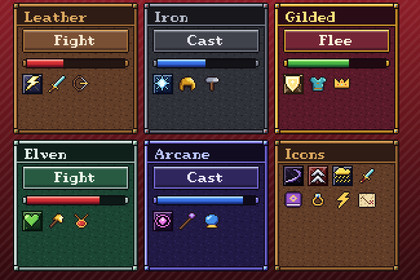
A complete RPG pixel-art GUI for Unity UI, trimmed, riveted and ready.Works in any pipeline: the kit is UGUI and TextMesh Pro, which draw the same in each. Tested in Built-in, URP (2D and Universal Renderer) and HDRP. In HDRP the demo scene's background colour comes from HDRP's camera settings instead; the UI looks the same.A complete RPG pixel-art GUI for Unity UI, trimmed, riveted and ready. Six themes, each a set of UGUI prefabs, with the pieces an RPG needs on top: rarity item slots, portrait frames, nameplates, ribbons, a parchment scroll, skill frames and health and mana orbs. Put one on a Canvas and it comes skinned and padded.What's inside6 themes: parchment, leather, iron, gilded, elven and arcane, each with its own trim metal and gem. Each is 43 UGUI prefabs: buttons (normal, hover, pressed, disabled), gem checkboxes and radio buttons, a slider with a shield grabber, framed progress bars (health, mana, stamina and XP), a scrollbar and scroll view, an input field, a dropdown, tabs, a tooltip, grainy panels with riveted corners, windows with title bars, labels, titles and an ornamental divider. Each theme also comes as a PixelTheme asset that names its prefabs, so code can build a screen and switch its theme.The RPG pieces, as prefabs too: item slots in five rarities (common, uncommon, rare, epic, legendary), skill frames with a lit active one, a portrait frame, a nameplate, a ribbon banner with forked tails, ink text and a parchment scroll with wooden rolls for quest logs and letters.The game's pieces, as prefabs too: menu lines with a pointer, save slots, item slots with a picked one and stack counts, key caps for button prompts, toggle switches, steppers and toasts.64 skill icons, 16x16 framed ability squares: bolt, nova, ward, mend, strike, rain, aura and summon in eight schools (fire, frost, storm, nature, holy, shadow, arcane and might).71 item icons, 16x16, coloured and outlined: swords, axes, bows, staves, daggers, hammers, shields, helmets, armour, boots, rings, amulets, potions, food, herbs, scrolls, spellbooks, runes, orbs, fire, frost and lightning spells, coins, gems, chests, keys, crowns, maps, torches, quests, hearts, mana, XP and the menu set (check, cross, lock, arrows...), with the sword, axe, dagger, hammer, helmet and chestplate in bronze, gold and mythril too.Orbs and cooldowns: each theme's orb ring, red, blue and green orb fills and a glint, and a cooldown shadow, as sprites for UI Image's Filled mode (vertical for an orb, radial for a cooldown).Quill, our storybook serif pixel font, with printable ASCII and Latin-1 accents as a TextMesh Pro font asset, crisp at 10 px and its multiples, and a gold mouse cursor at 1x to 4x.Every piece is a 9-sliced, point-filtered sprite, so it also works with your own UI.PixelCanvas scales the canvas by whole numbers, so the pixels stay square at any resolution.Demo scene, three RPG screens built from the prefabs: an adventure (the hero's portrait and bars, settings, an inventory of rarity slots, a quest scroll, a hotbar and a line of dialogue), the menus (pause, settings, key bindings, save slots) and play (a bag, toasts, a quick-pick wheel, a hotbar, dialogue), with buttons to switch between them and the six themes.The same prefab names as Pixel UI and Pixel UI Sci-Fi, so a game can switch between the kits.CompatibilityUnity 6.3 or later, with UGUI and TextMesh Pro (both built in).Either input handler: the Input Manager or the Input System.Unity 6.3 or later with UGUI and TextMesh Pro; import TMP Essential Resources when Unity offers it.A Documentation.txt in the package's folder says what is where and how to use it.Try the demo scene in your browser: https://heyheythere.com/demos/pixel-ui-fantasy/Code written with the help of AI (Anthropic's Claude); no generative image, 3D or audio model.

