






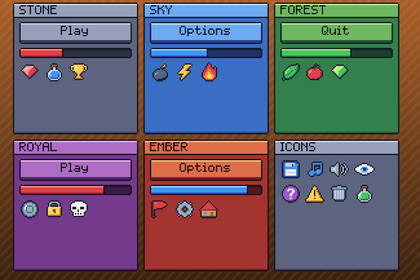
A complete pixel-art GUI for Unity UI, skinned and ready. Six colour themes, each a set of UGUI prefabs: put a Button, Window or Slider on a Canvas and it comes skinned and padded.Works in any pipeline: the kit is UGUI and TextMesh Pro, which draw the same in each. Tested in Built-in, URP (2D and Universal Renderer) and HDRP. In HDRP the demo scene's background colour comes from HDRP's camera settings instead; the UI looks the same.A complete pixel-art GUI for Unity UI, skinned and ready. Six colour themes, each a set of UGUI prefabs: put a Button, Window or Slider on a Canvas and it comes skinned and padded. No 9-slice setup and no styling by hand.What's inside6 colour themes: stone, wood, sky, forest, royal and ember. Each is 21 UGUI prefabs: buttons (normal, hover, pressed, disabled), checkboxes and radio buttons, a slider, progress bars (health, mana, stamina and XP), a scrollbar and scroll view, an input field, a dropdown, tabs, a tooltip, panels, windows with title bars, sunken item slots, labels, titles and a separator. Each theme also comes as a PixelTheme asset that names its prefabs, so code can build a screen and switch its theme.50 icons, 16x16 and outlined: hearts (full, half, empty), stars, coins, gems, potions, keys, chests, weapons, food, elements, and the menu set (play, pause, sound, music, settings, save, delete, info, arrows, check, cross...).A pixel font with all of printable ASCII as a TextMesh Pro font asset, crisp at 8 px and its multiples, and a mouse cursor at 1x to 4x.Every piece is a 9-sliced, point-filtered sprite, so it also works with your own UI.PixelCanvas scales the canvas by whole numbers, so the pixels stay square at any resolution.Demo scene: a settings window, an inventory with tabs, a HUD and a dialogue box, built from the prefabs, with buttons to switch between the six themes.CompatibilityUnity 6.3 or later, with UGUI and TextMesh Pro (both built in).Either input handler: the Input Manager or the Input System.The Python code that draws every piece, icon and glyph pixel by pixel and the package's C# scripts were written with the help of AI (Anthropic's Claude); no generative image model.Unity 6.3 or later with UGUI and TextMesh Pro; import TMP Essential Resources when Unity offers it.A Documentation.txt in the package's folder says what is where and how to use it.Try the demo scene in your browser: https://heyheythere.com/demos/pixel-ui/

