






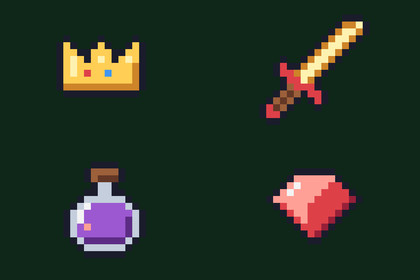
200 pixel-art game icons for Unity, 16x16 and outlined.Works in any pipeline: the icons are plain sprites, for an Image or a SpriteRenderer, and the demo scene's UI is IMGUI.200 pixel-art game icons for Unity, 16x16 and outlined. Weapons, armour, food, potions, coins, gems, crafting materials, tools, a full set of menu buttons, stats and status effects: what an inventory, a shop, a HUD and a settings screen need, in one palette.What's insideWeapons (14): swords, a dagger, an axe, a bow and arrow, a spear, a hammer, a mace, a staff, a wand, a crossbow, a shuriken and a bomb.Equipment (15): shields, helmets, a chestplate, boots, gloves, rings, an amulet, a crown, a cape, a belt, a backpack and a bag.Consumables (25): thirteen foods, potions in five colours, an empty bottle, flasks, vials, a bandage and a scroll.Currency (17): gold, silver and bronze coins, a coin stack, gold and silver bars, gems in five colours, a crystal, a ticket, keys, a chest and a gift.Resources (15): wood, planks, stone, ores, coal, bone, leather, cloth, rope, herbs, wheat, a sprout, a leaf and a feather.Tools (17): a pickaxe, a shovel, a fishing rod, an anvil, a torch, a lantern, a campfire, a map, a compass, an hourglass, a bucket, a cauldron, books, a quest marker, a door and a lock.Menu (61): play, pause, settings, save, folder, sound, music, arrows, check, cross, search, info, warning, user, chat, mail, trophy, leaderboard, controller, keyboard, and more.Stats (18): hearts (full, half, empty), healing, mana, stars, XP, level up, attack, strength, intellect, agility, luck, critical hit, magic, energy and a die.Status (18): poison, curse, freeze, burn, stun, sleep, bleed, blessed, regeneration, haste, slow, silence, confusion, charm, weakness, shielded, rage and death.Put any of them on an Image or a SpriteRenderer. They are made at 1x for low-resolution games: scale them by whole numbers and they stay crisp. They match the Pixel UI kits' windows and buttons, and include Pixel UI's 50 icons.CompatibilityUnity 6.3 or later for the demo scene; the sprites import in any version.Either input handler: the Input Manager or the Input System.Every icon as a sprite, point filtered and uncompressed, a folder per category, and a demo scene that browses them by category and by name. Unity 6.3+, no dependencies.Unity 6.3 or later for the demo scene; the sprites import in any version.A Documentation.txt in the package's folder says what is where and how to use it.Try the demo scene in your browser: https://heyheythere.com/demos/pixel-ui-icons/Code written with the help of AI (Anthropic's Claude); no generative image, 3D or audio model.

