






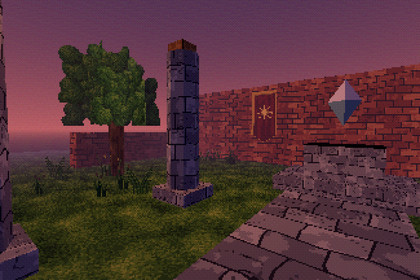
Make any URP 3D game look like it runs on a PS1.Made for URP's Universal Renderer, in Forward, Forward+ and Deferred alike (tested in each): the shaders are written for URP and light per vertex. The Built-in pipeline and HDRP can't run them, and URP's 2D Renderer isn't supported.Make any URP 3D game look like it runs on a PS1. Wobbling vertices, warping textures, 240 chunky lines, 15-bit colour and that dither, over your own level in two lines of C#, or one of ten ready-made looks in a third.var screen = Camera.main.gameObject.AddComponent();PSX.Convert(level); // every material under level becomes its PS1 versionPSXPreset.Named("horror").Apply(screen, level); // optionalWhat's insideVertex snap: vertices land on the low-res pixel grid, so edges jitter as the camera moves.Affine texture mapping: textures warp across big polygons as the PS1's did. A slider blends back to perspective-correct.PSXScreen: on the camera, it renders at 240 lines (or 480, or any), scaled up in sharp square pixels, in 15-bit colour with the PS1's own 4x4 ordered dither. Screen Space - Overlay UI stays crisp.10 presets: PS1, PS1 480i, Subtle, Crunchy, 64-Bit (three-point filtered, no warp), Handheld, Horror, Fog Town, Night and Flashback, each the screen, the materials and the fog in one call.Sprites, glow and waves: every shader can turn the mesh to the camera (all the way, or upright like a PS1 tree or enemy), play a flipbook and ride a wave (water, banners, leaves). PSX.Sprite makes an animated sprite in one line. New in 1.2.Colour grading: saturation and tint on PSXScreen, before the 15-bit reduction.Six shaders: lit (per-vertex lighting from ambient, the sun and the nearest point and spot lights), unlit, cutout (foliage, fences), transparent (water, glass), chrome (the PS1's sphere-mapped shine) and glow (added on top, its edges fading: flames, halos, beams of light). Every one has UV scrolling and vertex colours.PSX.Convert: turns every material in an imported level or model into its PS1 match, keeping texture, colour and tiling: additive blending becomes glow, alpha clipping cutout, transparent surfaces transparent, opaque Unlit unlit, metallic chrome. Unlit sources retain their brightness and alpha mode. PSX.SetFloat switches a setting on the whole level at once, for an options menu.Point-sampled textures or the N64's three-point filter, and URP's own fog for the PS1's draw-distance haze.Demo scene: a ruined courtyard at dusk with flickering torches, waving banners, grass, a pool and a floating gem in a beam of light, built in URP's own materials and converted on Play, 15 PS1-style textures and sprites, the presets to step through, and a switch for every part of the look.CompatibilityUnity 6.3 or later with URP and its Universal Renderer: Forward, Forward+ and Deferred.Either input handler for the demo: the Input Manager or the Input System.The shaders for URP (Forward, Forward+ and Deferred), PSX.Convert and PSXScreen as C# source, and a demo scene: a small level in URP's own Lit materials, converted on Play, with a switch for every part of the look. Unity 6.3+ with URP.Unity 6.3 or later with URP and a Universal Renderer (Forward, Forward+ or Deferred).A Documentation.txt in the package's folder says what is where and how to use it.Try the demo scene in your browser: https://heyheythere.com/demos/psx-look/Code written with the help of AI (Anthropic's Claude); no generative image, 3D or audio model.

