






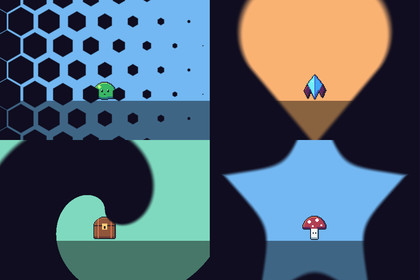
48 scene transitions for Unity, in one line of C#. No prefab to place, no setup: import the package and call it.Works in any pipeline: the transitions are UI shaders on a Screen Space - Overlay canvas, which UGUI draws the same in each. Tested in Built-in, URP (2D and Universal Renderer) and HDRP. In HDRP the demo scene's backdrop is darker, under HDRP's default exposure; the transitions look the same.48 scene transitions for Unity, in one line of C#. No prefab to place, no setup: import the package and call it.SceneTransition.ChangeScene("Level2", "diamonds");yield return SceneTransition.Cover("iris", new SceneTransition.Options { CenterOn = player });// ...teleport the player, load a save...yield return SceneTransition.Reveal("iris");What's inside25 patterns: fade, dither, wipe, diamonds, circles, iris, clock, blinds, checker, noise, spiral, curtain, zigzag, shards, bars, hexagons, tiles, triangles, waves, rays, box, interlace, rings, bubbles, pinwheel.9 screen effects that bend the game image before it fades: pixelate, swirl, ripple, zoom, slice, melt, tv, wave, blur.14 rule masks: bricks, burst, clouds, cracks, drip, fan, flames, heart, moon, paw, shatter, spots, star, whirl. Or draw your own: any greyscale texture works as a transition.Every transition has options: colour, duration, easing, direction, cell count, soft edges.Iris, clock, spiral, rays, swirl, zoom and tv close on a point or a Transform, so the screen can close on the player.PixelSize gives chunky edges that match pixel-art games.Scenes load in the background while the screen is covered.Runs on unscaled time, so it works while the game is paused, and blocks clicks while the screen is covered.Prefer the editor? Each transition is a UI shader with a Progress slider, ready for an Animator or Timeline.Demo scene: a meadow and a dungeon and a button for every style.CompatibilityUnity 6.3 or later, in any render pipeline: Built-in, URP (2D or Universal Renderer) and HDRP.Either input handler for the demo: the Input Manager or the Input System.The transition shaders (UI shaders, on a Screen Space - Overlay canvas the first call makes), the rule masks, SceneTransition as C# source, and a demo scene with a button per style. Unity 6.3+, any render pipeline.Unity 6.3 or later, in any render pipeline: Built-in, URP (2D or Universal Renderer) or HDRP.A Documentation.txt in the package's folder says what is where and how to use it.Try the demo scene in your browser: https://heyheythere.com/demos/scene-transitions/Code written with the help of AI (Anthropic's Claude); no generative image, 3D or audio model.

