






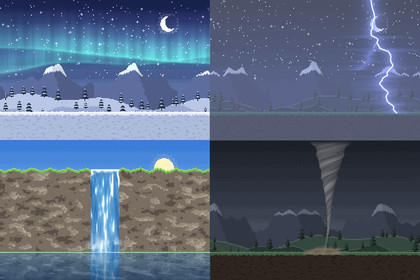
34 animated 2D weather effects for Unity, one line of C# each. Every effect is a single shader on a single quad: no textures, no particle systems, sharp at any size.Works in any pipeline: the effects are unlit shaders on a quad each. Tested in Built-in, URP (2D and Universal Renderer) and HDRP. In HDRP the colours come out under HDRP's default exposure and post-processing unless the camera turns them off.34 animated 2D weather effects for Unity, one line of C# each. Every effect is a single shader on a single quad: no textures, no particle systems, sharp at any size.var rain = WeatherFX.Add("rain").Set("density", 0.8f);WeatherFX.Add("fog").Set("color", new Color(0.9f, 0.9f, 1f)).FadeIn(3f);WeatherFX.Add("water").Place(new Vector2(-6.4f, -1.4f), new Vector2(12.8f, 2.2f));var storm = WeatherFX.Add("lightning");storm.Strike();rain.Stop(2f);weather.Change("storm", 6f); // a WeatherSystem: rain, storm clouds and lightning fade inWhat's insideWeather that covers the camera's view and follows it: rain (with splashes), snow, hail that bounces, fog, low mist, lightning, falling leaves or petals, a sandstorm, wind streaks, cloud shadows, god rays, heat hazeStorms: heavy storm clouds lit from within by flashes, a tornado whirling debris, a blizzard in gustsSky: the sun with rays and lens flare, the moon in any phase or cycling through them, stars with shooting stars, a meteor shower, an aurora, drifting pixel-art clouds in three layers, a rainbowIn the air: falling ash, rising embers, fireflies blinking at dusk, pollen and dandelion fluff, underwater bubblesWater: a lake that reflects your scene with waves and glints, raindrop ripples on it, a waterfall with foam and mist, underwater causticsOn the glass: rain on a window, beads that bend the scene behind them and drops running down; frost creeping in from the edgesTime of day: day_night tints the whole scene from dawn through noon and dusk to night, held or cyclingWeather states: a WeatherSystem component changes the weather in one call, the old effects fading out as the new ones fade in: clear, cloudy, drizzle, rain, storm, hail, snow, blizzard, fog, windy, sandstorm, heatwave and ashfall. Give it a forecast of weighted states and it changes on its own. New in 1.3.Colour, strength, speed and wind on every effect, plus settings of its own: density, drop length, fog height, ray count, wave height, strike frequency...Pixel-art mode: set PixelSize on one effect, or WeatherFX.DefaultPixelSize once for the whole game, and the effects draw in crisp, world-aligned pixels that match your art.Layer them: rain over water with lightning, an aurora over fireflies, ash with embers, fog under god rays.Patterns stay put in the world while the camera moves, orthographic or perspective.FadeIn() and Stop() for weather that comes and goes; Strike() for lightning on cue.Add a WeatherFX component to an object and it shows in the editor too.Demo scene: a pixel-art landscape in 12 moods, toggle and stack every effect, or step through the weather states.CompatibilityUnity 6.3 or later, in any render pipeline: Built-in, URP (2D or Universal Renderer) and HDRP.Either input handler for the demo: the Input Manager or the Input System.The weather shaders (unlit, a quad each), WeatherFX as C# source, and a demo scene: a pixel-art landscape in 12 moods with a toggle per effect. Unity 6.3+, any render pipeline.Unity 6.3 or later, in any render pipeline: Built-in, URP (2D or Universal Renderer) or HDRP.A Documentation.txt in the package's folder says what is where and how to use it.This package's models, textures, sounds and code were generated with the aid of AI, which helped in the code that produces them; no generative image, 3D or audio model was used.

