






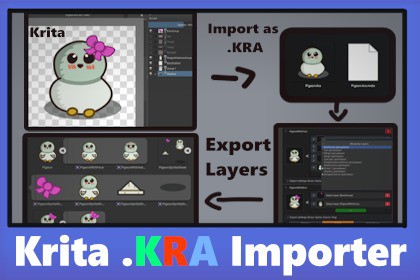
KRA Importer is a Unity editor tool that allows you to import Krita .kra files directly into your project. It is designed with artists in mind to allow much smoother workflow.KRA Importer is a Unity editor tool for importing Krita .kra files directly into a Unity project.It can read Krita layers, including nested group layers, and lets you create custom merged layer presets inside the importer inspector! This removes the need to manually open Krita and export each individual layer, especially when working with more complex Krita files.Layers can be exported as Textures, Sprites, SpriteSheets, PNG files, or Unity subassets.The package is suitable for 2D games, UI assets, sprites, icons, concept art, textures, and any workflow where layered Krita files need to be used in Unity without manually exporting each layer. It is essencial asset if you work with Krita, allowing to quickly edit layers, change names, and keep asset dependencies intact.Direct .kra import into Unity.Layer and group layer parsing.Layer merging with opacity support.Texture, Sprite, SpriteSheets, PNG, and subasset export.Custom inspector with previews.Use custom layers as samples for creating new layers.Editable merged layer presets.Support transparency maskRoadmap:Support masks: filter, selectionSupport complex Krita blending modes throughout layers marge process.Import and manipulate animations in importer and export to Animator animationHave any ideas how can I improve this tool, email me! Thanks!Third-Party Software: This asset includes CLZF2 / LibLZF compression code under its respective BSD-style license. See Third-Party Notices.txt included in the package for full copyright and license information.I used AI tools throughout the package creation, it support code development and search in open source code Krita, because it doesn't have any documentation to help with that.AI was also used to assist with writing and improving C# code, solving implementation issues, and preparing package documentation.I still try to learn and do as much as possible by myself, but when I get stuck on specific issues, I use AI as a support tool to help move the development forward.

