






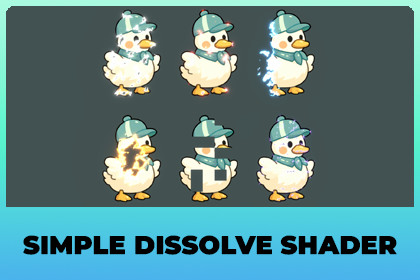
Six dissolve effects for any 2D sprite. Add one component, animate one slider. No material setup.Simple Dissolve makes any 2D sprite dissolve away. Add one component to a SpriteRenderer, pick one of six effects, and animate a single value from 0 to 1. There is no material to create, no shader to assign and no extra artwork to draw.Run that value backwards and the sprite appears instead, so the same component handles both deaths and spawns.SIX EFFECTS• Noise - the classic. Soft irregular patches eat into the sprite from every side.• Burn - the same patches, but the edge runs from white hot through ember to soot, like paper catching fire.• Directional - a clean sweep in whatever direction you point it, with a rough edge so it does not read as a plain wipe.• Radial - opens out from a point in a circle. Suited to teleports and spawns.• Pixel - square blocks pop out in random order. Retro and deliberately hard edged.• Cells - irregular cell shapes break away one at a time, like shattering glass or cracked stone.Each mode ships with its own tuned values and edge colour, so the six read as six different effects rather than six shades of the same one. Changing the mode loads that look, and Undo works.FULLY CUSTOMIZABLEEvery effect is a starting point, not a lock. Set the edge colour to anything you like, make the cut razor sharp or fog soft, make the pattern chunky or fine, widen or narrow the glowing band, and point the sweep wherever you want. Each sprite keeps its own settings while they all share one material, so a scene full of dissolving objects never turns into a folder full of materials.The edge colour is HDR, so turning it up makes the cut glow through Bloom.SUITS ANY 2D GAMEThe effects are art-style neutral. Pixel and Cells fit retro and puzzle games, Burn and Noise fit action and RPGs, Radial and Directional fit card games and UI. It works on characters, items, tiles, props and UI sprites alike, because it reads the shape of whatever sprite you give it.Typical uses: killing an enemy without a death animation, spawning something in, teleports and portals, picking up an item, and fading scenery in and out as the player moves.BOTH LIGHTING MODESA dropdown switches between Unlit, where the sprite stays at full brightness, and Lit 2D, where URP's 2D lights tint and dim the sprite while the dissolve edge keeps glowing on top.NO CODE REQUIREDDissolve, Restore and Rewind buttons drive the effect straight from the Inspector, without entering Play mode. When you do want code, Amount is a plain value, so Timeline, the Animator and any tween library drive it with no glue code.The package includes a demo scene with all six effects, and an offline manual with a table of contents, a step-by-step setup guide and a full script reference.REQUIREMENTSUnity 6000.0 or newer, and the Universal Render Pipeline with the Shader Graph package. Both ship with the URP 2D template, so a normal URP project already has them.This package is URP only. The Built-in Render Pipeline and HDRP are not supported.• Six dissolve modes in a single shader: Noise, Burn, Directional, Radial, Pixel and Cells• One component per sprite. No material assets are created and no shader has to be assigned• Unlit and Lit 2D, switched from a dropdown on the component• HDR edge colour with adjustable width and intensity, built for Bloom• Every mode ships pre-tuned. Changing the mode loads its values, and Undo works• Per-sprite settings ride on a MaterialPropertyBlock, so every sprite keeps its own look while sharing one material• Amount is a plain serialized value, so Timeline, the Animator and tween libraries need no glue code• Dissolve, Restore and Rewind buttons work in the Inspector without entering Play mode• Play On Enable, Play Speed, Loop and Ping Pong for effects that run by themselves• Full C# API: Play, PlayReverse, Stop, Rewind, ApplyModePreset, plus a property for every setting• Assembly definitions (RoamMoon.SimpleDissolve), so nothing collides with your own code• One 256x256 noise texture, uncompressed and shared by every instance• No per-frame allocations, and no Update cost while nothing is playing• Demo scene with all six effects• Offline manual (RTF) with a table of contents, a setup guide and a script reference• Requires Unity 6000.0 or newer, URP and Shader Graph. Built-in and HDRP are not supported

