






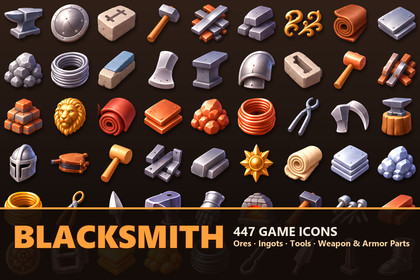
447 glossy RPG icons for blacksmithing and crafting: ores, ingots, anvils, forges, hammers, tongs, weapon blanks, armor parts, chains, buckles and emblems. Color + grayscale PNG.447 icons for every corner of a blacksmith's forge.Ores and raw gems in every metal. Ingots, bar stacks and riveted metal plates, from iron and copper to mithril, damascus and glowing runic steel. Brick, clay and stone furnaces, bellows, coal buckets, quench tubs, crucibles of molten metal and ingot molds. Anvils, swage blocks, stakes and hardy tools. Hammers, mallets, tongs, pliers, chisels, punches, rasps, clamps and vises. Axe heads, sword and dagger blanks, spearheads and arrowheads. Helmets, gauntlets, vambraces, pauldrons, gorgets and shields. Nails, bolts, nuts, washers, rivets, chains, hooks, shackles, hinges, keyhole plates, padlocks and gears. Leather rolls, belts and buckles. Handles and grips. Crowns, rings, coins, emblems and gold ornaments. Every icon shares the same soft lighting, bold colours and rounded shapes, so any two of them sit together in a grid.Built for crafting systems.Materials come in tiers — iron, copper, silver, gold, mithril, dark steel, arcane and runic ingots and plates; ores and shards in several colours — so recipe tiers and upgrade paths need no new art. Raw material, tool, part and finished piece all exist, so a full "ore → ingot → blade → weapon" chain can be shown.Two states of every icon, same name, same folder.Color — the default stateGrayscale — a ready "locked / missing material / not yet learned" stateSwitching a whole UI between states is a folder-name change in your path string.Scroll through everything before you buy. The demo scene shows all 447 icons in one grid with buttons that switch the grid between Color and Grayscale.No pipeline lock-in. Plain sprites with an alpha channel. Built-in, URP and HDRP all work, and so do uGUI and UI Toolkit. Nothing to configure.447 icons, 1788 PNG files totalVariants: Color (512 / 256 px), Grayscale (512 / 256 px)Format: PNG, 32-bit RGBA, straight alpha, square, transparent backgroundImport settings: Sprite (2D and UI), Single, Alpha Is Transparency ON, mip maps OFF, wrap Clamp, filter Bilinear, Pixels Per Unit 100, Max Size matched to folder, Compressed HQ13 categories, identical folder tree in every variant: Hardware & Fittings 86, Jewelry & Emblems 58, Smithing Tools 46, Forge & Smelting 39, Weapon Parts 35, Armor Parts 31, Anvils & Swages 29, Ores & Gems 28, Ingots & Bars 28, Leather Belts & Buckles 24, Raw Materials 18, Metal Plates 15, Hammers 10Demo scene: scrolling grid of all 447 icons with runtime Color/Grayscale switching (uGUI, one small MonoBehaviour)Render pipeline: none required — sprites only, works in Built-in / URP / HDRPUnity version: built and verified in Unity 2022.3 LTS; works in Unity 6 as wellNo 3D meshes, materials, shaders or prefabs in this packageThe source artwork was generated with an AI image-generation tool (OpenAI ChatGPT image generation) as sheets of icons on a dark background, from my own written prompts; no third-party artwork was supplied to the tool. Each sheet was then processed by my own scripts: every icon was cut out individually (touching icons separated by hand-placed cut lines), upscaled 4x with Real-ESRGAN, separated from the background with an alpha matte (BiRefNet plus colour-based correction, see-through holes in rings, buckles and gears reopened), cleaned of dark edge fringes, normalised to a 512 px square canvas, named and categorised. Every icon was inspected on light and dark backgrounds; defective icons and near-duplicates (104 in total) were removed. The grayscale variant and the 256 px size are generated from the 512 px colour icons.

