






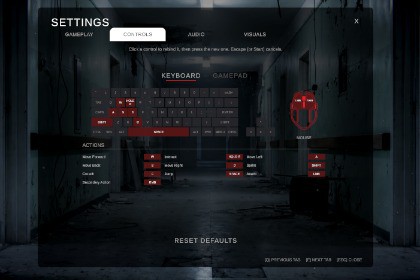
Complete horror main menu for Unity 6 + URP. Every setting actually works: rebinding with conflict detection, pause menu, saves, 5 languages, and a jump scare. No dependencies.URP only — built and tested on URP 17.5 / Unity 6. Not compatible with Built-in or HDRP without modification: the background and dust materials use URP Unlit shaders, the Volume Profile uses URP post-processing overrides, and SettingsManager.cs needs URP to compile. Ships no URP Asset or Renderer, so your project's pipeline settings are untouched.Horror Main Menu UI is a complete, ready-to-ship front end for horror and survival games. It is a finished main menu you drop into your project and use, not a set of UI sprites you still have to assemble and wire up yourself.WHAT PROBLEM THIS SOLVESThe main menu is the first thing every player sees and the last thing most developers get to. Building one properly costs weeks that have nothing to do with your actual game: a settings screen where every slider genuinely changes something and remembers it next launch, a rebinding screen that will not let a player bind two actions to the same key, and then a second copy of that entire settings UI for the in-game pause menu to keep in sync forever. Most menu packages hand you the layout and leave the wiring to you, so the sliders move but nothing happens behind them. This one is the opposite: every control is connected to working code, so you ship the menu on day one and spend your time on your game.MAIN MENU AND NAVIGATIONPlay, Continue, Settings, Credits and Quit over an atmospheric background, fully navigable with mouse, keyboard or gamepad. An animated marker slides an outline box and chevron onto the highlighted item. Escape steps back one panel at a time, and each panel remembers which control to select first, so gamepad players are never left with nothing highlighted. Continue greys out automatically until a save exists. Play fades to black, holds a beat for pacing, then loads your scene asynchronously with an optional loading panel and progress bar.ATMOSPHEREThe backdrop is a photographic corridor lit by failing fixtures. Two plates, one lit and one blacked out, cross-fade so the highlights the ceiling lamps cast die away while emissive detail keeps burning - it reads as dying bulbs, not a dimmer. Blackout frequency, duration, stutter count and recovery speed are all yours to retune. Slow drift wanders the image without ever repeating in a way the eye locks onto, and floating dust motes keep the frame alive. Swapping in your own artwork takes two images and one click, and the background resizes itself to fill the camera at any aspect ratio, so it looks right on ultrawide and 4:3 alike.A SETTINGS MENU THAT ACTUALLY WORKSThirty-two working settings across four tabs, each backed by real code and saved between sessions.Gameplay - mouse sensitivity, UI scale, HUD toggle, HUD scale, quick swap, tutorial toggle, developer console toggle, radar style, notification position, language.Audio - master, music, SFX and voice-chat volume, subtitles, voice chat toggle, output device, microphone device.Visuals - resolution, window mode, VSync, brightness, gamma, field of view, draw distance, texture quality, texture filtering, shadow quality, shadows, soft particles, reflections, motion blur.Controls - full rebinding, below.Adding a setting of your own follows a pattern you copy in minutes, so the menu grows with your game instead of being replaced by it.CONTROLS REBINDING WITH CONFLICT DETECTIONRebinding happens on interactive diagrams rather than a wall of text: a keyboard and mouse layout, and a gamepad layout with labelled callouts. Players click the key or button they want and press a new one. Binding a control already in use is rejected with a warning flash instead of silently stealing it from the other action - the most common source of broken-controls support tickets. Custom bindings persist between sessions, and Reset Controls restores your defaults behind a confirmation prompt.REAL AUDIO OUTPUT DEVICE SWITCHINGOn Windows, the Audio Device row lists the machine's actual output devices and switches the system default when the player picks one, so headset-and-speakers players can change output without leaving your game. Microphone selection is populated from the connected devices.IN-GAME PAUSE MENUEscape during gameplay opens Resume, Settings and Main Menu over a dimmed screen, freezes time and releases the cursor. It reuses the exact same Settings panel as the main menu, so audio, graphics and rebinds are adjustable mid-game with no duplicate UI to maintain or restyle. Your gameplay scripts check one flag to suspend their input while it is open.SAVE SYSTEM AND CONTINUEA three-slot save system writes readable JSON, tracks which slot is newest so Continue always resumes the player's latest progress, and drives the Continue button's state. Your own game state slots in without modifying the system. A demo gameplay scene is included so you can watch the entire save, pause and continue loop work before writing any code.LOCALIZATIONEnglish, Spanish, French, German and Japanese included. Every built-in label is already localized through a table asset you edit, and adding your own strings or another language is a one-line call, not a refactor.REUSABLE COMPONENTSA confirmation dialog callable from anywhere, already wired into Quit, Reset Controls and Exit To Main Menu. Animated toggle switches, cycling arrow selectors with option dots, tabbed panels, styled sliders and dropdowns are all reusable on your own screens. Hover and click sounds are pre-attached to every button with volume already driven by the SFX slider, so adding audio means dropping in two clips.BUILT TO BE CHANGEDEvery scene, panel and wired reference here was generated by a heavily commented editor tool that ships with the package. Nothing is hand-placed and buried in the Inspector, so you can read exactly how any piece was built, rebuild any single part after editing it, and re-theme the whole menu without reverse-engineering someone else's prefab hierarchy. All scripts are commented, and the included documentation covers customizing, re-theming and integrating the menu with your own scenes and save data.REQUIREMENTS AND DEPENDENCIESThis package is built for the Universal Render Pipeline and will not look correct in a Built-in or HDRP project without conversion. It uses Unity's new Input System exclusively and does not support the legacy Input Manager. TextMeshPro is required, with its Essential Resources imported - the included build tool checks for this and tells you if it is missing. It is designed for desktop games: the menu is driven by mouse, keyboard and gamepad with no touch input, and settings such as resolution and window mode are desktop concepts.Two honest limitations up front. Real audio output device switching is Windows-only; on macOS and Linux that one row falls back to a single "Default" entry and every other setting behaves identically. And UI sound effects are not included - the sound component is already attached to every button with its volume wired to the SFX slider, so you assign your own hover and click clips, and an unassigned clip is skipped silently rather than erroring.No additional asset purchases are required. Everything else the menu needs is included.COMPATIBILITY• Unity 6000.0 LTS or newer (built and tested on 6000.5.4f1)• Universal Render Pipeline 17.5+ — URP only; Built-in and HDRP are not supported• Input System 1.19+ — new Input System only, no legacy Input Manager support• TextMeshPro 2.5+, with TMP Essential Resources imported• Platforms: Windows, macOS, Linux (desktop). Not designed for mobile or WebGL.• No paid third-party dependenciesSCRIPTS• 26 C# scripts, approximately 7,200 lines, all commented and in the HorrorMenu namespace• 25 runtime scripts: MainMenuUI, PauseMenu, SettingsManager (819 lines), RebindRow,InputRebindStore, WindowsAudioDevices, SaveSystem, SaveData, SceneLoader,LocalizationManager, LocalizationTable, LocalizedText, BackgroundFlicker, CameraDrift,MenuHighlight, MenuHighlightTarget, ConfirmationModal, SettingsTabs, ControlsTabs,ControlsPanel, ArrowSelector, ToggleKnob, UIButtonSounds, DemoAutoSave, TestLookController• 1 editor script: MenuBuilder.cs (4,011 lines), which generates every scene and panelin numbered steps from the "Horror Menu" menu bar itemSCENES AND PREFABS• 2 scenes: MainMenu.unity (the menu) and Game.unity (demo gameplay scene showing thesave, pause and continue loop)• 0 prefabs by design — the menu is generated directly into the scenes by MenuBuilder.cs,so any part can be regenerated or re-themed from code rather than edited by handTEXTURES (10 unique PNG files)• MenuBackground.png — 1672 x 941, RGB (lit corridor plate)• MenuBackground_Dark.png — 1672 x 941, RGB (blackout plate)• ControllerIcon.png — 1920 x 1287, RGBA (gamepad diagram)• MouseIcon.png — 743 x 1024, RGBA (mouse diagram)• UI_Circle.png — 128 x 128, RGBA• UI_Pill.png, UI_RoundedBox.png, UI_RoundedOutline.png, RoundedTopPanel.png,DustDot.png — 64 x 64, RGBA (9-slice UI shapes and particle dot)MATERIALS• 3 URP materials: MenuBackground, MenuBackground_Dark, DustMoteAUDIO (1 unique track)• "Crushed Suspense 001" — WAV, 48 kHz, 16-bit, stereo, 37.62 seconds, seamless loop• Licensed CC0 / public domain (freesound.org/s/818855 by johnmode). Trimmed of 0.52shead silence with a 3-second crossfade applied to create the loop.• UI sound effects are NOT included — see Description.FONT• Nosifer Regular — TTF plus a pre-generated TextMeshPro SDF asset• SIL Open Font License, license text included in the packageDATA ASSETS• LocalizationTable ScriptableObject — 66 string keys x 5 languages (English, Spanish,French, German, Japanese)• Input Actions asset — 2 action maps: Player (12 actions: Move, Look, Attack,SecondaryAction, Interact, Crouch, Jump, Sprint, Flashlight, Aim, Previous, Next)and UI, with keyboard, mouse and gamepad bindings• 1 URP Volume Profile for the menu's post-processingPERSISTENCE• Settings and key rebinds: PlayerPrefs (bindings stored as a single Input Systemoverride JSON string)• Save games: JSON files in Application.persistentDataPath, 3 slotsPACKAGE SIZE• Approximately 23 MB, 50 filesDOCUMENTATION• README.md included in the package, covering quick start, per-step customization,integration into your own scenes, and limitationsAI DISCLOSURE• The corridor background image is AI-generated. The darkened blackout plate was derivedfrom it programmatically. All code, scenes and UI artwork are hand-authored.EDITOR EXTENSION LOCATION• All Editor tools are located under Tools > Horror Main Menu UI in the Unity menu bar. This package does not add a top-level menu of its own.• Entry points: "Build All", numbered build steps 0-10 (one per part of the menu), and utilities for TMP font creation, URP material conversion and scene reset.Parts of this package were created with the aid of generative AI. Specifically:VISUAL ASSETS (functional, included in the package)• Art/Backgrounds/MenuBackground.png — the lit corridor menu background is an AI-generated image.• Art/Backgrounds/MenuBackground_Dark.png — the "lights out" version of that background, including the figure revealed during the blackout, is an AI-generated image.These two images are the menu's background at runtime, not marketing material,and are shipped inside the package.CODE• The C# scripts in this package were written with AI assistance and reviewed, edited and tested by the publisher.LOCALIZATION• The Spanish, French, German and Japanese translations in the included LocalizationTable were produced with AI assistance.NOT AI-GENERATED• All UI shape textures (rounded boxes, pills, circles, outlines, the dust mote) are generated procedurally in code by the included editor tool, not by AI.• The music track is "Crushed Suspense 001" by johnmode, licensed CC0.• The typeface is Nosifer, licensed under the SIL Open Font License.

