






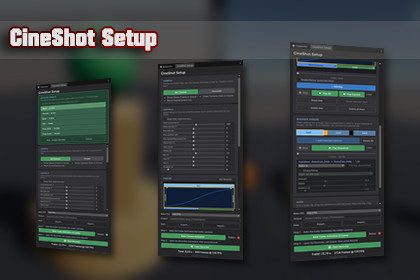
Build camera moves with sliders instead of keyframes, cut several cameras into a trailer, bake to an AnimationClip and record to MP4 - all in one dockable window.Supports Unity 6.0 LTS and higher, tested on 6.0, 6.3 and 6.5. The tool behaves identically in Built-in, URP and HDRP and ships no custom shaders, so switching pipelines breaks nothing. The demo scene ships three times (HDRP/, URP/, Built-In/) because a material binds to a single shader: keep the folder for your pipeline and delete the other two, or their materials show up pink.🎬 CineShot SetupCineShot Setup is a Unity editor tool for authoring camera moveswithout keyframing. Position the Scene View, press Set Camera, andshape the shot with sliders: orbit, crane, pan, dolly zoom, roll.Every move you like becomes a key; the sliders reset to zero and thenext move continues from there. What normally means wrestling withthe Animation window, tangents and dolly tracks becomes a handful ofslider drags.Everything happens in one dockable window (Tools > CineShot Setup):author the shot, shape its timing on a key timeline, cut severalcameras into a trailer with transitions and music, bake the result toa standard AnimationClip, and hand it to Unity's Recorder for an MP4.✨ Key Features🎥 Camera Setup- Set Camera creates a CinemachineCamera at the current Scene-Viewposition- Automatic look-at detection: pick a target from the detected list,or hover the object directly in the Scene View and click it- Pivot taken from the object's mesh bounds; LOD parts resolve totheir root object- Decouple / Couple to free-fly and lock back- Optional Scene-View overlays: game frame and camera path- Every camera remembers its own moves🎚️ Slider-Based Moves- Orbit horizontal and Orbit vertical (°)- Crane (m), Pan side, Pan up/down, Pan forward/backward (m)- Zoom FOV (°) and Dolly Zoom (the vertigo effect)- Roll, Yaw, Tilt (°) and Duration (s)- Hold Shift while dragging for 10x finer steps (0.001 grid), Ctrlfor 10x faster travel- Keep View holds the framing while the camera travels- Sliders are relative tools: they move the live camera away from itsstart pose, then + Add Key snapshots that pose⏱️ Timeline & Timing- Key bars proportional to their duration, drag to change length- Ease per key, cycled with one click: Smooth → Linear → Slow → Fast- Separate ease-in / ease-out phase lengths, draggable as flags rightin the key bar- Key Reverse plays a key backwards, easing mirrored in time- Per-channel mute via the eye icon, values stay intact and editable- Shake/Noise per key: strength, speed, window (full length, start orend) and length, with a Game-View preview- Continuity linter flags keys whose start jumps, with a plain-languagefix hint- Playhead scrubbing, Play All / Play Current, loop, Shift multi-select🎞️ Sequence (Trailer)- Chain any number of cameras into one trailer- Drag camera keys sideways to reorder the shots- Transitions: Cut, Linear, Ease In, Ease Out, Ease In-Out, Fade Black- Transition duration by dragging, in 0.1 s steps- Impact shake per transition, anchored at the cut or after the blend,with preview- Play the whole sequence in the editor, with loop- Play selected Cam right next to Play Sequence, to compare onecamera against the full trailer- Clicking a shot jumps the time slider to that camera's start- Playback also works in Play Mode, so you can watch moves togetherwith particles and VFX that only simulate while the game runs🔊 Audio- Drop in a music clip and drag the waveform to shift it- Plays along with Play and Play Sequence, scheduled and drift-locked- Ends up in the recording if your Recorder preset captures audio🎬 Bake & Record- Bakes to a standard AnimationClip + AnimatorController- Single camera, or a full multi-camera trailer baked onto a generatedtrailer camera- Selectable bake FPS and output folder- Bake status light: red = not baked or the baked result was deleted,yellow = changed since the bake, green = up to date- Bake info shows the exact clip length and frame count, the numberthe Recorder's end frame wants- Open Recorder makes the camera you are about to record the live one,hands over to Unity's Recorder window and uses your own settingsunchanged💾 Data & Safety- Stored per project in UserSettings/CineShotData.json, writtenatomically with a backup copy- Export / Import as JSON; import merges by GlobalObjectId, so sharedor backed-up moves land on the right cameras- Undo support across camera, key and sequence edits- While the window is open, Cinemachine's own camera frusta are hiddenin the Scene View so they do not fight CineShot's game frame; theoriginal gizmo settings are saved and restored when you close it🎯 Intended For- Solo developers and small teams making trailers, cutscenes and storevideos- Level and environment artists presenting their scenes- Asset Store publishers producing showcase footage- Anyone who wants a camera move without opening the Animation windowNot intended for- Gameplay camera logic or runtime camera control- Character or object animation- Replacing Cinemachine, CineShot builds on it🔧 Render Pipeline Support✅ Built-in Render Pipeline✅ Universal Render Pipeline (URP)✅ High Definition Render Pipeline (HDRP)Depth-of-field auto-focus is carried over to the trailer camera onHDRP only. Everything else behaves identically in all three pipelines.ℹ️ NoteCineShot Setup requires Cinemachine 3. The Unity Recorder is optional:without it the Record step is disabled and authoring, preview andbaking work normally. A demo scene with three ready-made camera moves and a finishedsequence is included, shipped once per render pipeline (HDRP, URP andBuilt-in), so you can watch the whole workflow before building yourown.🛠️ Tool Type- Unity editor tool, opened via Tools > CineShot Setup- One dockable EditorWindow (UI Toolkit)- Three small runtime components ship with it and are added only tobaked output or to cameras the tool creates: fade-to-black overlay,music sync and a marker component🧪 Tested Unity Versions- Unity 6.0 LTS (6000.0.80f1)- Unity 6.3 (6000.3.21f1)- Unity 6.5 (6000.5.7f1)🎮 Render Pipeline Compatibility- Built-in Render Pipeline- Universal Render Pipeline (URP)- High Definition Render Pipeline (HDRP)- Only pipeline-specific behaviour: HDRP depth-of-field auto-focus iscopied to the trailer camera📁 Asset Type- Editor scripts (.cs) plus UI Toolkit UXML/USS- Three runtime scripts (.cs)- Demo scene shipped three times, once per render pipeline (HDRP, URP,Built-in), each with its own materials and demo data file (.json)- No custom shaders or models: the demo uses Unity primitives andsimple materials on each pipeline's own lit shader🎥 Camera & Targeting- Creates and drives CinemachineCamera components (Cinemachine 3)- Look-at detection ranked by view ray through mesh bounds; LOD partsresolved to their root object- Hover-pick directly in the Scene View with green highlight- Pivot from combined mesh bounds (geometry only, particle and VFXrenderers are ignored); with Keep View each camera gets its own pivoton its view axis- Decouple / Couple, game-frame and camera-path overlays, optionalScene-View follow🎚️ Move Channels (per key)- Orbit horizontal, Orbit vertical (°)- Crane (m)- Pan side, Pan up/down, Pan forward/backward (m)- Zoom FOV (°), Dolly Zoom- Roll, Yaw, Tilt (°)- Duration (s)- Keep View, Key Reverse, per-channel mute- Drag modifiers: Shift = 10x finer (0.001 m grid), Ctrl = 10x faster⏱️ Timing- Ease modes per key: Smooth, Linear, Slow, Fast- Separate ease-in / ease-out phase durations, editable in the key bar- Shake/Noise per key: strength, speed, window (full, start, end),length- Continuity linter with per-key warning and fix hint- Scrubbing, single- and multi-key playback, loop🎞️ Sequence- Unlimited shots, reordered by dragging- Transitions: Cut, Linear, Ease In, Ease Out, Ease In-Out, Fade Black- Per-transition impact shake, anchored at the cut or after the blend- Full sequence playback inside the editor- Play selected Cam button (plays the selected camera's timeline)- Clicking a shot moves the time slider to that camera's start- Sequence and single-camera playback work in Play Mode🔊 Audio- One music clip per project, with adjustable offset- Scheduled playback with drift correction🎬 Baking & Recording- Output: AnimationClip + AnimatorController- Configurable bake FPS and output folder- Multi-camera sequences bake onto a generated trailer camera- Bake status light: red = not baked or the baked result was deleted,yellow = changed since the bake, green = up to date- Recording via Unity Recorder: CineShot opens the Recorder window,your recorder settings (resolution, codec, FPS, audio, output folder)are used unchanged💾 Data- Per project in UserSettings/CineShotData.json- Atomic write with .bak fallback- Export / Import as JSON, merged by GlobalObjectId- Cameras referenced by GlobalObjectId, which includes the scene GUID⚙️ Dependencies- Cinemachine 3.x (com.unity.cinemachine): required- Unity Recorder (com.unity.recorder): optional, only for the Recordstep; silently excluded when the package is absent- No other external packages- Three assembly definitions: CineShot.Runtime, CineShot.Editor,CineShot.Editor.Recorder- Namespace: CineShot🔐 Safety- Undo support for camera creation, key edits, sequence edits, shakeedits and every component a bake adds (Animator, fade overlay,audio sync)- Baked AnimationClips and controllers are files: written only to thefolder you pick and overwritten by the next bake, not removed by Undo- Your Recorder settings are never touched; CineShot only opens theRecorder window and activates the camera that is about to be recorded- Tool options (bake FPS, loop, overlays) are stored in EditorPrefsunder a CineShot prefix- While the window is open, Cinemachine's brain and vcam frusta arehidden in the Scene View; the original gizmo settings are stored andrestored when the window closes- No project settings are changed, and no scene data outside thecameras you edit- All operations are explicit and triggered by the user📋 Known Limitations- One look-at target per camera timeline (switch targets by cutting toa second camera)- Fade Black is currently the only overlay transition effect- Authored data lives in UserSettings/ and is therefore not sharedthrough version control by defaultThe tool were created with the assistance of AI tools.

