




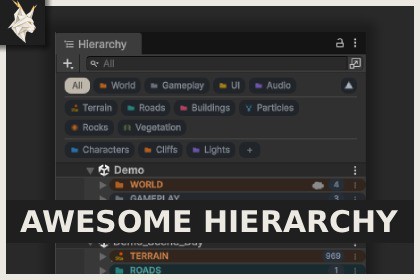
Organize complex scenes, focus on the objects you need, and improve team workflows with groups, visual customization, notes, and multi-scene filtering.Awesome Hierarchy is an Editor-only extension and is independent of the render pipeline. It works with Built-in, URP, HDRP, and custom render pipelines.Organize complex scenes and focus on the objects you need with Awesome Hierarchy.Awesome Hierarchy provides a focused organization workflow for projects with busy or complex scenes. Create logical groups, switch between them instantly, and use the Hierarchy Search field within the selected part of your scene.Create an empty group, convert an existing root GameObject, or place multiple selected objects under a new group. Groups use ordinary GameObjects, preserve the existing scene structure, and do not add components to scene objects.Use colors, automatic component-aware icons, included icon choices, notes, and guide lines to make important objects easier to recognize. Responsive statistics provide a quick overview of visible objects, groups, lights, cameras, and Audio Sources.For multi-scene projects, groups are organized by their loaded scene. Each Hierarchy window keeps its own selected group, allowing different parts of the project to remain visible side by side.Project metadata is stored in deterministic per-scene files designed for version control. Grouping, appearance, rename, hierarchy, and note operations support Undo and Redo.Key FeaturesFast group-based filtering for large and complex scenes.Empty group creation, root GameObject conversion, and multi-object grouping.Independent group selection for every Hierarchy window.Search within the currently selected group.Multi-scene and additive-scene group navigation.Object and group colors.Automatic component-aware icons and an included icon catalog.Notes for groups and regular GameObjects.Guide lines for clearer parent-child relationships.Responsive scene statistics.Remappable Shortcut Manager commands.Version-control-friendly per-scene metadata.Undo and Redo support for editing operations.Read-only Play Mode and Multiplayer Play Mode workflows.Requirements and CompatibilityRequires Editor 6000.5 or newer.Tested with Editor 6000.5.9f1.Compatible with Built-in, URP, HDRP, and custom render pipelines.DocumentationComplete setup documentation, feature guides, multi-scene and team workflow references, known limitations, and release notes are included in the package.Key Features of Awesome HierarchyGroup-focused views for large and complex scenes.Empty group creation, root conversion, selection grouping, marking, editing, and unmarking.Groups use ordinary root GameObjects and do not add components to scene objects.Independent group filters for every Hierarchy window.Search results limited to the currently selected group.Multi-scene and additive-scene support with groups separated by loaded scene.Responsive group bar with an optional collapsed view.Object and group colors.Automatic component-aware icons, Editor icons, hidden icons, and an included icon catalog.Notes of up to 4,000 characters for groups and regular GameObjects.Guide lines for visible hierarchy relationships.Counts for visible objects, groups, lights, cameras, and Audio Sources.Remappable Shortcut Manager commands.Undo and Redo integration for supported editing operations.Deterministic per-scene JSON metadata stored under ProjectSettings/AwesomeHierarchy/Scenes.Safe metadata writes with conflict, invalid-file, and read-only protection.Temporary in-memory group support for unsaved scenes.Read-only Play Mode and Multiplayer Play Mode support.Groups must be root GameObjects and cannot be nested.Group filters and collapsed group bars are stored for the current Editor session.

