




Voxelize It - Mesh Voxelizer & Voxel Editor
Paper Lynx Studio
$23.09
$32.99
30%OFF
(no ratings)
Jump AssetStore
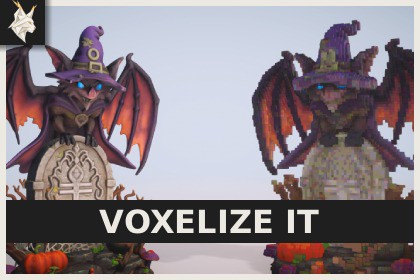
Turn Mesh assets, prefabs, and scene objects into editable voxel models directly in the Unity Editor. Refine shapes and colors, then export optimized prefabs or MagicaVoxel-compatible .vox files.VoxelizeIt officially supports the Universal Render Pipeline (URP) only. Built-in, HDRP, and custom Scriptable Render Pipelines are not supported. Exported prefabs use URP-compatible Lit, Unlit, or Beveled Lit materials.Turn the 3D assets already in your project into editable voxel models with VoxelizeIt.VoxelizeIt converts Mesh assets, prefabs, and scene GameObjects into voxel models that you can reshape, recolor, save, and export directly in the Unity Editor.Choose a source, set the voxel size, and sample supported materials, textures, alpha clipping, and vertex colors. Refine the result using an interactive preview with perspective and orthographic views, configurable lighting, grid controls, framing, and focus tools.Edit geometry and colors with Select, Attach, Erase, and Paint tools. Work with individual voxels, connected faces, or box selections using configurable cube and sphere brushes.Recolor connected regions, matching colors, or the entire model. Solid, Hue, and Keep Shading replacement modes help preserve the intended appearance, while configurable color merging reduces small color variations without forcing the model into a fixed palette size.Sources containing multiple MeshFilter or SkinnedMeshRenderer components remain organized as independent voxel layers. Layer names, pivots, parent relationships, voxel ownership, and layer-specific face colors are preserved in editable VoxelizeIt documents and layered prefab exports.Save your work in the editable .voxelizeit format, export optimized prefabs with greedy-meshed geometry and shared palette assets, or import and export single-model .vox files compatible with MagicaVoxel.Key FeaturesVoxelization of Mesh assets, prefabs, scene GameObjects, and baked SkinnedMeshRenderers.Independent voxel layers for individual source renderers.Material, texture, alpha clipping, and vertex color sampling.Select, Attach, Erase, Paint, and color replacement tools.Voxel, Face, and Box editing modes.Cube and sphere brushes with configurable radius.Region, Same Color, and Entire Model color selection.Solid, Hue, and Keep Shading color replacement.Configurable color merging with five presets and a custom mode.Built-in color collections and reusable custom palettes.Editable .voxelizeit documents.Single-model .vox import and export.Layered prefab export with optimized geometry, shared palette textures, and optional MeshColliders.Lit, Unlit, and experimental Beveled Lit output materials.Source replacement for editable prefabs and individual scene objects.Perspective and orthographic preview modes with configurable lighting.Undo and Redo support for editing operations.Welcome window, interactive tutorial, documentation, demonstration scene, and sample voxel models.Requirements and CompatibilityRequires Unity Editor 6000.0 or newer.Compatible with the Universal Render Pipeline (URP).Uses Burst, Collections, and Mathematics packages from the Unity Registry.DocumentationMagicaVoxel is developed by ephtracy. VoxelizeIt is an independent product and is not affiliated with or endorsed by ephtracy.Key Features of VoxelizeItSource and VoxelizationConverts Mesh assets, prefabs, scene GameObjects, and baked SkinnedMeshRenderers into voxel models.Supports hierarchies containing multiple MeshFilter and SkinnedMeshRenderer components.Creates an independent editable layer for every source renderer.Preserves layer names, pivots, parent relationships, voxel ownership, and layer-specific face colors.Supports models up to 1,024 voxels on the longest axis.Samples supported material colors, textures, metallic values, smoothness, alpha clipping, and vertex colors.Supports material sampling from URP Lit, Simple Lit, Complex Lit, and Unlit shaders.Uses Burst jobs to rebuild voxel data and preview geometry.Editing and Color ToolsSelect, Attach, Erase, Paint, and color replacement tools.Voxel, Face, and Box editing modes.Configurable cube and sphere brushes.Region, Same Color, and Entire Model color selection.Exact, Similar, Broad, and Custom color matching.Solid, Hue, and Keep Shading color replacement modes.Optional alpha preservation during color replacement.Five built-in color collections and reusable custom palette assets.Configurable color merging with Off, Subtle, Balanced, Strong, Aggressive, and Custom modes.Full Undo and Redo support for editing operations.Preview and WorkflowPerspective, Front, Side, and Top preview views.Configurable preview lighting, grid visibility, framing, and voxel focus controls.Editable .voxelizeit documents with layer and palette data.Recent file access, welcome window, interactive tutorial, documentation, demonstration scene, and sample models.Source replacement for editable prefabs and individual scene GameObjects.Prefab ExportLayered prefab export with one mesh object per non-empty voxel layer.Optimized greedy-meshed geometry.Shared albedo palette, material palette, and output material assets.Lit, Unlit, and experimental Beveled Lit output materials.Optional MeshCollider generation for every non-empty layer.Exported prefabs use standard MeshFilter, MeshRenderer, and optional MeshCollider components.Existing destination assets are never overwritten automatically..vox Import and ExportImports and exports single-model .vox files compatible with MagicaVoxel.Supports a maximum model size of 256 voxels per axis.Supports up to 255 unique colors when exporting .vox files.Flattens voxel layers into one model during .vox export.Editable documents and prefab exports may contain more than 255 colors.Technical RequirementsRequires Unity Editor 6000.0 or newer.Supports the Universal Render Pipeline only.Uses Burst, Collections, and Mathematics packages from the Unity Registry.Supports the Unity Editor on Windows, macOS, and Linux.

