




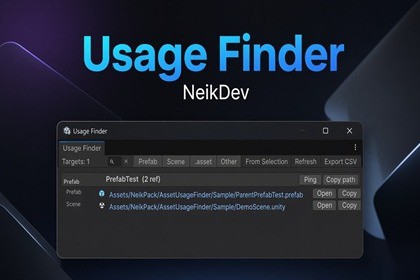
Usage Finder is a Unity Editor tool that helps developers discover where assets and prefabs are used across scenes, Prefab Stage .Usage Finder is a productivity-focused Unity Editor extension designed to answer a common and critical question:“Where is this asset or prefab actually used?”With a simple action, the tool scans your project to find all usages of a selected Prefab or Asset, including:Objects in open scenesInstances inside Prefab StageReferences from other prefab assetsEach result clearly shows:The usage scope (Scene, Prefab Stage, or Prefab Asset)The owning GameObject or prefabThe full hierarchy path (for scene and prefab contents)One-click actions to select, ping, or open the referenced objectThe tool is optimized for large projects and avoids modifying any user data.It is ideal for developers who need to debug dependencies, clean up unused assets, or understand complex prefab relationships.Usage Finder helps you work faster, refactor with confidence, and avoid hidden dependencies.ArchitectureUsage Finder is implemented as a Unity Editor-only tool and contains no runtime code.All functionality is excluded from player builds and operates entirely within the Unity Editor environment.The implementation is divided into:Asset and prefab scanning servicesSerialized reference inspectionHierarchy path resolutionEditorWindow-based result visualizationUsage DetectionThe tool detects asset and prefab usage by scanning serialized object references using SerializedObject and SerializedProperty.It supports:Direct references to prefab assetsNested prefab referencesPrefab variantsReferences inside Prefab StageFor accurate matching across scenes and prefabs, the tool relies on GlobalObjectId to safely identify asset references.Performance OptimizationsThe tool is designed to remain responsive even in large projects:Reuses internal component buffers to minimize memory allocationsAvoids LINQ and reflection-heavy operationsStops scanning a prefab asset once a valid usage is foundUses lightweight hierarchy path construction only when neededNo background threads or unsafe APIs are used.Editor IntegrationAccessible via context menus or dedicated menu itemsResults are displayed in a custom EditorWindowCopying usage paths for debugging or documentationSupports:Filtering and searchingObject selection and pingingOpening prefab assets directlySafety & CompatibilityUses only public Unity Editor APIsDoes not modify scenes, prefabs, or assetsNo analytics, network access, or external dependenciesCompatible with Unity 2022.3 LTS and Unity 6.x

