




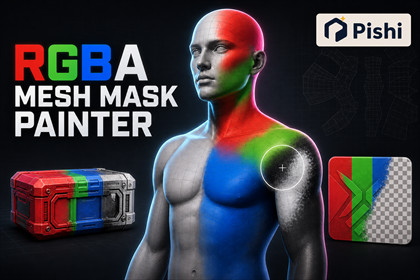
Paint, preview, import, and save RGBA masks directly on skinned meshes, static meshes, and UI Images in the Unity Scene view—without external image-editing software.RGBA Mesh Mask Painter is a Unity Editor tool for creating and refining packed RGBA masks directly in the Scene view. Add the component to a SkinnedMeshRenderer, MeshFilter + MeshRenderer, or UGUI Canvas Image and paint while previewing the result directly on the target.Work with RGBA, RGB, or individual R, G, B, and A channels. Import existing PNG files, copy and paste between channels, fill or invert values, sample colors from the painted surface, and overwrite the source PNG or save the result as a new file.Canvas Images automatically load their Source Image, making quick transparency cleanup and simple image touch-ups possible without opening external image-editing software.The package is genre-independent and can be used for material blending, damage, dirt, wetness, emission, dissolve effects, deformation influence, VFX control, character customization, and other shader-driven effects.Brush radius, falloff, opacity, flow, color, channel values, UV set, output resolution, and edge padding are customizable. Mesh masks are stored per vertex, while Canvas Image edits are stored per pixel at the source image’s native resolution.No helper GameObject, external ScriptableObject, or third-party framework is required.Scene view painting for SkinnedMeshRendererScene view painting for MeshFilter + MeshRendererDirect RGBA and transparency editing for UGUI Canvas ImageUnified RGBA, RGB, R, G, B, and A preview and editingAdd, Subtract, and Smooth brush modesAdjustable radius, inner falloff, opacity, flow, color, and preview opacityPaint Through mode for painting front and back mesh surfaces togetherSurface color sampling with Ctrl + ClickCopy and paste between individual mask channelsFill, White, Black, Invert, and Clear operationsPNG import using UV0, UV1, UV2, or UV3RGBA, opaque RGB, and grayscale single-channel PNG outputAdjustable output resolution and UV-island edge paddingSave over writable source PNG files while preserving GUID, .meta, and importer settingsSave As dialog starting from the source texture folderAutomatic Source Image loading for Canvas Image targetsNative-resolution per-pixel Canvas Image editingUnity Undo and Redo supportPersistent mask and brush data stored in scenes and prefabsKeyboard shortcuts for brush modes, channel selection, color sampling, and brush resizingInspector locking and automatic target visibility restoration during paint modeStatic source Mesh assets are never modifiedSupports static meshes with Read/Write disabled through an isolated editor snapshotAtomic PNG replacement with backup rollback protectionNo render-pipeline-specific dependencyNo third-party package dependencyTechnical notes:Painting tools are Editor-only. No runtime painting system is included.Mesh painting resolution is limited by the target mesh’s vertex density.Mesh working data is stored on the component; the source Mesh asset’s vertex colors are not modified.Overlapping UV islands share output pixels. Conventional 0–1 UVs are recommended.Mesh submeshes must use triangle topology.Canvas Image painting uses the full rectangular source-image surface and does not reproduce Sliced, Tiled, Filled, or tight-sprite display geometry.Sprite Sheet regions, non-PNG textures, read-only files, and textures under Packages must be saved using Save As.Maximum supported PNG resolution: 8192 × 8192.Requires Unity UI/UGUI for Canvas Image support.Currently validated with Unity 6000.6.0a7 and UGUI 2.6.0.Generative AI was used as a development assistant to help draft and refactor C# editor code, investigate bugs, propose test cases, and polish documentation.The publisher defined the requirements and user experience, reviewed and modified the generated output, and tested the final package in Unity.No AI-generated artwork, models, textures, audio, runtime AI models, or external AI services are included or required to use this package.

