






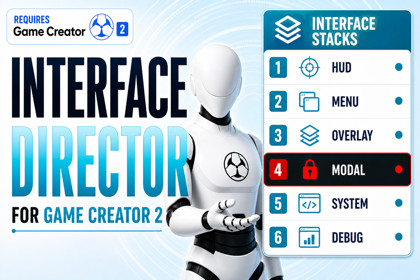
Interface Director for Game Creator 2
Skyward Games
$27.49
$54.99
50%OFF
(no ratings)
Jump AssetStore
Build and manage complete UI systems for Game Creator 2 with automatic navigation, focus and layering, plus full UI Toolkit support designed to work seamlessly alongside uGUI.Interface Director for Game Creator 2⚠️ RequirementsRequires Game Creator 2 Core 2.18.60.No other Game Creator modules are required.🎬 Take control of your game’s interfacesInterface Director helps you create, organize and control HUDs, menus, pop-ups and other interfaces in your Game Creator 2 project.Create an Interface Asset, design your UI, then open and close it using familiar Game Creator Instructions.Interface Director handles navigation, layering, focus and interaction automatically, so you don't have to build separate menu logic for every screen.No manager prefab or special Canvas setup is required.🖥️ Create interfaces such asHUDs and status displaysMain, pause and settings menusInventory, map and journal screensConfirmation windows and pop-upsTooltips and context menusLoading and system screensWorld-space UIMarkers that follow characters or objects✨ Main featuresSix ready-made UI layersAutomatic menu stacking and Return navigationShow, Hide, Toggle, Replace, Return and Close InstructionsAutomatic focus and button selectionFocus restoration when returning to previous menusAutomatic interaction blockingScene-based and persistent interfacesSingle or multiple interface instancesScreen Space, Camera, World Space and World Anchored UIBuilt-in Fade, Scale, Slide and Pop transitionsFor example:Inventory → Item Details → Confirm ActionClose the confirmation window and Item Details automatically becomes active again. Close Item Details and the player returns to the Inventory.📦 Reusable interfaces with dynamic contentSend information when opening an interface and reuse the same UI for different situations.Pass values such as:TextNumbersImagesColorsGameObjectsPerfect for notifications, item tooltips, confirmation windows, quest markers and interaction prompts.Built-in components can display received text and images without writing code.🌍 World and contextual UICreate interfaces attached to characters, objects or positions in the world.World Anchored interfaces can automatically:Follow their targetScale based on distanceStay inside the screenShow an indicator when the target is off-screenIdeal for quest markers, interaction indicators, enemy markers and contextual information.🧩 Built for Game Creator 2Interface Director integrates directly with Game Creator through:InstructionsConditionsEventsPropertiesHotspotsLocal and Global VariablesLifecycle InstructionsEverything uses Interface Assets directly, keeping your Game Creator graphs easier to understand and maintain.No coding is required for normal use.A public C# API is also available for advanced users.🛠️ Development toolsGuided Interface creationAutomatic View Prefab creationInspector warnings and validationBuild validationRuntime interface debuggerNavigation diagnosticsIncluded documentation and examples📚 Included examplesLearn how to create:A basic HUDA menu stackA modal window flowContextual interfacesWorld-anchored Hotspots📚 Useful links📖 Online Documentation💬 Discord Community🌐 Skyward Games Website✅ CompatibilityDeveloped and verified with Unity 6000.4.6f1Requires Game Creator Core 2.18.60No additional Game Creator modules requiredFeaturesBuilt specifically for Game Creator 2Simple Interface Asset and View Prefab workflowFull uGUI and UI Toolkit supportSupports both UIDocument and Unity 6.5+ PanelRenderer workflowsuGUI and UI Toolkit interfaces can be used together in the same projectSix logical interface layers: HUD, Menu, Overlay, Modal, System and DebugAutomatic Canvas creation, sorting order management and runtime cleanupScreen Space Overlay, Screen Space Camera, World Space and World Anchored presentationShow, Hide, Toggle, Replace, Return, Clear Layer and Close All operationsAutomatic menu stacking, interaction blocking, suspension and resumptionAutomatic button focus and nested focus restorationScene-based and persistent global interfacesSingle, Multiple, Bring to Front and Restart instance policiesInstance Keys for identifying and controlling individual interface instancesBuilt-in interruptible Fade, Scale, Slide and Pop transitions for uGUI and UI ToolkitDynamic Payloads for passing text, numbers, images, colors, GameObjects and other valuesTyped Payload Contracts for defining the data expected by each interfaceZero-code UI data binding for text, images and generic valuesPer-instance results for confirmation windows, selections and other interface flowsShow-and-Wait workflows for waiting until an interface closesNavigation rules that control which interfaces are allowed to openRuntime diagnostics when navigation requests are rejectedContext-following tooltips and contextual menusWorld Anchored UI with distance scaling, screen clamping and off-screen directional indicatorsGame Creator Hotspot integrationGame Creator Instructions, Conditions, Events and PropertiesLocal and Global Variable supportLifecycle Instruction listsZero-code UI Toolkit integration through UIToolkitInstructionBinderResponsive UI Toolkit styling templatesInspector validation and configuration warningsBuild-time validationIntegrated Runtime DebuggerPublic C# API with interface handles, queries and lifecycle hooksTechnical RequirementsUnity 6000.4.6f1 or newerGame Creator Core 2.18.60 or newerNo other Game Creator modules are requiredSupports Unity UI (uGUI) and UI ToolkitUIDocument supportedPanelRenderer supported on compatible Unity versionsNo external tweening library is requiredNo native or operating-system-specific plugins are includedSupported Operating SystemsWindows, macOS and Linux Unity EditorsRuntime platform support follows Unity, uGUI, UI Toolkit and Game Creator 2 compatibilityNo platform-specific native code is usedIndividual build platforms have not been separately certifiedImportant NotesInterface Director does not force a specific input setup or automatically bind Escape, Back or Pause controls. Connect these using your normal Game Creator workflow.uGUI and UI Toolkit can coexist within the same Interface Director project and are managed through the same interface system.UI Toolkit support depends on the capabilities available in the Unity version being used. PanelRenderer requires a compatible Unity version.World Anchored interfaces should normally be opened through Interface Director so the required target or world position can be provided.Advanced runtime behavior can be extended through the public C# API, but coding is not required for normal use.DocumentationGetting Started, feature guides and Runtime API documentation are included with the packageDocumentation location: Assets/Plugins/SkywardGames/InterfaceDirector/DocumentationOnline documentation

