




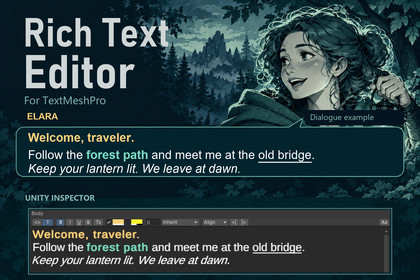
Author TextMeshPro rich text in the Inspector. Select words, apply formatting, and preview them in your TMP font. Includes editable tag source and a scratchpad.Write TextMeshPro rich text without hand-editing every formatting tag.Add [RichText] to a serialized string field, expand it in the Inspector, select some text, and apply bold, italic, underline, strikethrough, color, highlight, size, font, alignment, or indent. The editor writes the supported TMP formatting tags for you.Switch between rendered editing and editable tag source. Preview font and size are per-field view settings and are not written into your string. The Tools > Rich Text Editor scratchpad lets you compose text and copy its tagged output.Preserve existing markup while editing surrounding text. Unsupported tags such as sprite and link appear as selectable markers, retaining their original tag text. Unclosed recognized tags and unsupported numeric values are retained as opaque markup. Noparse regions retain their literal content as a single marker and can be edited in source view. Supported formatting can be normalized after a rendered edit.Version 1.0.1 adds safer caret mapping and UTF-16 surrogate-pair editing, corrects paragraph selection boundaries, and prevents a shared Inspector edit from replacing different selected strings. Named font choices are limited to uniquely named assets that TMP can load from its configured Resources path.Suitable for dialogue, tutorials, UI copy, and localization source strings that use TextMeshPro markup. This is an Editor authoring tool, not a runtime dialogue or localization system.Includes the Inspector drawer, Tools scratchpad, sample scene, PDF manual, and editable C# source. The authoring UI is editor-only; the runtime assembly contains the RichText attribute. The optional sample component is separate from the authoring UI.Features[RichText] and [RichText(height)] for serialized string fields.Rendered editing with selectable text and a caret.Toolbar: bold, italic, underline, strikethrough, clear character formatting, color, highlight, size, font, alignment, and indent.Supported markup: b, i, u, s, color, mark, absolute size, font name, cspace in em, alignment, and indent in px.Editable tag-source view; changing views preserves untouched source text.Per-field preview font and size settings.Marker-based preservation of unsupported tags and literal noparse regions.UTF-16 surrogate pairs kept intact during navigation, deletion, formatting, and copying.Mixed-value safeguard when selected objects contain different strings.Unity serialized-property editing for Inspector Undo and prefab integration.Tools > Rich Text Editor scratchpad with Copy Tagged.Sample scene demonstrating Inspector-authored TMP text.Full C# source and PDF manual.RequirementsUnity 6. Use the Unity version identified in this listing's compatibility information.Unity UI/uGUI, which includes TextMeshPro in Unity 6.TMP Essential Resources and a default TMP font asset for the preview and sample.For named font tags, uniquely named font assets under TMP's configured Resources path, with matching filenames and asset names. With TMP's default path, an example is Assets/Resources/Fonts & Materials/My Font.asset, with asset name My Font.Known limitsNo inline IME composition in the rendered canvas. Use source view for CJK IME input.Unsupported tags are markers; their effects, including sprites and links, are not fully simulated in the canvas.A noparse region is one marker. Edit its internal literal text in source view.Opening and closing unsupported tags can be separate markers. Deleting one does not automatically remove the other.Surrogate-pair safety does not imply navigation by complete grapheme clusters or joined emoji sequences.Letter-spacing markup is parsed and emitted, but its value is edited in source view; there is no letter-spacing toolbar field.Very long strings can be expensive to edit because layout is rebuilt after changes. No performance guarantee is made for large documents.The scratchpad has no Undo stack. Inspector Undo applies to serialized field edits.When selected objects have different strings, select one object to edit its text. Identical strings can be edited together.The package contains no AI-generated art, audio, or third-party content.AI was used for documentation so I could spend more time on the actual tool. It also helped write tests and surface possible bugs, and produced some optimization code under my guidance. AI assisted with drafting this Asset Store page as well. I reviewed, edited, and tested everything before release.

