




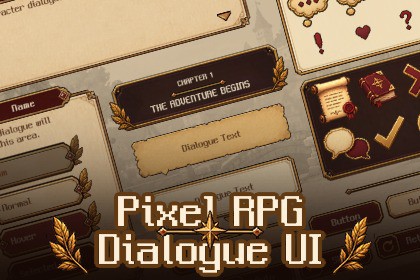
A complete pixel-art dialogue UI kit for Unity with 59 sprites, ready-to-use prefabs, a demo scene, and runtime components for typewriter text, choice cursors, panel animations, emotes, and more.Pixel RPG Dialogue UICreate classic RPG-style dialogue scenes quickly with a complete pixel-art UI kit for Unity.Pixel RPG Dialogue UI includes 59 pixel-art sprites, ready-to-use prefabs, a demo scene, and 8 runtime components for common dialogue animations and interactions.✨ What's Included59 Pixel-Art UI SpritesDialogue panels and message panelsChoice buttons with Normal / Hover / Selected / Disabled statesSpeech bubbles and character emotesUI icons, cursors, indicators, ribbons, and decorationsPortrait frame and sample portrait2 pixel-art backgrounds2 Ready-to-Use PrefabsDemo SceneIncluded pixel fontUnity FeaturesThe package also includes lightweight runtime components for:Dialogue TypewriterChoice CursorPanel Slide & FadeMessage ToastEmote Pop AnimationPixel-style UI MovementButton Text State ControlUse the complete dialogue prefab as-is, or connect individual components to your own dialogue system.Pixel-Art ReadyResizable panels and buttons support 9-Slice UI, and pixel movement components include pixel-snapping options to help keep your UI crisp.CompatibilityUnity 6 / 6000.0+Built-in / URP / HDRPTextMesh ProInput System only required for the demo sceneGreat for RPGs, JRPGs, adventure games, visual novels, simulation games, and other story-driven pixel-art projects.Everything you need to build a charming RPG dialogue interface without creating every panel, button state, cursor, and animation from scratch.TECHNICAL DETAILS- Unity: 6000.3 or higher- Render Pipeline: Built-in / URP / HDRP- Sprites: 59 PNG textures- Prefabs: 2- Runtime Components: 8- Demo Scene: 1- Font: 1 TTF + 1 TextMesh Pro font asset- TextMesh Pro Essentials: Required- Input System: Demo scene only- Documentation: PDF includedThird-Party Content:NeoDunggeunmo Pro — SIL Open Font License 1.1AI-based tools were used during initial sprite production. Everyasset was then hand-retouched and finalized in Photoshop. AIassistance (Claude) was also used to write and review the C#runtime scripts and the package documentation.

