






Cavitoon - Toon Cavity, Screen Space Curvature & Contours Shader Pro
DanilBond
$8.79
$17.59
50%OFF
(no ratings)
Jump AssetStore
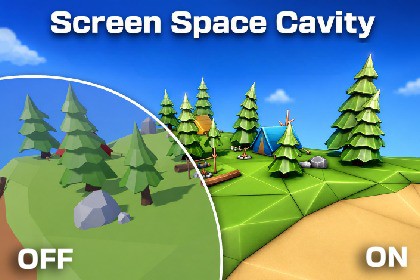
Stylize your URP scenes with customizable screen-space cavity and curvature: World, Screen and Both modes, colored ridges and valleys, masks, blend modes, and fades.Cavitoon adds clear, art-directable cavity, curvature, and contour detail to Unity URP scenes without modifying the materials on every object.Use it to brighten convex edges, darken recessed areas, emphasize silhouettes and intersections, or create colorful stylized accents for toon games, level previews, architectural scenes, and technical visualization.Choose the cavity behavior that fits your art style:World uses a radius measured in scene units. It is ideal for larger cavities, joints, overlaps, and contact details that should remain consistent with object scale.Screen uses a radius measured in pixels. It is well suited to fine curvature, sharp edges, and graphic contour detail.Both combines World and Screen responses while keeping Ridge and Valley independently adjustable.Customize the final look with separate Ridge and Valley strengths, monochrome or colored output, and three blend modes: Multiply, Additive, and Overlay. Limit the result using standard Unity Layers and Rendering Layers, or fade the effect smoothly by camera depth and absolute world-space height.Cavitoon is implemented as a URP Renderer Feature, so it works across compatible opaque materials in the scene and does not require a separate cavity material on every mesh. A built-in installer adds the feature to the selected Universal Renderer Data asset, while the organized Inspector exposes only the controls relevant to the selected mode.Main FeaturesWorld, Screen, and Both cavity modesIndependent convex Ridge and concave Valley controlsMonochrome and colored renderingMultiply, Additive, and Overlay blend modesInclude and Exclude object masksUnity Layer and Rendering Layer filteringCamera-depth Distance FadeBidirectional world-space Height FadeAdjustable World quality with 4, 8, or 16 samplesScreen-space depth rejection for cleaner object boundariesConfigurable render injection pointGame view and optional Scene view renderingOne-click installation into the selected Universal Renderer DataOriginal camera alpha preservationFull source code and shader source includedCavitoon is especially useful for stylized rendering, toon shading, readable gameplay geometry, modeling previews, scene blockouts, and any project that benefits from stronger shape definition.CompatibilityRender Pipeline: Universal Render Pipeline onlyTarget Unity version: Unity 6Developed and tested with: Unity 6000.3.14f1 and URP 17.3.0Rendering backend: URP Render GraphCompatibility Mode: not supportedShader model: 3.5Only platforms and Unity/URP versions listed as supported on the final product page should be considered officially tested.RenderingFull-screen URP ScriptableRendererFeatureRecommended injection point: Before Rendering TransparentsReads camera color, depth, and normalsURP may generate an additional depth/normals prepass depending on the renderer and platformEnabling URP Opaque Texture globally is not requiredPreserves the original camera alphaSupports Game Cameras and optional Scene view renderingPreview and Reflection Cameras are skippedWorld ModeRadius is measured in Unity scene unitsQuality levels: 4, 8, or 16 radial samples per pixelAdjustable attenuation and maximum projected pixel radiusHigher sample counts improve stability at an approximately proportional shader costScreen ModeRadius is measured in pixels of the active render targetUses neighboring depth and view-normal samplesDepth Threshold rejects samples across large depth discontinuitiesApparent line width is affected by Render Scale, dynamic resolution, and upscalingObject MasksModes: Disabled, Include, and ExcludeUnity Layer and Rendering Layer filters are combined using logical ANDMasking applies to the nearest visible opaque surfaceEnabling a mask creates a camera-sized coverage texture and redraws selected opaque geometry using a depth-tested mask passStandard MeshRenderer, SkinnedMeshRenderer, and GPU Instancing workflows are supportedFadesDistance Fade uses linear camera depthHeight Fade uses absolute world-space YReversing Height Start and End changes the fade directionDistance, Height, and object-mask coverage are combined without changing the original alphaImportant LimitationsCavitoon is a screen-space effect and only has information about the nearest visible surface. Hidden, off-screen, and fully occluded geometry cannot contribute.The effect is designed for opaque geometry. Regular transparent materials do not provide the required depth and normals information.Custom shaders must provide matching DepthOnly and DepthNormals passes, including compatible alpha clipping and vertex deformation.Custom vertex displacement, wind, depth offset, procedural geometry, or mismatched depth passes may reduce object-mask accuracy near boundaries.Screen mode uses depth discontinuities rather than an object-ID buffer, so some complex intersections may require Depth Threshold adjustment.Non-uniform foveated rasterization is currently unsupported.Using an injection point after post-processing together with an upscaler is not recommended because color and depth/normals may use different resolutions.Mobile performance depends strongly on resolution, depth/normals prepass cost, World sample count, and object masking. Profile on the target device.Third-Party AssetsSome models and environments shown in screenshots/videos are third-party assets used for demonstration only and are not included in the package.Showcase assets from Sketchfab are used under CC BY licenses with attribution to their respective authors.AI tools were used as development assistants for code drafting, debugging, documentation, and test planning. The product design, visual direction, feature requirements, Unity integration, testing, and final technical decisions were handled and validated by the publisher. All AI-assisted output was manually reviewed and adapted before inclusion. No AI-generated images, audio, or third-party content are included in the package.

