






Stylized Color Swapper & Material Optimizer: Micro Atlas & Recolor Tool
DPTGames
$19.24
$38.49
50%OFF
Jump AssetStore
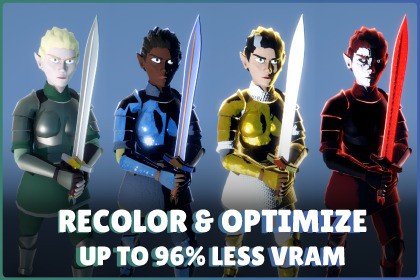
Make stylized assets uniquely yours as game ready PBR props. Paint in 3D, Reduce Texture VRAM by up to 99%, and consolidate scenes into a single material via micro-palettes or vertex colors... & more!Built in Unity 6000.5.4f1.SRP Batcher Compatible.Minimum Version: Requires Unity 6000.3.8f1+.Key Features at a Glance:Choice of Workflows: Choose between micro-texture generation, advanced vertex coloring or repainting existing textures.Massive VRAM Savings: Slash texture memory by up to 99% using micro-palettes in just a few clicks.Upgrade Flat Models: Easily recolor micro-textured assets and inject full PBR properties.In-Editor Recoloring: Customize asset colors via an embedded 3D viewport.Cut Rendering Overhead: Consolidate hundreds of unique props into a single master material.No External Tools: Handle all texturing and mesh modification natively inside Unity.Make Assets Your Own: Break away from standard aesthetics by easily matching your unique style or branding.Automatic LOD Processing: Apply your recoloring and optimization workflow across LODs without manually repeating the process.Texture & UV Optimization: Let the tool generate, repack, and remap the required texture data automatically.Procedural Detail, Wind & Gradient Painting: In Vertex Coloring Mode, apply high-resolution surface normals across your whole project, paint gradients to mask wind sway intensity or blend colors straight onto any model.Escape the Cloned Game Look: Marketplace assets are a great starting point, but they often leave games looking identical. Stylized Color Swapper lets you create unique color palettes, variations, and stylized looks directly inside Unity, without ever opening Blender or Photoshop. Optimize entire scenes into ultra-dense micro-textures, or convert standard assets into a highly optimized, vertex-driven workflow with procedural detail arrays, stylized lighting, and gameplay zone masking.More Than a Recolor Tool: Stylized Color Swapper combines visual customization with a highly optimized rendering pipeline. Whether you simply want to give an asset a new color palette or completely convert a scene to a lightweight vertex painting workflow, you can do it natively. Plus, see your exact optimization results before you commit: the integrated Live Audit utility provides before-and-after technical metrics for your assets.Core Workflow & ToolingEmbedded 3D Viewport: Stop constantly switching between windows. The tool features a fully embedded, interactable 3D preview window right inside the editor, complete with lighting and rotation controls. You can also spawn objects in scene and paint them directly in the scene view.Upgrade Flat Stylized Assets to PBR: Most stylized and marketplace assets rely on simple color-swatch textures without Metallic, Smoothness, or Emissive data. Stylized Color Swapper lets you easily isolate elements (like making a sword shiny or a crystal glow) and automatically bakes those new PBR and color properties directly into the mesh or micro-texture. Upgrade the visual fidelity of flat assets in seconds.Instant Visual Differentiation: Take stylized assets and effortlessly shift their color schemes to match your game's unique mood, faction, biome, or branding in seconds.Isolation & Grouping: Split disconnected islands, extract faces, or use Group Similar to instantly select matching materials across an entire modelDisconnected Islands or Face Extract: Isolate and independently paint individual parts, with automatic master-pixel consolidation on save, or activate Group Similar with a color tolerance slider to instantly grab and recolor all matching parts across the entire model.No Project Clutter: Instead of duplicating massive texture files for every color variant, the tool condenses your selections into extremely lightweight micro textures, you can even have entire scenes use the same micro texture!Built-in Raycast AO Baker: Casts rays against scene geometry to calculate geometric ambient occlusion, baking the result directly into vertex channels or standalone texture maps.Per-Swatch Normal Smoothing: Recalculates and averages vertex normals across edges using continuous angle thresholding (0°–180°).Automatic LOD Coloring: Paint the base model once and your recoloring carries across every LOD automatically, mapped directly from the source geometry.Under the Hood: The VCCore Feature SuiteBeyond recoloring, the tool includes the custom VCCore shader pipeline, packed with rendering and optimization features designed for mobile, standalone VR, and high-performance desktop projects:Universal Stylized Lighting: Custom stylized lighting and toon shader features including rim glow, emissive controls, smooth shading, and cel shading, natively available across both workflows, built exclusively for URP.Runtime Ready Zone Data: Bake lightweight gameplay zone IDs (Zones 0–7) directly into your geometry. Use these zones for runtime recoloring, gameplay logic, or environmental variations. This data is baked directly into the mesh, meaning you can easily query these IDs in your own custom shader graphs if you choose not to use the VCCore shader.Directional 3D Gradients (Vertex Mode Only): Click and drag directly in the 3D viewport to apply stylized gradients across Color, Metallic, Smoothness, AO, and Emissive channels with custom blend modes and strength controls.Procedural Detail Arrays (Vertex Mode Only): Assign unique Feature IDs to parts of your mesh to drive the VCCore procedural detail system. Choose between 11 high-resolution surface normals such as stone cracks, woven leather, or hammered metal, without requiring individual detail textures for every model.Gradient-Painted Wind (Vertex Mode Only): Paint a directional wind gradient onto any model and simulate realistic sway directly in the viewport.Emissive Painting & Baking: Paint emissive masks directly onto your models in the 3D viewport. The emissive data is baked directly into the vertex channels, ready to be rendered by VCCore or routed into your own custom setups.64-Color Palette Generator: Tailor your runtime recoloring gamut with a built-in Master Palette generator. Adjust per-channel RGB weighting to allocate specific shades, preview the calculated gamut distribution, and bake the results directly to a PNG for your VCCore materials. It yields 63 customizable colors (reserving pure white as a safe default to protect original assets when variation scripts are unused).1. Texture Coloring Best for: Maximum texture optimization while retaining the original mesh structure.Optional Palette Optimization: Generate a brand-new ultra-lightweight micro-palette for maximum VRAM savings, or turn this off to simply repaint the existing texture in place for quick touch-ups without leaving Unity.Texture Overhead: With optimization on, a micro palette replaces the full texture sheet; with it off, the original texture's footprint stays unchanged.Reduce VRAM: With optimization on, overall VRAM usage drops by up to 96% compared to standard assets.Mesh Geometry: Preserves the original geometry without adding tessellation. Existing vertices are split where required to support color boundaries.Available Shader Features: Full support for Stylized Lighting, Rim Glow, Emissive rendering, Micro-Atlas Repacking, and Zones.2. Vertex Coloring Best for: Eliminating textures, maximizing material sharing, and scene-wide SRP batching.Texture Overhead: Completely eliminates color textures through vertex painting.Material Consolidation: Allows virtually unlimited numbers of visually distinct, uniquely colored props to share 1 master material.Mesh Geometry: Uses adaptive tessellation to add vertex resolution only where color boundaries require it, avoiding unnecessary subdivision across the rest of the mesh.Available Shader Features: Full support for Directional 3D Gradients, Procedural Detail Arrays, Feature IDs, Zones, Rim Lighting, Emissive rendering, Stylized Lighting, and 1-Material SRP Batching.Documentation Can Be Found HereAsset & Media DisclaimersPipeline Requirement: Stylized Color Swapper and the included VCCore shaders are built exclusively for the Universal Render Pipeline (URP).Included Demo Assets: Includes 3 playable demonstration models (Elf Character, Sword, and Medieval House) to test all workflows and features immediately upon import.Performance Metrics: VRAM figures are based on comparisons against standard 2048x2048 Base Color and PBR texture maps. Actual savings will vary depending on the source asset, texture resolution, material setup, and selected workflow.Disclaimer: Certain low poly environment props, background models, and the large hall shown in promotional media are for presentation only and are not bundled with this package (select presentation props courtesy of Quaternius and Kenney.nl).The Stylized Color Swapper & Material Optimizer is implemented as an Editor-only Unity utility for reskinning, recoloring, and optimizing existing models, with dedicated editor assemblies, isolated preview rendering, non-destructive asset processing, and automated management of generated and temporary resources.Technical Architecture & WorkflowSupported Renderers: Fully compatible with both static MeshFilter/MeshRenderer setups and rigged/animated SkinnedMeshRenderer hierarchies. Auto-scans and builds internal data structures for all child renderers upon GameObject assignment.Interactive Viewport Rendering: Utilizes Unity's native PreviewRenderUtility API for self-contained, isolated 3D rendering. Viewport cameras are mathematically synchronized, supporting turntable auto-rotation, local-space matrix projections, and custom bounds calculations without cluttering or modifying the active Scene view. Integrated Color Wheel & Picker: Full HSV color wheel with hue ring and saturation/value square, alongside RGB channel sliders, hex input, and a default/custom swatches panel, edit swatch values directly from the embedded 3D preview without leaving the tool.Advanced Raycast & Screen Projection: Implements accurate local-space triangle raycasting against source meshes to map 2D viewport clicks directly to sub-meshes and materials. Includes custom 3D coordinate-to-viewport algorithms using Camera.WorldToViewportPoint to draw interactive Handles and GUI elements dynamically over the preview render.Mesh & Layer Management: Selections can be individually hidden (excluding them from viewport rendering and raycast calculations) or locked (disabling swatch modification during bulk operations or Paint Mode).Advanced Editing AlgorithmsDynamic Face Extraction: Uses a procedural flood-fill neighbor-matching algorithm to let users isolate and repaint individual polygons or geometry chunks dynamically without destructively modifying the original mesh vertex buffer.Algorithmic Color Grouping: The 'Group Similar' tool calculates the 3D Cartesian distance between RGB vectors across all asset materials, utilizing a user-defined mathematical tolerance to instantly group and edit discontinuous sub-meshes that share original visual properties.Procedural 3D Gradients: The custom DPT_GradientUtility calculates precise t interpolation parameters by projecting mesh vertex positions onto a user-drawn 3D directional vector (Start ↔ End). Supports independent mathematical blending (Multiplicative, Additive, Override) for Color, Metallic, Smoothness, AO, and Emissive channels based on user-defined alpha strength.Recolor & UV Processing EnginesTexture Recoloring Mode: Retextures and tints source models by reading existing texture data and remapping color blocks within configurable RGB tolerance thresholds, preserving alpha/transparency and original UV coordinates.Vertex Paint & Pack Mode: Built for vertex painters, it utilizes UnwrapParam and Unity's built-in UV unwrapping tools (with user-defined hard seam angle thresholds from 10° to 170°) to generate clean, non-overlapping UV layouts. Bakes surface IDs (FeatureID), procedural gradient data, texel scaling, and detail rotation parameters into vertex data. Supports configurable Seam Blend Dissolve calculations to smooth transitions across UV islands.PBR Channel Packer SpecificationsInput Formats: Accepts standard 8-bit/16-bit grayscale or RGB Texture2D inputs for Metallic, Roughness/Smoothness, and Ambient Occlusion.Output Packing Formats:Standard Unity (URP): Red = Metallic, Green = Ambient Occlusion, Blue = Detail Mask (Unused), Alpha = Smoothness.Unity Roughness Setup: Red = Metallic, Green = Ambient Occlusion, Blue = Detail Mask (Unused), Alpha = Roughness.Custom Mapping: Assign any source texture channel (R, G, B, A) to any target PBR channel.Texture Read/Write Handling: Features an optional automated system to manage texture readability flags (isReadable) and compression states during scanning. To ensure full control over your project assets, this automation is strictly opt-in; you can leave it disabled and use the manual 'Re-Scan' button to handle texture states on a case-by-case basis. Original asset import settings are always cleanly restored upon completion.Export & File ManagementGenerated Assets: Creates standalone .prefab files, .mat material assets, and .png texture atlases.Memory Management: Editor script actively tracks and cleans up temporary live-preview meshes, materials, and textures via DestroyImmediate during cycle changes and assembly reloads to prevent Editor memory leaks.Pipeline Compatibility: Built to work seamlessly with the Universal Render Pipeline (URP) Version 6000.3.8f1+ (tested up to 6000.6.0b6). Supports standard URP Lit/Unlit shaders out-of-the-box and includes a highly optimized custom stylized shader (VCCore), purpose-built to maximize this tool's vertex-packing and zone-variation features.Assembly DefinitionsIsolated Editor & Runtime Scopes: Editor utilities are strictly isolated to a dedicated Editor assemblies, ensuring no editor-only scripts leak into runtime builds.Optimized Recompilation: Scoped compile boundaries prevent project-wide recompiles of Assembly-CSharp.dll when editing core tool logic.

