




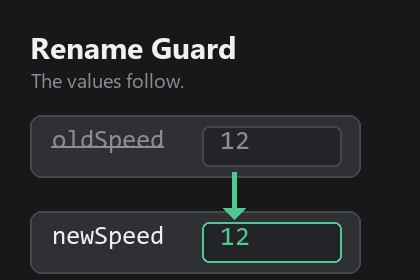
Rename a serialized field without losing the values you set in the Inspector. Catches the rename the moment your code compiles, and puts every prefab, scene and asset value back.Editor-only tool. It never touches materials, shaders or rendering, so it behaves identically in Built-in, URP and HDRP. No runtime code ships with your build.You rename a field. Unity stores Inspector values under the field name, so the value saved as "oldSpeed" no longer matches anything. Every prefab, every scene and every ScriptableObject that used that script falls back to zero.Nothing warns you. No console message, no icon, no dialog. The project compiles, the scene opens, and the numbers are simply gone. Most people find out in play mode, hours or days later, and blame the wrong change.Serialized Field Rename Guard watches every compilation. The moment a field is renamed, it tells you - while the values are still recoverable - and puts them back with one click.WHY THE VALUES CAN STILL BE RECOVEREDUnity has an answer for this: [FormerlySerializedAs("oldName")]. With that attribute on the renamed field, the next import reads the value stored under the old name and hands it to the new one.The catch is timing. Nobody thinks of it before renaming, and by the time you notice the damage, the usual instinct - open the scene, look around, save - is exactly what destroys the data.On disk, your prefab still contains the line "oldSpeed: 12". Unity ignores that unknown key, but it does not erase it: the line survives until the file is written again. This tool exists to write the attribute during that window, and it opens by itself so you cannot miss it.WHAT YOU ACTUALLY DORename your field the way you always have, and save. Unity compiles. The window opens with the pairing already made: oldSpeed -> newSpeed. Click "Count values at risk" to see how many values are still stored under the old name, then "Recover the values". Unity reimports, and your Inspector is exactly as you left it.One line is added to your script, plus the using directive if it was missing. Your indentation, line endings and file encoding are preserved. Nothing is written until you press the button.IT PAIRS, YOU CONFIRMA field that disappeared from a class and a field of the same type that appeared in it, between two compilations: that is a rename. When the pairing can only be one thing, it is pre-selected. As soon as several fields of the same type moved at once, you pick from the list yourself - guessing would write the wrong old name into your script.A rename you have not answered yet comes back after the next compilation, until you repair it or dismiss it for good.WHAT YOU GET- A check after every compilation, which is the only moment that matters.- The window opens on its own, or stays quiet and reports to the console - your choice.- The count of values still stored under the old name, read from every prefab, scene and asset file of the project.- A safe edit of your script: it only writes on a declaration it can identify with certainty, and refuses to write otherwise.- Fields covered: public and [SerializeField] private, arrays and lists, fields inside plain [Serializable] classes, fields declared in a base or abstract MonoBehaviour.- A snapshot stored in ProjectSettings: outside Assets, versionable, shared by the whole team.- The line it wrote is watched: if a code editor saves an older copy of the file back over it and wipes the attribute, the rename is raised again instead of failing silently.HONEST NOTES[FormerlySerializedAs] is standard Unity, and free. What this package gives you is the detection at the right moment, the pairing, the count of what is at risk, and a safe edit of the file. If you already add the attribute by reflex before every rename, you do not need this tool.And if the scenes and prefabs holding those values have already been saved since the rename, the old values were rewritten and are gone - no tool can bring them back, only your version control. The window tells you how many are still there, so you always know what you are recovering.WHAT IT DOES NOT COVERRenaming a class, and reordering or removing an enum member. Both lose data too, both are a different mechanism, and repairing them means rewriting values inside your assets - which this tool deliberately never does.COMPATIBILITYUnity 2022.3 or newer. Editor only: nothing ships in your build. No third-party dependencies. Built-in, URP and HDRP.Features:- Records a baseline of every serialized field name declared in your own assemblies (scripts under Assets; packages and Unity assemblies are ignored).- Compares after every compilation and reports a removed field plus an added field of the same type, in the same class, as a rename.- Pre-selects the pairing only when it is unambiguous; otherwise you choose the old name from a popup.- Writes [FormerlySerializedAs("oldName")] above the field, adds "using UnityEngine.Serialization;" when missing, preserves indentation, line endings and BOM.- Refuses to edit when the declaration cannot be identified with certainty (zero or several matches) and reports it instead.- Counts the values still stored under the old name across every .prefab, .unity and .asset file, filtered by the script GUID so a common field name is not counted for another component.- Pending renames survive Unity restarts until repaired or dismissed.- After writing, the script is re-read at each compilation: an attribute removed by an editor that saved an older buffer over the file puts the rename back on the table, with an explicit message. Removing the line on purpose only asks once, then never again.- Snapshot stored in ProjectSettings/, outside Assets, safe to commit.- Detection also runs when the window is closed; it can report to the console only.Requirements:- Unity 2022.3 or newer.- Editor only: no runtime code ships with your build.- No third-party dependencies.- Built-in, URP and HDRP.Note: recovery works while the scenes, prefabs and assets holding the values have not been saved again since the rename. Text serialization is required for the "values at risk" count; Force Binary projects can still recover, they just cannot be counted.Documentation: Documentation.html is included in the package.The C# editor code of this package, its HTML documentation, its README and its store description were written with the assistance of Claude (Anthropic), under my direction and review.Every behaviour was specified, tested and validated by me inside the Unity editor before submission: detection of a renamed serialized field, the count of values still stored under the old name, and the recovery of those values in a prefab.No AI-generated art, audio, 3D model or third-party content is included in the package. The images on this store page are screenshots of the tool running in Unity, assembled with a script.

