






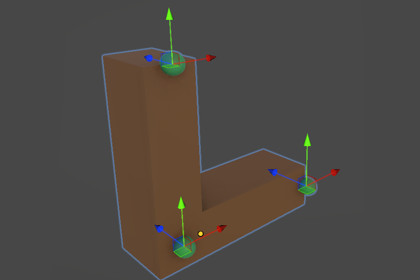
Reposition transform handles anywhere. Edit pivots visually, no mesh changes needed.This is an editor-only package.• Compatible with all Render Pipelines (Built-in, URP and HDRP)• Compatible with Unity 2022.3.62LTS and newer• Supported on Windows, MacOS and LinuxNote:The tool itself is independent of render pipeline. However, the included demo scene is built using URP and is intended for demonstration purposes only.Every Level Designer knows this pain. You import a door, and its pivot is stuck at the center of the mesh. You want it to rotate from the hinge. So you make an empty GameObject, parent the door to it, offset it by hand, and hope you never have to redo it.Pivot++ removes that entire headache.Select any object in the Scene view and drag a slider. The pivot moves instantly, allowing you to rotate the object exactly where you want to rotate it from.No parenting. No re-exporting from your DCC tool. No math.Built for the way you actually workBounded Mode lets you think in terms of shape. Set the pivot to the bottom of an object, or a corner, or an edge. The same setting works whether you are placing a pebble or a skyscraper, since it is relative to the object's own bounds.Unbounded Mode gives you exact control. Enter a precise offset in scene units when you need a pivot far outside the mesh, like orbiting a moon around a planet, or matching a measurement from your DCC tool.Save pivots, not workaroundsDoors need a pivot at each hinge. Props might need a pivot at every corner. With Object Pivots, you save as many custom pivot points as an object needs, right on the object itself. Switch between them anytime.Edit Pivots Mode lets you move, rotate, and delete these saved pivots visually, with full Undo support.Zero risk to your assetsPivot++ never touches changes meshes, prefabs, or hierarchy. It only changes where the editor draws the handles. Nothing is added at runtime, and the tool is stripped from builds completely.RequirementsUnity 2022.3 or newer.DocumentationShowcaseUser ManualFeaturesReposition transform handles (move/rotate/scale) for any GameObject without modifying meshes or hierarchyShared Pivot: quick, selection-wide pivot offset that carries over automatically between objectsBounded Offsets: normalized (-1 to 1) pivot placement relative to an object's bounds, adapting automatically to mesh sizeUnbounded Offsets: exact, fixed-distance pivot placement in local space, with optional "Use Object Scale" scalingObject Pivots: save unlimited custom pivots per object (e.g. one per hinge or corner), persisted across sessionsEdit Pivots Mode: visually move, rotate, and delete saved pivots directly in the Scene view, with full Undo supportDelivered as a native Unity Scene view Overlay — dockable, collapsible, and unobtrusive100% non-destructive: no changes to meshes, prefabs, or GameObject hierarchyEditor-only: adds no runtime components and is fully stripped from buildsSupported OSWindowsmacOSLinux(Since Pivot++ is a pure Unity Editor tool with no native plugins, it should work anywhere the Unity Editor itself runs)RequirementsUnity 2022.3.62 or newerDocumentationShowcaseUser Manual

