




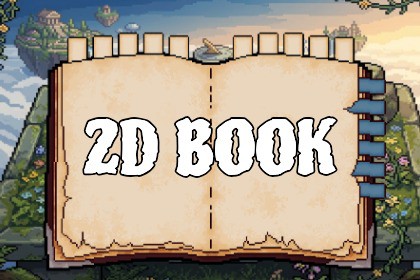
A pixel-art book UI with sprite-based page-flip animations, 10 category tabs, 6 sub-tabs, and a drop-in prefab for RPG journals, quest logs, and bestiaries.2D SpriteRenderer + Sprites/Default. No URP/HDRP shaders in the package.Built-in: Compatible. Open Demo.unity. Camera must be tagged MainCamera.URP 2D: Compatible. Use a 2D Renderer, not the 3D Universal Renderer.HDRP: Not supported.Input System is optional. Works with New and Legacy Input.Minimum Unity: 6000.3 (uploaded from 6000.3.14f1).Pixel Book UI - Page Flip System is a ready-to-use pixel-art book interface for RPG journals, quest logs, bestiaries, inventories, and any in-game book UI. It ships as a single prefab with sprite-based page-flip animations and tabbed navigation.Features- Hand-crafted pixel art: book frame, cover, inner page, and modular tab sprites- Sprite-based page flip animations (7 frames left, 7 frames right, 12 FPS)- 10 main category tabs (top) and 6 sub-category tabs (right)- Selected tabs stay bright and offset; unselected tabs dim automatically- Drag-and-drop setup: drop Prefabs/2D_BookUI into a 2D scene and press Play- Automatic support for both the New Input System and the Legacy Input ManagerWhat's included- 1 prefab (2D_BookUI)- 1 demo scene (Demo.unity)- 49 PNG sprites (279 x 175, Point filter, uncompressed)- 2 animation clips + 2 animator controllers- 1 runtime script (BookPageFlipController) with Assembly Definition- README (EN / KO) and licenseQuick start1. Import the package into a Unity 6 project.2. Open Assets/2D_BookUI/Demo.unity, or drag Assets/2D_BookUI/Prefabs/2D_BookUI into your own 2D scene.3. Make sure a Camera tagged MainCamera exists.4. Press Play and click the tabs.Runtime APIusing PixelBookUI;book.SelectCategory(3);book.SelectSubcategory(2);book.PlayLeft();book.PlayRight();Render pipelines- Built-in: Compatible- URP 2D: Compatible- HDRP: Not supported. This asset uses 2D SpriteRenderer and is not built for HDRP.Requirements- Unity 6 (6000.3) or later. Authored in Unity 6000.3.14f1.- 2D Sprite package (included by default)- Input System package is optionalCustomization- Change tab count by duplicating or removing children under category / subcategory (names must stay c1, c2... and sub1, sub2...).- Replace PNGs in Assets/2D_BookUI/Assets/ while keeping file names.- Adjust Unselected Tint, Selected Tint, tab offsets, and Flip Sorting Order in the Inspector.No third-party assets. Standard Unity Asset Store EULA.Art Style: Pixel ArtTexture Format: PNG (lossless, alpha)Texture Resolutions: 279 x 175 px (all sprites share the same canvas)Filter Mode: Point (no filter) — pixel-perfectCompression: None (Uncompressed)Animated: YesAnimation Frames: 7 frames per page flip (Left and Right)Animation Sample Rate: 12 FPS (clip length 0.5s)Animation Types: Sprite-based page flip (Left / Right)Number of Prefabs: 1 (2D_BookUI)Number of Demo Scenes: 1 (Demo.unity)Number of Textures / Sprites: 49 PNG files- Book frame, cover, inner page: 3- Left page-flip sequence: 7- Right page-flip sequence: 7- Main category tabs: 20 (10 color + 10 line)- Sub-category tabs: 12 (6 color + 6 line)Number of Animation Clips: 2 (Page_L_Animation, Page_R_Animation)Number of Animator Controllers: 2Number of Scripts: 1 runtime script (BookPageFlipController.cs) + 1 Assembly Definition (PixelBookUI.asmdef)Namespace: PixelBookUIThird-Party Content: NoneShaders / Fonts / Plugins: None bundledInput: New Input System and Legacy Input Manager (automatic fallback)Render Pipelines:- Built-in: Compatible (Sprites/Default, no URP components in the package)- URP 2D: Compatible (Sprites/Default works with URP 2D Renderer) — confirm in a clean URP 2D project- HDRP: Not supported (2D SpriteRenderer / no 2D Renderer)Minimum Unity Version: Unity 6 (6000.3) or later(Package was authored in Unity 6000.3.14f1. Do not list 2022.3 unless you also upload from that editor.)Required Packages: 2D Sprite (built-in)Optional Packages: Input System (com.unity.inputsystem) — falls back to Input.GetMouseButtonDown if absentPlatforms: Any 2D-capable Unity platform (PC, Mobile, Console, WebGL)Physics: 2D colliders (BoxCollider2D, trigger) for tab clicks. Requires a Camera tagged MainCamera.Setup: Drag Prefabs/2D_BookUI into a 2D scene and press Play.

