




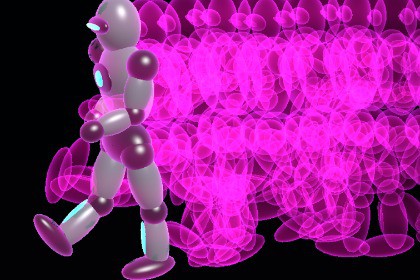
Create and customize Animated Character Trails in Unity, featuring Animated Character Trails Runner, editable assets, runtime controls, and a ready-to-review demo.Animated Character Trails creates fading snapshots of animated skinned meshes for dash, movement, and afterimage effects in Unity URP.The demo includes an original mechanical runner with a skinned mesh and procedural running motion, plus cyan, magenta, and amber trail examples. You can use the supplied prefab or add AfterimageTrailEmitter to a hierarchy containing your own SkinnedMeshRenderer.Adjust the sampling interval, ghost lifetime, trail color, and emission state. Runtime methods let you configure the effect, toggle emission, change color, and clear existing ghosts. An offline PDF manual covers setup, the supplied demo, runtime API, and troubleshooting.This is a skinned-mesh afterimage effect, not a complete character controller, animation-clip collection, or projectile/beam system. The included runner is a procedural mechanical demonstration character.Unity: 6000.0.30f1; Universal Render Pipeline 17.0.3.Content: 1 demo scene, 2 prefabs (runner and showcase setup), 8 materials, 2 shaders, 2 runtime C# files, 1 demo director, 1 native skinned mechanical runner mesh, and 1 offline PDF manual.Shaders: Animated Character Trail; Original Runner.Source textures: none; visuals use procedural geometry, vertex colors, and materials.Runtime: AfterimageTrailEmitter provides Configure, SetEmitting, SetTrailColor, Clear, and IsEmitting. OriginalRunnerMotion controls the demo gait.Integration: requires SkinnedMeshRenderer sources and the supplied URP trail material. Sample interval and lifetime affect the number of temporary mesh snapshots and runtime cost; profile with your target characters.Current store video: actual 1920x1080, 30 fps, 30-second Unity demo capture. Promotional video files are not included as package assets.Built-in Render Pipeline and HDRP conversions are not included.AI was used during code refactoring and scene preparation.

