




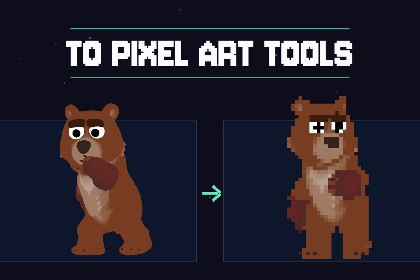
Convert images, 3d models, 3d animated models, sprites, animations, and batches into polished pixel art directly in Unity, with live preview, palettes, presets, and a runtime API.Turn images or 3d models into pixel art without leaving Unity.To Pixel Art Tools is a native C# conversion toolkit for artists and developers who need controlled, repeatable pixel art results from illustrations, renders, photos, sprites, icons, backgrounds, and animation frames.Work interactively in a dedicated Editor window, compare the source and result through a live preview, fine-tune the look, and save the converted image with pixel-art-friendly import settings.FAST VISUAL WORKFLOW- Drag an image into the conversion window or select it from the Project window.- Start from one of seven built-in presets.- Preview changes without exporting after every adjustment.- Zoom, pan, enable a pixel grid, or compare the source and result with a draggable divider.- Convert and save directly into the project.FULLY CUSTOMIZABLE PIPELINEThe conversion pipeline contains six reorderable stages:- Smooth- Background Removal- Pixel Art- Despeckle- Outline- DiffuseMoving a stage before or after the Pixel Art step changes whether it processes the full-resolution source or the final pixel grid, giving you direct control over the resulting style.CONTROL RESOLUTION, COLOR, AND TEXTUREChoose between Nearest, Box, and perceptual LAB Average downscaling. Build palettes using K-Means, Median Cut, or a fixed palette asset.Add organic Floyd-Steinberg dithering or ordered 2x2, 4x4, and 8x8 Bayer patterns. Additional controls include run merging, color transfer, alpha thresholding, sharpening, background edge cleanup, outline generation, and painterly diffusion.BUILT FOR PRODUCTION WORKFLOWS- Batch-convert multiple textures or complete folders.- Share one palette across related assets for visual consistency.- Automatically detect numbered animation frames.- Convert animation frames against one shared palette to reduce color shimmer.- Save complete configurations as reusable profile assets.- Create, import, export, sort, and extract color palettes.- Automatically apply point filtering, uncompressed textures, disabled mipmaps, and optional sprite settings.EDITOR AND RUNTIMEThe complete conversion pipeline is also available through a public runtime API. Convert individual Texture2D assets or animation sequences synchronously or asynchronously, with progress reporting and cancellation support.The algorithm core uses a plain RGBA pixel buffer and does not depend on Editor APIs.NO EXTERNAL WORKFLOWNo Python, command-line tools, native plugins, generative AI, external executables, third-party packages, internet connection, or cloud service is required. The complete implementation is included as C# source code and runs locally inside Unity.Suitable for 2D RPGs, platformers, roguelikes, strategy games, retro-inspired projects, stylized backgrounds, UI icon sets, texture processing, and custom asset pipelines.Includes a ready-to-open demo scene, seven presets, scripting examples, offline HTML and Markdown documentation, and a detailed troubleshooting guide.COMPATIBILITY- Requires Unity 6 (6000.x) or newer.- Developed and validated with Unity 6000.5.0f1 on Windows 11.- Conversion code is render-pipeline independent.- No render-pipeline-specific setup or custom shader is required.- No third-party Unity packages are required.- No native plugins or external executables.- No internet connection or cloud service required.- Complete C# source code included.EDITOR WORKFLOW- Dedicated UI Toolkit conversion window.- Live, cancellable background preview.- Source/result comparison divider.- Zoom, pan, fit, 1:1 view, and optional pixel grid.- Draggable scale-reference overlay.- Project window context-menu integration.- Batch conversion window.- Seven built-in presets.- Reusable profile assets.- JSON profile import and export.- Palette asset inspector and creation tools.- Ready-made demo scene with reproducible settings.CONVERSION PIPELINE- Six reorderable stages: Smooth, Background Removal, Pixel Art, Despeckle, Outline, and Diffuse.- Downscaling methods: Nearest, Box, and perceptual LAB Average.- Manual or automatic downscale factor.- Quantization methods: perceptual K-Means, Median Cut, and Fixed Palette.- Dithering methods: Floyd-Steinberg, Ordered 2x2, Ordered 4x4, and Ordered 8x8.- Adjustable palette size and deterministic palette seed.- Perceptual run merging.- Color transfer from a reference image.- Two-stage background removal with edge peeling.- Connected-region despeckling.- Contrast-aware outline generation.- Anisotropic and pixel-scattering diffusion.- Alpha thresholding and post-quantization sharpening.ANIMATION AND BATCH PROCESSING- Automatic detection of numbered animation frames.- Timeline preview and playback inside the Editor window.- Shared palette across animation frames.- Batch conversion of selected textures and folders.- Optional shared palette across an entire batch.- Cancellable batch progress.PALETTES- Manually editable Color Palette assets.- Import from HEX, TXT, and GIMP GPL files.- Export as hexadecimal color lists.- Extract palettes directly from textures.- Sort palettes by hue or luminance.- Fixed-palette conversion support.INPUT AND OUTPUT- Supported project image extensions: PNG, JPG, JPEG, TGA, BMP, PSD, TIF, TIFF, GIF, EXR, and WEBP, when imported by Unity as Texture2D assets.- Output format: PNG.- Reads original PNG and JPG file data when available, avoiding source import compression and maximum-size changes.- Sources do not need Read/Write Enabled.- Optional Sprite import configuration.- Automatic Point filtering.- Optional uncompressed output.- Mipmaps disabled by default.- Non-power-of-two rescaling disabled.- Configurable output folder, filename suffix, overwrite behavior, and pixels per unit.RUNTIME API- Texture2D conversion from settings or profile assets.- Animation-sequence conversion with a shared palette.- Synchronous and asynchronous entry points.- Progress reporting and cancellation tokens.- Direct PixelBuffer processing API.- Deterministic output when fixed seeds are used.- Runtime assembly contains no UnityEditor references.DOCUMENTATION- Offline HTML documentation.- Markdown manual.- API examples.- Quick-start guide.- Detailed stage reference.- Performance guidance and troubleshooting.- Demo scene with source and converted textures.

