




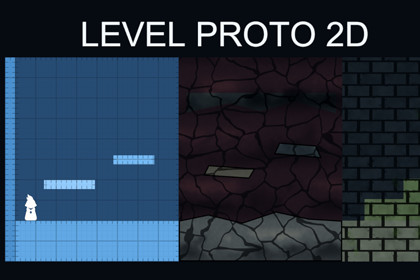
Build, edit, playtest, and export blockouts for Metroidvania, platformer, or any 2D side-scroller games using polygon-based shapes, snapping tools, procedural materials, labels, and a prototype playerDesign and validate levels for Metroidvanias, platformers, or any 2D side-scroller directly in the Unity Scene View.Level Proto 2D is a level-design toolkit for building platforming blockouts with editable polygon shapes instead of manually placing and resizing dozens of square sprites.Create floors, walls, slopes, platforms, rooms, hazards, and traversal routes using ProtoShape2D. Edit vertices and edges directly in the Scene View, insert or remove points, extrude new sections, and keep geometry aligned with grid and angle snapping.FAST LEVEL-BLOCKOUT WORKFLOW• Create polygon-based level shapes from the GameObject menu or with the dedicated Draw Shape tool.• Drag vertices and edges directly in the Scene View.• Insert, delete, extrude, and automatically clean redundant vertices.• Generate matching PolygonCollider2D components.• Use grid snapping, angle snapping, and a numbered Scene View ruler.• Organize rooms and level sections with Proto Shape Groups.• Add visible area labels for rooms, encounters, landmarks, and design notes.THREE VISUAL STYLESSwitch each shape between three included URP materials:• Proto Grid — a world-space prototyping grid with ruler-style boundary ticks.• Cavern Stone — layered procedural rock with surface detail and irregular cracks.• Mossy Ruins — procedural masonry blocks with chipped edges and moss.The procedural patterns remain continuous across adjacent shapes. Every shape supports an individual Fill Color tint, while Cavern Stone and Mossy Ruins also provide an optional per-shape Outline Color.PLAYTEST IMMEDIATELYDrop the included Proto Player into your scene to test movement distances and traversal flow.The player includes:• Walking and jumping.• Coyote time and jump input buffering.• Variable jump height through jump cutting.• Ground detection.• Dynamic grounded/airborne friction materials.• New Input System support.• Keyboard controls ready for immediate testing.EXPORT YOUR BLOCKOUTExport an entire scene or an individual Proto Shape Group:• PNG export directly from polygon and label data.• Configurable pixels per unit and transparent background.• Optional baked grid appearance.• Per-shape outlines included in PNG output.• JSON export containing vertices, transforms, colors, collider settings, sorting order, tags, and labels.CUSTOMIZABLE AND SOURCE-AVAILABLEAll scripts and shaders are included. Shapes expose editable colors, materials, collider generation, sorting order, tags, and polygon data.The package is suitable for metroidvania, platformer, side-scroller, action-adventure, puzzle-platformer, and other 2D level-design workflows.A playable demo scene is included, presenting Proto Grid, Cavern Stone, and Mossy Ruins side by side with floors, slopes, platforms, labels, groups, and a configured Proto Player.Please note: this is a level prototyping and visualization toolkit, not a finished environment tileset or a complete production character controller. The included Proto Player is intentionally focused on testing movement and traversal.But it can easily be used as a starting point for a final implementation for your game.CORE FEATURES• Editable polygon-based ProtoShape2D component.• Generated Mesh and optional PolygonCollider2D.• Direct Scene View vertex and edge editing.• Vertex insertion, deletion, edge extrusion, and redundant-vertex cleanup.• Automatic self-intersection detection and repair tools.• Grid snapping and horizontal/vertical angle snapping.• Numbered Scene View grid ruler.• Multi-selection and Undo support.• Proto Shape Groups for room and section organization.• ProtoLabel2D area labels.• Per-shape Fill Color, Outline Color, sorting order, collider settings, and tags.• PNG and JSON exporters.• Group-scoped and scene-wide export.• Playable demo scene.• Runtime Proto Player for traversal testing.• Full C# and shader source included.• EditMode test suite included.VISUAL MATERIALS• 3 included URP materials.• Proto Grid Unlit.• Proto Cavern Stone.• Proto Mossy Ruins.• Texture-free procedural environment shaders.• World-space patterns remain continuous across adjacent shapes.• Per-shape tinting through MaterialPropertyBlock.• Optional polygon-boundary outlines for Cavern Stone and Mossy Ruins.• Universal 2D Renderer and Universal Forward Renderer passes.PROTO PLAYER• Walk and jump controls.• Coyote time.• Jump input buffering.• Variable jump height.• Rigidbody2D contact-based ground detection.• Dynamic grounded and airborne friction.• New Input System integration.• Included Input Actions asset.• Included placeholder player sprite.• No character animation files.COMPATIBILITY• Developed and tested with Unity 6000.5.0f1.• Requires Universal Render Pipeline.• Requires Unity Input System.• Uses Unity 2D Physics.• Designed for URP 2D and Universal Forward renderers.• Demo scene is intentionally not added to Build Settings automatically.PACKAGE INFORMATION• Distributed asset files: 53, excluding .meta files.• Approximate package size: 414 KB, excluding .meta files.• C# scripts: 34.• Shaders: 3.• Materials: 3.• PhysicsMaterial2D assets: 2.• Input Actions assets: 1.• Demo scenes: 1.• Animation files: 0.2D SOURCE FILE INFORMATION• Source artwork file count: 1 PNG.• Player sprite size: 61 × 132 pixels.• Player sprite file size: approximately 12.67 KB.• Animated: No.• Animation type: None.• Additional: Hybrid content — polygon/vector-generated level geometry with a pixel-based placeholder player sprite. Environment visuals are generated procedurally by shaders.Documentation generation and assistance with workflow and coding.

