




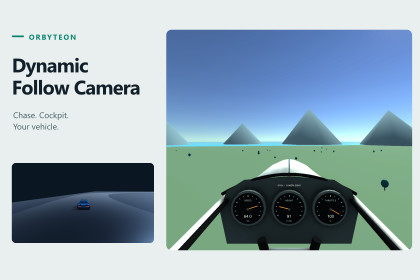
Input-independent Chase/Cockpit camera with reusable profiles, motion response and obstruction handling. Includes car and assisted airplane examples plus a preview-first Setup Wizard.Unity 6000.2.12f1; Windows; URP 17.2.0; Input System 1.14.2 and resolved registry dependencies. Both keyboard examples: Active Input Handling = Both. Camera core is input-independent; example fallback does not modify project settings. Other editors/platforms/pipelines and touch/gamepad controls are not claimed. See offline Compatibility.md and Airplane.md.Build a follow camera around your own target and input system. Tune height, distance, offsets, damping and field of view. Provide target pose through a Transform provider and actual motion through Rigidbody, Manual or custom providers. Camera Profiles copy settings into local camera settings without sharing mutable runtime state.CHASE AND COCKPITGive each vehicle its own driver-eye anchor, local position and orientation. Adjust eye height, fore/aft offset and FOV, then return to independent Chase settings. Only explicitly assigned, vehicle-owned exterior renderers are hidden in Cockpit and restored on release. Configure your own model's windshield/interior and clear sightline. View changes are deliberate immediate cuts, not blended transitions.CAR AND AIRPLANE EXAMPLESDrive the existing car circuit scene with two selectable cars, Manual/Autopilot and 24/36/48 m/s forward boost limits. The new coastal airplane scene demonstrates takeoff, pitch, bank/coordinated turns, ascent/descent, speed changes and runway reset. Its Chase view follows pitch/heading while rejecting roll; Cockpit follows the aircraft's full orientation. Compare profiles and local Chase/Cockpit adjustments while moving.These are assisted camera demonstrations, not general-purpose vehicle physics or flight simulation. The airplane is transform-driven with pitch -25..30 degrees, bank +/-50 and a 22 m/s minimum airborne-speed assist. It does not simulate aerodynamic lift/stall, aircraft collision/crash, damage, wind or landing. Camera obstruction handling remains separate from vehicle collision. No aerobatic, inverted or unrestricted 6DOF guarantee.INCLUDED• Full C# camera source and public target/motion provider APIs.• Motion-responsive framing/FOV, orbit, recenter and transient zoom APIs.• Obstruction handling with smooth recovery after clearance.• Value-copy Camera Profiles, custom Inspector and validation.• Preview-first Setup Wizard with Undo; no automatic scene saving.• Configurable Chase/Cockpit adapters and bounded eye/FOV adjustment.• Saved original car and airplane scenes, simple geometry/materials and profiles.• Offline import, setup, alternate-target, API, controls and limitation guides.CONFIGURATIONUnity 6000.2.12f1, Windows, URP 17.2.0 and Input System 1.14.2 with their registry dependencies. For both supplied keyboard demos use Active Input Handling = Both. Install/configure these prerequisites yourself using the Quick Start. The package does not change project input/graphics settings, install packages or replace Input Actions. The camera core is input-independent; the airplane fallback is confined to its example and compiled only for enabled backends.No paid Asset Store dependency. Other Unity versions/platforms, Built-in/HDRP/Custom RP rendering, touch/gamepad driving, camera shake and blended target/view transitions are not advertised as tested or included. Example geometry is intentionally simple; customer vehicles/controllers need their own integration checks.Four customer assemblies: Runtime camera, reusable car/Cockpit adapters, Editor setup/inspection tools and airplane example. Existing car/core defaults retained. URP 17.2.0 and Input System 1.14.2 are declared registry prerequisites, not bundled copies. No internal authoring tools, runners, test assemblies, recordings, logs or executables in the package.Car: M Manual/Autopilot, W/S drive/brake/reverse, A/D steer, Left Shift boost, Space brake; visible Chase/Cockpit and framing controls.Airplane: E/Q throttle, S/W nose up/down, A/D bank, L level pitch, C Chase/Cockpit, P profile, Tab settings, R runway reset. Click the Game view and hold E before attempting takeoff above 24 m/s; WASD alone is not throttle. F2 switches to car only when included in the build scene list.Offline documentation: Assets/Orbyteon/DynamicFollowCamera/Documentation; begin with README and QuickStart.md. Airplane.md covers another target without publisher tools. Support: info@orbyteon.com. https://orbyteon.com/.OpenAI Codex assisted with C# code, tests, demo geometry, documentation and listing/artwork layout. The publisher directed the design and reviewed and tested the implementation. Screenshots and videos show actual Unity captures.

