






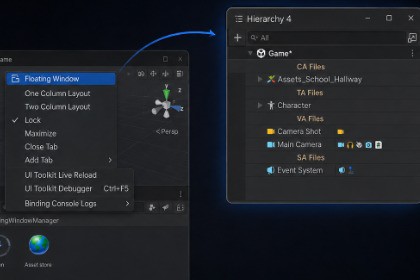
Take control of your Unity Editor workspace with instant, customizable floating window presets!Tired of manually dragging, sizing, and docking floating Unity windows every time you debug or tweak your game? Floating Window Manager lets you capture, save, and restore your exact floating window combinations, sizes, screen positions, and tab arrangements—all accessible with a single hotkey!⚡ Key Features🖱️ Right-Click "Floating Window" Context Menu: Right-click any editor tab header (Hierarchy, Inspector, Console, or custom tool) and select Floating Window to instantly pop it out into a standalone floating window!📸 One-Click Layout Capture: Scan active floating windows across all your monitors with a single click. The tool automatically captures precise screen coordinates ($X, Y$), window dimensions ($W, H$), sub-tab sequences, and docked split widths.🧩 Automatic Multi-Tab Docking : Recreates complex multi-tab floating arrangements (e.g., Hierarchy + Inspector side-by-side in one window) smoothly while restoring relative split widths without breaking your custom layouts.🎹 Custom Global Hotkeys: Set up custom editor hotkeys (e.g., Ctrl+Shift+H) via an interactive shortcut binder to spawn your default floating workspace instantly from anywhere in the editor.📌 Always-On-Top Mode : Features a built-in Win32 Z-ordering engine that forces custom floating windows to stay on top—even when focusing the Game View or using Fullscreen Editor assets like Fullscreen Editor and Fullscreen Editor Play Mode - FREE💾 JSON Import & Export: Easily back up, share, and restore saved workspace presets across team members, different project environments, or Unity installations via lightweight JSON files.🚀 Quick Start GuideRight-click any Editor tab. Select Floating window to make it floating, or drag and arrange floating windows on your screen.Open the tool via Tools > Floating Windows > Floating Window Manager (or Window > Floating Windows).Click Scan to detect open floating windows, enter a preset title, and click Save.Click Set Default on your preferred preset and configure your target shortcut key.Press your hotkey anytime to restore your floating layout instantly!

