






FREE Low Poly Plants & Pots Demo with Growth System / Cosmic Retro
The PolynestLab
$0.0
(no ratings)
Jump AssetStore
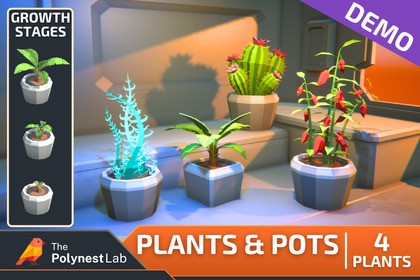
Free stylized low-poly plants demo with 4 species, 3 growth stages, 2 pot variants and configurable Inspector system. Test the full Plants & Pots workflow in Unity.The FREE Plants & Pots Demo is a functional sample of the full Plants & Pots Pack / Cosmic Retro, designed to let you test the complete workflow directly inside your own Unity project before purchasing the full collection.The demo includes 4 plant species, each with 3 growth stages, 2 modular pot variants, and the same configurable plant system used in the full package.▶ Explore the Full Plants & Pots PackLike the style and workflow? Continue with the complete collection featuring 40 plant species, 120 plant models, 4 pot variants, and 284 prefabs. Low Poly Plants & Pots Pack with Growth System◼ Two Ways to Use the Demo ◼Test both workflows available in the complete package:Classic Drag & Drop: Use ready-made Plant + Pot prefabs, plant-only prefabs, or pots separately.Configurable Plant System: Use flexible plant prefabs to change growth stages, swap pots, and randomize variations directly in the Unity Inspector.◼ What’s Included in the FREE Demo ◼4 Plant Species: A small curated selection representing the visual variety of the full pack.3 Growth Stages Per Plant: Every included species features L1, L2, and L3 versions.12 Plant Models: 4 species × 3 growth stages.2 Modular Pot Models: Test different pot variations with the included plants.4 Configurable Plant Prefabs: One flexible prefab per included species.12 Plant + Pot Prefabs: Ready-made drag-and-drop combinations.12 Plant-Only Prefabs: Use the plants separately or combine them with your own setup.2 Pot Prefabs: Pots can also be used independently.◼ Configurable Growth System Included ◼The demo includes the same CR_PlantSwitcherV3 workflow used in the complete package.Directly from the Unity Inspector you can:Switch between Empty / L1 / L2 / L3Change the active potRandomize the growth stageRandomize the potConfigure plants without entering Play ModeAutomatically adjust plant height depending on whether a pot is activeThis allows you to test the complete configurable workflow before moving to the full 40-species collection.◼ Lightweight Stylized Workflow ◼The demo uses the same lightweight visual setup as the full package, with compact low-poly geometry and 16x16 px textures designed for stylized and performance-focused projects.◼ Unity Compatibility ◼Unity 2022: Compatible with Built-in Render Pipeline and URPUnity 6: Compatible with Built-in Render Pipeline and URPNo Additional Dependencies: No additional Asset Store packages are required.◼ What You Can Test ◼Plant style and scaleAll 3 growth stagesPot swappingRandom growth stagesRandom pot selectionDrag-and-drop prefab workflowConfigurable Inspector workflowIntegration with your own environmentPerformance in your project◼ Perfect For ◼Testing the full Plants & Pots workflow before purchasingCozy gamesSci-fi colonies and space stationsSurvival and crafting gamesIndoor environmentsGreenhouses and research facilitiesBase-building gamesStylized environmentsMobile and performance-focused projects◼ Part of the Cosmic Retro Universe ◼The plants are designed to match the stylized visual language of the Cosmic Retro series, while remaining versatile enough to work independently in cozy, colorful, survival, and other stylized projects.Enjoyed the FREE demo?If it has been useful for testing your project, leaving a short review helps support future updates and the continued development of Cosmic Retro. Thank you! 💛Number of textures: 2Texture dimensions: 16x16Minimum polygon count: 52Maximum polygon count 2158Number of meshes/prefabs: 14/30Types of materials and texture maps (e.g., PBR): pngAI was used only as a coding and documentation assistant during the development of the CR_PlantSwitcherV3 script and the included PDF documentation. The final script and documentation were manually reviewed, edited, tested, and integrated into the package. No generative AI was used to create the visual content.

