






Text to AI Lab | AI Model, Animation, Skybox, Sound & Speech Generator
Satisvizion
$54.45
$108.90
50%OFF
(no ratings)
Jump AssetStore
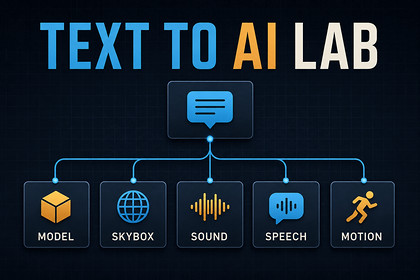
Generate, import, preview, and organize AI-powered 3D models, humanoid animations, skyboxes, sound effects, and speech inside the Unity Editor.Text to AI Lab is a modular AI asset generation toolkit for Unity that brings 3D model, humanoid animation, skybox, sound-effect, and speech generation directly into the Unity Editor.Online Showcase Demo🎬 YouTube TutorialsDescribe the content you need, configure the generation settings, and submit the request from one dockable Editor window. Text to AI Lab downloads the returned files, imports them into the Unity project, records useful generation metadata, and organizes the results in a shared searchable Library.The toolkit combines five specialized AI generation modules with common navigation, invoice activation, prompt guidance, generation queues, import automation, previews, tagging, and asset-management tools.🧠 FIVE AI GENERATION MODULESText to Model AICreate 3D assets from a written prompt or a PNG, JPEG, or WebP reference image.Configure quality, seed, variation count, and output naming.Generate up to four model variations in one request.Import returned GLB files through Unity glTFast.Create centered-pivot prefabs ready for scene placement.Optionally place imported models into the active scene.Generate LOD1–LOD3 levels when the optional UnityMeshSimplifier package is installed.Export model contact sheets and turntable GIF previews.Text to Motion AICreate reusable Humanoid animation from natural-language motion descriptions.Configure motion duration, seed, and output name.Validate the assigned Humanoid character before generation.Detect missing Animators, invalid Avatars, rig mapping problems, and non-uniform scale.Access contextual one-click rig correction tools.Import returned FBX animation files.Optionally apply the generated clip to the selected character.Add motions as reusable states in a standard Animator Controller.Reapplying the same clip updates its existing state instead of creating duplicates.Use standard Humanoid animation for retargeting between compatible characters.Text to Skybox AIGenerate panoramic environments from text prompts.Enter a prompt and optional negative prompt.Configure style, seed, steps, guidance, and upscale settings.Import the returned panoramic PNG texture.Automatically create a Skybox/Panoramic material.Optionally apply the material to the active scene.Refresh ambient lighting after applying the new environment.Preview generated panoramas from the shared Library.Text to Sound AIGenerate and organize sound effects for Unity projects.Configure generation engine, style, category, duration, and variation count.Generate up to eight sound variations in one request.Import returned WAV or MP3 files as Unity AudioClips.Organize generated audio into category-specific folders.Apply category-aware AudioImporter settings.Configure appropriate loading and compression behavior.Optionally create ready-to-place AudioSource prefabs.Preview generated clips directly inside the Editor.Text to Speech AIConvert written scripts into dialogue, narration, character voices, and system audio.Configure voice, engine, language, delivery, speed, pitch, and category.Generate up to four speech takes in one request.Import returned WAV or MP3 speech files.Organize speech into dedicated category folders.Apply speech-focused mono and load-type import settings.Optionally create ready-to-use AudioSource prefabs.Create flat 2D voiceover or positional character-audio configurations.Preview generated speech inside the Unity Editor.💎 500 INCLUDED GENERATIONS PER MONTHA qualifying Text to AI Lab purchase includes up to 500 generations per monthly cycle, distributed across five separate module allowances:Text to Model AI: 50 generations per monthText to Motion AI: 50 generations per monthText to Skybox AI: 50 generations per monthText to Sound AI: 250 generations per monthText to Speech AI: 100 generations per monthThese are independent module allowances and do not form one transferable balance.Each generated model variation uses one Text to Model generation.Each newly generated motion uses one Text to Motion generation.Each generated skybox uses one Text to Skybox generation.Each generated sound variation uses one Text to Sound generation.Each generated speech take uses one Text to Speech generation.Allowances refresh automatically each monthly cycle. Generation is not unlimited, and unused generations cannot be transferred between modules.🗂️ UNIVERSAL AI ASSET LIBRARYGenerated output from every installed module is indexed in one Library.Search across all generated assets.Filter by generation module.Add favorites and custom tags.Sort results and adjust thumbnail sizes.Preview 3D models and Humanoid animation interactively.Preview panoramic skyboxes.Play sound and speech clips inside the Editor.Add model prefabs to the active scene.Apply compatible animation clips and skybox materials.Export model contact sheets and turntable GIFs.Favorites and tags are stored as Editor overlay data without modifying the original generated files.📋 SEARCHABLE GENERATION METADATAText to AI Lab can create .ttai.json sidecar files containing useful workflow information, including:Generation moduleOriginal promptNegative prompt, when supportedSelected generation settingsProvider stateAvailable generation metricsOutput pathsWhen an asset is renamed or moved through Unity’s Project window, its sidecar follows it. Deleting the asset also removes its associated sidecar.Assets without sidecar metadata can still appear in the Library, but will not display generation provenance.💡 MODULE-SPECIFIC PROMPT HELPERThe Prompt Helper automatically adapts to the selected generation module.Prompt structure recommendationsValidation feedbackModule-specific examplesReusable prompt chipsOne-click prompt insertionGuidance for creating clearer generation requests⚙️ GENERATION QUEUE AND DIAGNOSTICSTrack active jobs from the persistent queue strip.View submission, generation, download, import, completion, failure, and cancellation states.Review the availability of each configured generation service.Rebuild the Library index when needed.Configure service endpoints through Settings.Generate support reports without exposing saved invoice values.Receive clear feedback for activation, connectivity, service, import, and allowance errors.🔐 ONE-TIME PURCHASE AND INVOICE ACTIVATIONEach included module is activated separately using the same qualifying Text to AI Lab Unity Asset Store invoice.One-time purchaseNo recurring subscriptionNo separate AI-provider registrationNo customer-supplied provider API keysNo self-hosted backend setupGeneration requires an active internet connection, successful invoice activation, a reachable configured generation service, and remaining monthly allowance for the selected module.📦 DEPENDENCY-AWARE INSTALLATIONText to AI Lab checks whether the required Newtonsoft Json package is available. When it is missing, the package remains compile-safe and offers a guided installation option.Unity glTFast is required to convert generated GLB model files into Unity prefabs. Without glTFast, the downloaded GLB remains available in the project, but automatic prefab creation is unavailable.UnityMeshSimplifier is used only for automatic model LOD generation. A namespaced, editor-only copy of its simplification core is bundled with Text to AI Lab under the MIT License, so LOD1-LOD3 generation works without installing anything separately. The bundled copy uses its own namespace and omits the upstream runtime components, so it does not conflict if you already have UnityMeshSimplifier installed, and none of it is compiled into built players. Asset uses UnityMeshSimplifier under the MIT License; see Third-Party Notices.txt file in package for details.Device hashing disclosure: Text to AI Lab creates a stable, pseudonymous device identifier in the Unity Editor by hashing Unity's deviceUniqueIdentifier with a product-specific suffix. The resulting hash is sent to the configured service with requests made through the asset's shared service client, including activation and generation-related requests, so the service can identify the requesting editor device. Requests may also include your Asset Store invoice for activation or authenticated operations. The raw device identifier is not sent by this hashing mechanism. A stable hash can link requests from the same device; it is not fully anonymous. This hashing code is editor-only and is not included in exported games. Previously downloaded assets can be used without making generation requests.⚠️ IMPORTANT WORKFLOW BOUNDARIESText to AI Lab is an Editor extension and does not include a runtime generation API.Generation is service-backed and does not operate offline.A self-hosted generation backend is not included.Monthly generation allowances are not unlimited or transferable between modules.Standard Animator Override Controllers are not modified automatically when applying motion clips.Generated assets may require artistic cleanup, material adjustment, rig review, technical optimization, or legal review.Users remain responsible for confirming that generated output is appropriate for their project, target platform, distribution channel, and applicable licensing requirements.📖 DOCUMENTATION AND SUPPORTThe package includes HTML documentation covering installation, invoice activation, every generation module, the Universal Library, Prompt Helper, import workflows, dependencies, generated files, sidecar metadata, service diagnostics, and known limitations.For product help, contact SatisVizion at satisvizion@gmail.comProduct type: Unity Editor extensionVersion: 1.0.0Tested with: Unity 6000.0.62f1Editor menu: Window > Text to AI LabIncluded modules: 5Source code: IncludedRuntime components: None requiredRuntime generation API: Not includedNetwork access: Required for generationActivation method: Qualifying Unity Asset Store invoiceSubscription: Not requiredCustomer API keys: Not requiredSeparate provider registration: Not requiredSelf-hosted backend: Not includedTotal included allowance: Up to 500 generations per monthly cycle across separate module balancesText to Model allowance: 50 generations per monthText to Motion allowance: 50 generations per monthText to Skybox allowance: 50 generations per monthText to Sound allowance: 250 generations per monthText to Speech allowance: 100 generations per monthModel input: Text, PNG, JPEG, or WebPModel output: GLB and generated Unity prefabModel variations: Up to 4 per requestAutomatic model LODs: Optional LOD1–LOD3Motion output: FBX-based Humanoid animation workflowSkybox output: Panoramic PNG texture and Unity materialSound output: WAV or MP3, depending on the returned artifactSound variations: Up to 8 per requestSpeech output: WAV or MP3, depending on the returned artifactSpeech takes: Up to 4 per requestGeneration metadata: .ttai.json sidecarsRequired package: com.unity.nuget.newtonsoft-jsonRequired for model prefab creation: com.unity.cloud.gltfastBundled third-party component: UnityMeshSimplifier simplification core, MIT License, editor-only, privately namespaced; see Third-Party Notices.txt in the package rootDocumentation: Included HTML manualThis package was built with AI-assisted development tools. Primarily Claude Codefor the C# implementation, with a smaller amount of assistance from GPT-basedmodels via Codex. All generated code was reviewed, edited and integrated by handrather than shipped as produced.The written documentation and store copy were drafted with AI assistance andedited by hand.

