






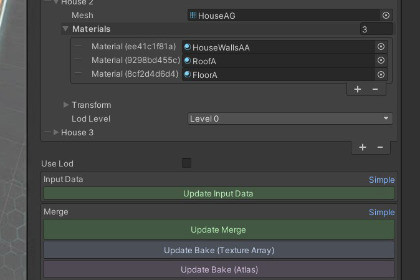
FREE, zero-dependency mesh combiner. One-click Texture2DArray baking for TRUE 1-draw-call optimization. Works with Built-in RP & URP.Built-In / URP: Fully native. Includes a custom PBR shader (maleric/TextureArray/URP, Standard) with ambient lighting and shadow support.HDRP: The C# mesh-combiner works everywhere, but shaders are not built for HDRP at the moment. You must swap to custom shaders for other pipelines.Hardware: Texture arrays require DX11+, GLES 3.5+, Vulkan, or Metal. Use atlas mode for legacy devices.MeshMerge is a powerful, lightweight, and completely free optimization toolkit designed to instantly slash your draw calls with zero external dependencies.Unlike basic free combiners that only merge geometry (which leaves you with multiple materials and zero actual draw call reduction), MeshMerge includes an intuitive, One-Click Texture 2D Array Baker. It automatically extracts your textures, compiles them into an optimized array, and remaps them via per-vertex coordinates — giving you the holy grail of optimization: 1 Mesh + 1 Material = 1 Draw Call.Whether you need to batch thousands of static environment pieces in the editor or merge meshes procedurally during a live build, MeshMerge provides clean, pure logic optimization without cluttering your project.MeshMerge was originally built for a real mobile city builder — where runtime merging with dynamic rules let us swap construction states, unlock buildings, and keep a massive city running at 60 FPS. It shipped. It worked. Now it's yours.KEY FEATURESOne-Click Texture Array Baking: Instantly turn 5+ distinct materials into 1 unified texture array material to achieve true 1-draw-call optimization.Mesh Combiner & Splitter: Easily merge multiple child meshes together or break multi-submesh objects back apart into individual GameObjects for seamless editing.Full Runtime Support: Includes a dedicated Runtime Mesh Combiner component to dynamically merge static meshes inside your executable builds.Advanced Material Rules System: Powered by robust ScriptableObjects to automatically map and preserve original material configurations across your project.Atlas Packing: Alternative UV-offset texture packing optimized for non-tiling props and assets.Non-Destructive Workflows: Full Unity Undo/Redo integration for all operations ensures your source assets always remain completely safe.100% Free & Open Source: Released under the MIT license with zero hidden costs, watermarks, or licensing restrictions.TECHNICAL REQUIREMENTSUnity Version: Unity 2021.3 LTS or later.Render Pipelines: Fully compatible with both the Built-in Render Pipeline and the Universal Render Pipeline (URP).Hardware Support: Texture Array sampling requires Graphics Tier 3.5 (DirectX 11+, OpenGL ES 3.5+, Vulkan, or Metal). Standard Atlas packing is available as an optimized fallback for legacy devices.IMPORTANT NOTES & LOGS (v1.0.0)Texture Array Mipmapping: Automatic mipmap generation for newly baked Texture2DArray assets is currently limited due to native platform variations in hardware-level pixel stream handling. As a result, textures may appear slightly grainy or alias when viewed from a long distance on certain GPU/driver configurations. This issue is actively under review for a future updateTiling Textures: The standard Atlas packing utility is strictly designed for non-tiling texture assets. For all tiling textures (such as repeating terrain, roofs, or modular walls), please utilize the native Texture Array Mode to maintain perfect mapping.Mesh Merge - Combine child GameObjects into a single mesh with one clickMesh Split - Break multi-submesh objects into individual GameObjectsTexture Array Bake - Turn N materials into 1 Texture2DArray material → 1 draw callAtlas Bake - UV-offset packing for non-tiling texturesRuntime Support - RuntimeMeshCombiner component for dynamic merging in buildsMaterial Rules - ScriptableObject system maps original materials → texture array slicesEdit Mode - Temporarily split to reposition parts, then re-mergeBatch Process - Process all MeshCombiners in the scene at onceUndo/Redo - Full Unity undo support for all operationsLicense - MIT — free, no watermarks, no restrictionsThis asset was created primarily through manual labour. AI tools were utilized in a limited capacity as follows:Texture Retouching: AI tools were used to process and stylize four source textures to ensure aesthetic consistency and clarity for the tech demo. All underlying models and artistic direction are original works.Development Assistance: A Large Language Model (LLM) was used as a productivity assistant to summarize legacy codebase documentation and help generate task lists, assisting in the refactoring of a project originally authored in 2019.Runtime: No AI/ML components, scripts, or models are included in the runtime of this asset. The logic is written in pure C#.

