






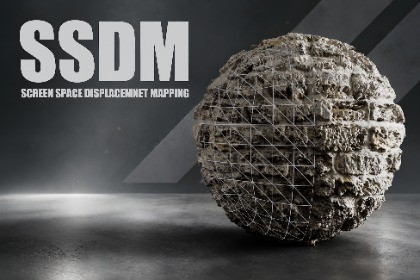
SSDM - Screen Space Displacement Mapping
Gece Studio
$26.95
$38.50
30%OFF
(no ratings)
Jump AssetStore
SSDM(Screen Space Displacement Mapping) is an advanced Unity 6 URP rendering system that converts height maps into real-time screen-space displacement. Unlike traditional parallax techniques, it can modify not only the internal surface details but also the visible silhouette of an object. All of this is achieved without tessellation, dense geometry, or mesh subdivision.Two-pyramid approach, the system combines high-resolution inverse mapping, conservative forward reconstruction, and a second depth-peel layer. This provides more stable results with strong displacement values, steep camera angles, and overlapping objects.Key FeaturesTrue screen-space displacement and silhouette deformationGPU-based architecture with no tessellation or additional geometry requiredLit material support: Base Color, Normal, Metallic, Smoothness, Occlusion, and Height MapSecond depth-peel layer for overlapping objectsForward barycentric reconstruction to fill missing silhouette pixelsSoft edge mask to reduce clipping at screen boundariesAdjustable mip bias to help preserve source texture sharpnessDistance fade for smoothly disabling displacement at long distancesAdjustable pyramid levels and refinement iterationsSupport for both positive and negative displacementObject-scale-aware displacement heightCompatible with Alpha Clipping, shadows, fog, and URP lightingRenderGraph-based Unity 6 URP Renderer FeatureIncludes a ready-to-use material, demo scene, and sample texturesFully AdjustableArtists can directly control the displacement height, height center, texture tiling, height mip bias, and source mip bias through the material properties.The Renderer Feature provides advanced quality settings such as screen-edge transition width, depth-peel sensitivity, Pyramid Levels, Fine Refinement Iterations, and depth tolerance. Distance Fade Start and End values can also be used to smoothly fade out the effect over distance.This structure allows projects to find their own balance between visual quality and GPU performance.Use CasesSSDM is particularly effective for the following types of surfaces:Stone and brick wallsRocky surfacesDamaged or fractured materialsOrganic shells and crustsEmbossed metal surfacesGround and environment detailsMaterials requiring significant silhouette depthSSDM is a screen-space technique. Source pixels that are outside the camera view cannot be reconstructed, and the current system resolves a maximum of two overlapping SSDM surface layers. Within these limitations, the system provides a flexible solution for achieving strong surface depth and silhouette displacement without additional geometry.Note: The “Smooth Camera” package has been included in the project so that you can move around the demo scene comfortably.-------------------------------------------------------------------------------------So, what is SPOM, and how does it differ from SSDM? You can access the package below and read the comparisons between the two systems.SPOM (Silhouette Parallax Occlusion Mapping)🔷 SPOM 🔶 SSDM| PERFORMANCE🔷 Performance cost depends on the number of steps. Fewer steps result in higher performance. In 1080p testing, the processing cost is up to ~0.5 ms.🔶 Since the system is a screen-space technique, approximately 90% of the performance cost depends on screen resolution. In 1080p testing, the processing cost is up to ~1 ms.| CLIPPING🔷 Clipping is UV-based. Clipping occurs only at UV seams. The object can still be deformed using rigging or shape keys; however, clipping will still occur along the UV boundaries.🔶 Clipping is screen-space based. Therefore, clipping behavior depends on the object's visibility within the screen rather than its UV boundaries.| LOD🔷 The number of steps can be reduced based on distance, allowing performance to be improved for distant objects.🔶 LOD is used primarily for visual accuracy rather than performance optimization. Settings such as Pyramid Levels can be adjusted to control image quality.| ACCURACY🔷 Since the system operates inside the shader using UV-based mapping, it provides high / deterministic accuracy across the surface.🔶 Since the system is screen-space based, certain artifacts may occur. Objects or geometry located in front of the SSDM surface can also affect the result.| USE CASES🔷 Due to its high accuracy, it is recommended primarily for interiors. It is well suited for close-range and controlled viewing conditions.🔶 Due to its screen-space nature, it is recommended primarily for outdoor environments and areas where the SSDM surface can be clearly observed.| DISPLACEMENT🔷 Since the system is UV-based, it cannot move beyond the boundaries of the object's surface. Therefore, displacement always occurs inward, and the system cannot produce outward protrusions.🔶 Since the system is screen-space based, pixels can be displaced outward as well. SSDM works by modifying screen-space displacement vectors, allowing displacement to affect silhouettes as well.| PDO (Pixel Depth Offset)🔷 Supports Pixel Depth Offset. However, PDO is only available in HDRP. Since URP does not support PDO, this feature is not available when using SPOM in URP.🔶 Not currently available, since URP does not provide Pixel Depth Offset support.The package includes:Renderer FeatureCompute ShaderCustom URP shaderAutomatic renderer setup utilityExample MaterialDemo SceneDocumentationSmooth Camera PackLimitationsAs with any screen-space technique, SSDM only operates on surfaces visible to the camera. Completely hidden geometry cannot be reconstructed.Currently, displacement affects the rendered color only. Camera depth, motion vectors, SSAO depth, and shadow geometry are not yet displaced. Because URP does not provide Pixel Depth Offset(PDO) support.Due to the nature of the technique, some minor flickering may occur in extremely complex or high-frequency displacement scenarios.Requirements* Unity 6.x* Universal Render Pipeline (17.0.4)Note: The HDRP version has not been included due to its high maintenance cost and the possibility of HDRP being discontinued in the future. This system has been developed as a preliminary preparation for the single render pipeline that will be used in Unity 7.

