






Visual Dialogue Graph - Branching Conversations for Unity
Conquerror
$8.25
$16.50
50%OFF
(no ratings)
Jump AssetStore
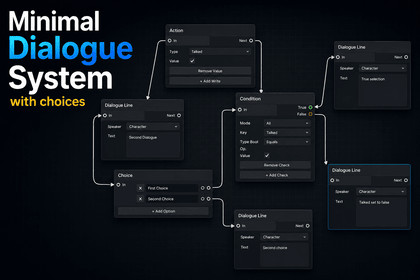
A visual dialogue system for Unity 6. Build branching conversations on a node graph, gate choices with blackboard conditions, and drive your own UI with simple events. You own the save data.Build branching conversations without writing a parser, a script format, or a state machine.Conquerror Dialogue System is a node based dialogue editor for Unity 6. You draw the conversation. The system runs it.No new language to learnNo custom scripting syntax, no markup format, no external tool. Everything lives in a Unity window and behaves like Unity. If you can use the Animator or Shader Graph, you already know how this works.Drag and drop authoringRight click to add a node. Drag from one port to another to connect them. That's the whole workflow.Four node types cover everything:Dialogue Line for a speaker and their textChoice for player optionsCondition to branch on what the player has doneAction to remember what just happenedBranches split and rejoin freely. Hit Save when you're done.Conditions without codeDeclare a key in the side panel, give it a name and a type, and it shows up in a dropdown on every Condition and Action node. Set a flag when the player agrees to help. Check it three conversations later. Writers can build the entire branching structure on their own.Simple to hook upCode needs to subscribe to three events and call two methods to run a conversation. No UI is forced on you. The runner tells you what to display and gets out of the way.Your save system stays yoursThe system never writes a file. Call one method and you get a string, ready for PlayerPrefs, your own save format, or the cloud.Technical detailsUnity 6 requiredBuilt on the official GraphView APIFull C# source included, no DLLsSeparate Runtime and Editor assembly definitionsFour node types: Dialogue Line, Choice, Condition, ActionTyped blackboard (bool, int, float) shared across graphsEvent driven runner: OnLine, OnChoices, OnFinishedControl API: StartDialogue(), Continue(), SelectChoice(index), StopDialogue()JSON blackboard export/import, no file I/O performed by the assetIncludes a working sample scene scriptDocumentation split for designers and programmersI have used it for Documentation, some debug and creating the visuals for the asset store page(I am bad with visuals)

