




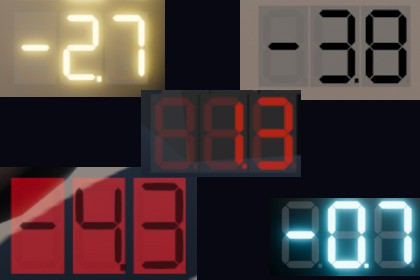
Create realistic LCD displays with customizable digits, emission, transparency, and LCD response effects. Perfect for HUDs, dashboards, and sci-fi UIs in 3D or Canvas.Create stunning, high-quality digital displays that instantly elevate the look of your project. This LCD display system is built for both realism and flexibility, giving you full control over how your numbers look and behave.Customize everything:Display color, brightness, and backgroundTransparency and emission (use separately or combined)Digit count with optional decimal pointLight on/off behavior and dark mode appearanceUse it anywhere:As a 3D object in your sceneAs a World Space UI elementAs a Screen Space Overlay (perfect for HUDs)Designed with realism in mind, the display includes adjustable LCD response lag, simulating the subtle delay of real-world digital screens. Want instant updates? Set lag to zero for crisp, responsive feedback.The transparency system makes it ideal for sleek HUD designs, while emission ensures visibility even in dark environments. Switch between bright and dark display modes to match any visual style.Whether you're building vehicles, simulators, sci-fi interfaces, or modern UI systems, this package gives you a powerful, ready-to-use digital display solution that looks as good as it performs.LCD Digital Displays are provided as ready-to-use prefabs for three different applications:Canvas Overlay – displays rendered as UI elements on a Canvas Overlay.Canvas World – displays rendered as UI elements within the 3D world.3D World – displays built from 3D mesh objects and placed directly in the 3D world.For the Canvas Overlay and Canvas World versions, each digit is constructed from 2D image elements. The 3D World version uses actual 3D mesh geometry.The display works by switching individual digital segments on and off. This is achieved by modifying their transparency and/or emission, allowing different visual styles and levels of realism.Included PrefabsAs a starting point, several ready-made prefabs are included:1. Canvas Overlay7 different prefabs are provided, featuring various combinations of:EmissionTransparencyEmission + transparencyDark display variantsSpecial shaders and materials are included to simulate an emission/glow effect in Canvas Overlay mode.2. Canvas World6 different prefabs are provided with various combinations of:EmissionTransparencyEmission + transparencyDark display variantsSpecial shaders and materials are included, including a halo effect for displays using emission.3. 3D World7 different prefabs are provided, featuring various combinations of:EmissionTransparencyEmission + transparencyDark display variantsA dedicated material/shader with a halo/glow effect is also available for emission-based displays.LCD Response SimulationThe display can optionally simulate the slow response of real LCDs. Using a script parameter, you can specify the amount of time it takes for individual display segments to turn on or off, creating a more realistic transition instead of an instantaneous change.Performance OptimizationAn optimization parameter is included in the scripts to control how frequently the display's material properties are updated.Instead of updating the digital elements every frame, you can limit updates to a specified FPS rate, reducing unnecessary material updates and improving performance when using multiple displays simultaneously.AI was consulted in constructing custom shaders.

