






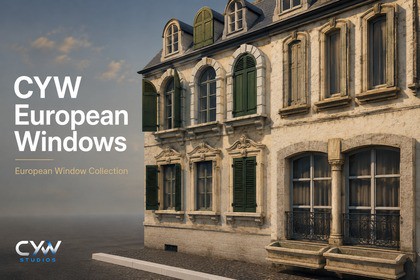
Modular European heritage windows with shutter variants, PBR materials, selected LODs, and an architectural showcase scene for Unity URP.Designed and tested for the Universal Render Pipeline in Unity 6.3 LTS (6000.3.9f1).All included materials and demonstration content are configured for URP.Built-in Render Pipeline and HDRP are not supported in version 1.0.0.No additional Asset Store packages are required.CYW European Windows is a collection of 12 sets and 34 window variations inspired by European architecture, designed for Old Town environments, residential facades, period settings, games, and architectural visualization.The collection features basement windows, narrow and full-arch windows, a decorative balcony window, ornate window surrounds, rectangular and arched mullions, and round oculus windows. Many sets include separate prefabs with open shutters, closed shutters, or no shutters, making it easy to create visual variety between buildings.These assets are designed primarily as static exterior architectural elements. Shutter variations are separate prefabs; shutter animation and interactive opening systems are not included. The collection is suitable for street scenes, historic districts, background architecture, and architectural presentations.Materials and LODsThe windows are provided as ready-to-use Unity prefabs with URP-compatible materials.Multi-level LOD support is included for 22 of the 34 window variations:- 16 variations include LOD0, LOD1, and LOD2.- 6 variations include LOD0 and LOD1.- The remaining 12 variations consist of a single level. The multi-level prefab systems feature LOD groups with screen-relative transitions and cross-fading. Transition settings can be adjusted to suit your project's camera, viewing distances, and performance requirements. The included LOD inventory details the available levels for each prefab.Selected lower-detail levels use textured planes to preserve the window's front-facing design at a distance. These levels are not intended to replace full-depth geometry during close-up or rear-view inspection.Texture resolutions and available maps vary by asset, including select 4K images and one 8192×8192 source texture. Texture import settings and platform overrides can be adjusted for your target hardware.Placement and CustomizationWindow dimensions vary across styles to reflect their distinct architectural roles. Building proportions can be adjusted, and materials can be customized to fit your scene.The package includes close-up thumbnails of the window designs to facilitate easy identification of window variants. This optional editor tool displays saved preview images without rotating or altering the actual preview assets. Demo ContentFour demo scenes are included:- Window Gallery – A complete, standalone catalog of all 34 variants.- LOD Viewer – An interactive demo for selecting windows, inspecting available LOD levels, and testing distance-based transitions.- Architectural Showcase – All 34 variants arranged by family along the exterior of a demo building.- Optional Wall Catalog – All 34 variants displayed with a separate wall model.The building and wall models are included as reusable demo assets. The building uses solid walls; the interior and automatic cutouts for window openings are not included. Dormers in the wall catalog are displayed for inspection purposes only and not as examples of roof installation.Presets for balanced and high-quality URP rendering are included, along with documentation on installation, placement, and upgrading.Compatibility and DependenciesThis release is configured and tested with Unity 6000.6.0f1 and Universal Render Pipeline 17.6.0.The Built-in Render Pipeline, HDRP, and older Unity versions have not been verified for this release.The window prefabs do not require runtime scripts. Optional demo control scripts and editor-only thumbnail generation tools are included. No additional Asset Store packages are required; URP is required via the Unity Package Manager. The package contains assets ready for Unity. Blender source files are not included.Important information for existing customersVersion 1.1.0 uses new asset IDs and does not automatically replace windows placed in version 1.0.0.Retain the previous assets while manually replacing existing window instances. Remove old assets only after their scenes and dependencies have been migrated and tested. Follow the included upgrade guide before updating an existing project.Technical details — updated entriesTested with Unity 6000.6.0f1 and URP 17.6.0.3D Content:- 34 ready-to-use window prefabs across 12 sets- 2 additional building/wall demo prefabs- 36 FBX model files in total: 34 window models and 2 demo models- 4 demonstration scenes- 190 standalone material assetsLODs:- 22 window variants include multiple LOD levels- 16 variants include LOD0, LOD1 and LOD2- 6 variants include LOD0 and LOD1- 12 variants are single-level- Configured screen-relative LOD transitions with cross-fading on multi-level prefabsPolygon Counts (triangles, window geometry only):- LOD0: approximately 2,150 average, 1,442.5 median, range 148–18,662 across 34 variants- LOD1: approximately 1,154 average, range 2–9,866 across 22 variants- LOD2: approximately 197 average, range 2–2,224 across 16 variantsTextures:- 128 material texture files: 127 PNG and 1 EXR- 34 additional PNG images used for Project-window thumbnails- Variable source dimensions, including non-square images, selected 4K textures and one 8192×8192 textureTexture map types:- Base Color, including alpha where applicable- Normal- Packed Metallic/Smoothness- Specular maps for applicable demo materials- Map availability varies by asset; not every material uses every map typeDependency:- com.unity.render-pipelines.universal — version 17.6.0- No additional Asset Store packages requiredCYW Studios created the vast majority of the base models and window assets, including modeling, UV work, topology editing, LODs, materials, textures, optimization, and Unity setup.AI tools were used for two external 3D objects, one basic window object, select texture images, and limited support for naming, package organization, and initial technical validation.All AI-generated content was manually reviewed, cleaned, adjusted, integrated, and tested by CYW Studios before being included in the final package.

