






ScenePeek - Preview Icons, In-Scene Inspect, Create & Replace
kyosyunn
$5.49
$10.99
50%OFF
(no ratings)
Jump AssetStore
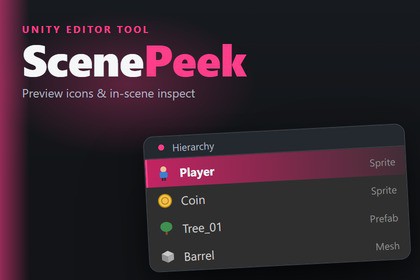
See what every object really is with content preview icons in the Hierarchy, and inspect it in the Scene view without opening the Inspector. Quick create & batch replace included.Editor-only, zero runtime code — works identically with any render pipeline (Built-in, URP, HDRP), since nothing is added to players or builds. Verified via automated EditMode tests on Windows with Unity 2022.3 LTS (2022.3.62f3) and Unity 6 (6000.5.4f1). Built entirely on public Editor API, no reflection — stable across future LTS updates. macOS/Linux not yet verified.Every Hierarchy row shows a generic cube. Every quick tweak means clicking the object, waiting for the Inspector, then clicking back. ScenePeek removes both frictions — it revives the workflow of the well-loved, discontinued Peek, rebuilt for modern Unity on public Editor API only (no reflection), so it keeps working across Unity upgrades. Editor-only, zero runtime footprint.Content preview icons in the HierarchyEvery Hierarchy and Project row shows what the object actually is, not a generic icon.Sprites render their exact artwork, extracted straight from the source texture — crisp, synchronous and atlas-correct.Meshes and prefab instances render a real thumbnail of their shape.Toggle it and tune the thumbnail size (12–32 px) in Preferences ▸ ScenePeek. Restrict to the Hierarchy, or show previews in the Project window too.Unity's own preview grids live inside the Search window; ScenePeek puts previews where you actually scan for objects — the Hierarchy itself.Inspect & edit in the Scene view — no InspectorA dockable Scene-view overlay, "ScenePeek Inspector", shows the current selection — GameObject, Component or Material — with a compact set of editable fields.Every edit is Inspector-equivalent and fully undoable; nothing is a fragile reflection hack.Every Hierarchy row also gets an inline activate/deactivate toggle, so you flip objects on and off without leaving the list.Stop bouncing between the Hierarchy, the Scene and a docked Inspector for one small change.Also includedFuzzy Finder — press Ctrl+F, type a few characters, and drop a primitive, prefab or component straight into the scene. Ctrl+Shift+Click in the Scene view creates a GameObject exactly where you click. A fast, keyboard-first way to place things without opening extra windows.Replacer — select any number of scene objects and swap them for a prefab or primitive in one undoable step. Parent, sibling order, local transform, active state, layer, tag and name are all preserved. A handy utility for reskinning greybox scenes.QualityEditor-only: zero runtime code, no dependencies, nothing added to your builds.Public Editor API only — no reflection, no vendored third-party code — so behaviour stays stable across Unity LTS upgrades.Automated EditMode tests pass on Unity 2022.3 LTS and Unity 6, with zero compiler warnings.Everything included — no add-ons, no upsells.Sits alongside Hierarchy organisers like vHierarchy or Hierarchy Designer rather than replacing them: they colour and tidy your Hierarchy; ScenePeek lets you see and act on what's in it.Editor-only assembly (ScenePeek.Editor); zero runtime footprint.No external dependencies; no code added to builds or to the Assets folder.Public Editor API only — no reflection (uses the version-proof hierarchy row callback for both the Unity 2022.3 integer API and the Unity 6000.5 EntityId API), no vendored third-party code.Preview Icons: sprites extracted from the source texture sub-rect (GPU-blit fallback for non-readable textures); meshes/prefabs via AssetPreview on the underlying asset.Context Toolbar: SceneView IMGUI Overlay + per-row Hierarchy GUI callback.Fuzzy Finder / Replacer: AssetDatabase + TypeCache discovery; all edits via Undo-recorded public APIs.Automated EditMode tests; verified on Unity 2022.3 LTS and Unity 6.Portions of this package's C# source code were written with the assistance of AI coding tools (Anthropic Claude). All code was human-reviewed and is verified by an automated EditMode test suite on Unity 2022.3 LTS and Unity 6. No third-party code is included: every feature is built on Unity's public Editor API only, with no reflection and no vendored libraries. Marketing images are original designed layouts composited with faithful reproductions of the editor UI (no fully AI-generated imagery).

