







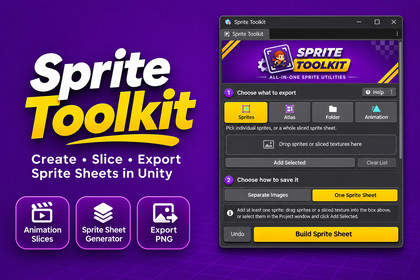
Export sprites as images or pack them into sliced sprite sheets with live preview. Turn 2D/3D animation clips into PNG frames and sheets. Beginner-friendly editor window. Editor-only.Sprite Toolkit: export, pack and capture sprites in one windowSprite Toolkit takes the busywork out of preparing 2D art. Choose your sprites, pick how to save them, and press one button. No scripting is needed, and it works entirely inside the Editor, so nothing is added to your game builds.Choose what to exportSprites: drag in sprites or sliced texturesSprite Atlas: export every sprite from an atlasFolder: scan a folder (and its sub-folders) for sprites, with an optional label filterAnimation: capture a 2D or 3D animation clip as framesChoose how to save itSeparate images: one file per sprite or frame, as PNG, JPG or TGAOne sprite sheet: every sprite packed into a single imageScale: Original, x2, x4 or a custom size, with Point or Bilinear smoothing for pixel art or painted artFile names: prefix, suffix, numbering, date stamps or a custom nameSprite sheet packingCompact packing with spacing, edge trimming, edge extrude, power-of-two and square optionsA live sheet preview that updates as you change sprites or settings, without saving anythingAutomatic extra sheets when a maximum size is reachedWhen saved in your project, the sheet is imported already sliced with sprite names and pivotsOptional JSON file listing each sprite’s position, for use in other engines and toolsAnimation to sprite framesPick a prefab or scene object and a clip. A hidden copy is animated, so your original is never touched.Camera presets (Front, 3/4, Side, Back, Top) plus Tilt and Turn slidersA live frame preview, so you can choose your angle before exportingFrame size from Pixels Per Unit or a fixed size, with margin and anti-aliasing optionsTransparent backgroundsExport as separate frames or as a single sprite sheetEasy to useThree numbered steps: what to export, how to save it, where to save itClear hints and a status message that tells you what’s missingUndo removes the files created by the last exportA history of recent exports, and settings that are remembered between sessionsA PDF guide with screenshots is includedGood to knowEditor tool only. It does not run in your built game.UI (Canvas/Image) animations can’t be captured; use sprite or mesh-based objects.Developed and tested on Unity 6000.3.Support: greydoorgames.support@gmail.com. If Sprite Toolkit saves you time, a review on the Asset Store is much appreciated.Key featuresFour sources: individual sprites, Sprite Atlas, project folder scan (with sub-folders and label filter), and animation clipsSeparate image export as PNG, JPG or TGASprite sheet packing with spacing, edge trimming, alpha threshold, edge extrude, power-of-two and square optionsMax sheet size, with extra numbered sheets when sprites don’t fitLive sheet preview that updates as sprites or settings changeAuto-slicing on import, keeping sprite names, pivots and the original sprite referencesOptional JSON file listing each sprite’s position, for other engines and toolsAnimation clip capture to PNG frames or a sprite sheet, from 2D or 3D objectsCamera presets plus Tilt and Turn sliders, with a live frame previewFrame size by Pixels Per Unit or fixed size, with margin, anti-aliasing and frame rate optionsTransparent background captureScale options: original, x2, x4 or custom, with Point or Bilinear smoothingFile naming: prefix, suffix, numbering, date stamp or custom nameBeginner-friendly three-step editor window with a banner and status hintsUndo for the last export, plus a history of recent exports and remembered settingsEditor-only code in its own assembly definition, so nothing is added to game buildsPDF documentation with screenshots includedThe original code was created by the creator. AI tools were used to assist with documentation, marketing image creation, and code refactoring. All AI-assisted code changes were reviewed, verified, and tested by the creator.

