






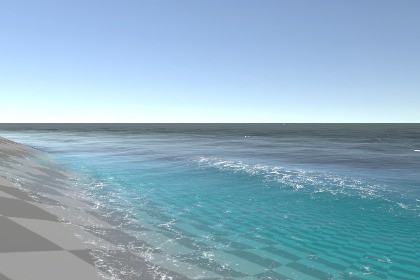
Real-time interactive water for unity 6.3 URP running on the GPU through WebGPU compute. A modern Unity port of Evan Wallace's legendary WebGL Water, rebuilt and extended for games and the browser.Water that reacts. Drop an object in, drag your cursor across the surface, walk a character through the shallows — every ripple is simulated live on the GPU, not faked with a scrolling texture. Built for URP and designed to deploy to the web via WebGPU.Live WebGPU demo: https://abstractocclusionshowreel.web.app/projects/unity6-webgpu-water.htmlBuilt on a classic, rebuilt for todayThe interactive ripple-and-caustics technique here traces back to Evan Wallace's original WebGL Water — one of the most-loved graphics demos on the web. WebGpu Interactive Water is a faithful port of that idea into Unity, then pushed far beyond it: GPU compute simulation, wind waves, volumetric lighting, foam particles and depth-aware shading, all wired into the Universal Render Pipeline.Key featuresLive ripple simulation — objects, mouse and touch push real waves across the surface, computed on the GPU every frame.Analytic wind waves — a sum-of-sines swell layer that floating objects genuinely ride.Caustics & volumetric god rays — light shafts with real shadow occlusion beneath the surface. The caustics and shafts now shimmer with the wind-wave layer, so even near-still water gets living structure instead of a static pattern.Exclusion zones (in active dev) — drop a box, a hull or any volume into the water and it carves a real hole: the surface and walls cut to the shape, nothing renders inside it, and underwater the excluded volume casts a proper shadow through the god rays and caustics. Built for boats, piers, submerged props and anything that should displace the water rather than clip through it. Still being hardened — the analytic shadow reach was just reworked, so expect ongoing tuning.Shore & surf waves (in active dev) — an analytic surf layer that breaks and runs up the beach: uprush and backwash swash, crest and small-wave foam, persistent swash deposits, and optional whitecap flipbooks. Pairs with a terrain bed-depth shoreline gradient that fades naturally into the shallows. The breaking model and front choppiness are still being iterated.Water chunks (in active dev) — bounded secondary water bodies cut to any (convex) 3D mesh shape, at any fill level, each carrying pool-grade caustics and god-ray shafts inside the chunk. Multi-level pools and independent bodies drop in the same way. Arbitrary concave shapes (via an SDF bake) are on the roadmap; convex meshes work today.Dynamic foam — surface foam shading plus GPU compute foam particles for crests, wakes and shorelines.Depth-aware water — per-channel light extinction, underwater fog and tint, and a terrain bed-depth shoreline gradient.Any-shape containers — pools, tanks and multi-level bodies using pool walls, mesh-cut chunks, or any custom mesh.Multiple independent water bodies in one scene, each with its own settings.Web-ready — the full pipeline, including foam and particles, runs on WebGPU compute and is tested and validated in the browser.CompatibilityUniversal Render Pipeline (URP), min Unity 6.3.Desktop and WebGPU browser builds.One-window setup via the Water Wizard.Honest about the limitsThis is an interactive simulation, and that shapes what it's best at. It shines on pools, ponds and mid-sized bodies of water, where the live ripple grid has the resolution to look crisp. For very large open water — big lakes and oceans — the surface currently relies on the analytic wave layer rather than a full ripple sim across the whole body; large-scale interactive simulation (via a camera-following sim window) is on the roadmap. If your project is a swimming pool, a koi pond, a flooded dungeon or a harbor, you're in the sweet spot. If it's an open ocean, FFT is implemented but still under active dev.The newer systems — exclusion zones, breaking shore waves, and mesh-cut water chunks — are the freshest additions and are still in active debug . They work and ship in the demos, but they're moving fast: expect tuning knobs to shift and edge cases to keep getting fixed release to release.The upside of the WebGPU compute pipeline: it's efficient enough that even low-end phones render it in the browser — foam and particles included — with no heavyweight fullscreen passes.Rivers are just a pre-state do no count on it RN .I am a solo dev. Support can be slow but I will always try to answer.Actively developed. Feel free to refactor , enhance , develop and reshare .TECHNICAL DETAILSRenderingUniversal Render Pipeline (URP) only. URP-specific code is gated behind the WEBGPUWATER_URP define; there is no Built-in RP path.The water surface is a transparent-queue material. God rays render as a transparent pass, so the URP asset's Transparent Receive Shadows must be enabled for shadow shafts to appear.Requires Opaque Texture and Depth Texture enabled on your URP asset (used for refraction and depth-based shading).Caustics and god rays can fold the analytic wind-wave slope into their projection, so the shimmer tracks the surface waves instead of scrolling independently. Foreign floors (non-water-receiver surfaces) sitting inside a secondary body can receive screen-space caustics projected per body.SimulationThe interactive surface is a GPU compute simulation — ripples from objects, mouse and touch are integrated on the GPU each frame into an RGBAFloat render texture.A separate analytic sum-of-sines wave layer drives large-scale swell that floating objects sample and ride.Foam is two systems: surface foam shading plus GPU compute foam particles for crests, wakes and shorelines.Shore/surf waves are an analytic, largely stateless render layer (breaking fronts, swash uprush/backwash, crest and small-wave foam); persistent foam deposits are the one stateful path, injected into the ripple-sim foam buffer. This system is under active development.Exclusion zones remove water inside a volume and occlude the underwater god-ray/caustic lighting analytically (closed-form box shadow, finite reach). Under active development.Water chunks are bounded, mesh-cut water bodies: the surface and walls are clipped to a convex closed mesh via a depth prepass, at any fill level, and each chunk renders its own pool-grade caustic RT and in-chunk god-ray shafts. Concave/arbitrary shapes via a baked SDF are planned. Under active development.Because the sim uses compute shaders, it runs on compute-capable platforms only — desktop/standalone (D3D11, D3D12, Vulkan, Metal) and WebGPU in the browser. It does not run on WebGL2/GLES2, which lack compute support.Platform & version supportUnity 6.3 and newer (URP).WebGPU browser deployment uses Unity's WebGPU backend, which enables compute shaders in the browser. Tested and validated in-browser, including foam and particles, on WebGPU-capable devices — down to low-end phones.Note: WebGPU is a hardware/browser feature. Devices without WebGPU support cannot run the browser build; the included WebGPU capability gate detects this and shows a clear message instead of failing.Packaging & setupShips as a UPM package (com.abstractocclusion.webgpuwater) with a single Water Wizard menu under Window/AbstractOcclusion/… — no top-level menu clutter.Set up water in one window; supports multiple independent water bodies per scene, pool-wall / mesh-cut chunk / any-mesh containers, and multi-level pools.A WebGPU capability-gate web template ships inside the package and installs into your project via a menu item (packages can't ship WebGL templates directly).No third-party dependencies. Compute shaders are resolved internally.What's includedCore water system (surface shader, compute sim, wave layer, foam, caustics, god rays, underwater fog/tint, depth shading, exclusion zones, shore/surf waves, mesh-cut water chunks).Demo scenes covering pools, ponds, foam, splash, shorelines and multi-level setups.WebGPU capability-gate web template + installer.Documentation and changelog.Known limitationsThe interactive ripple sim targets pools, ponds and mid-sized bodies. Very large open water (big lakes/oceans) currently relies on the analytic wave layer rather than a full ripple sim across the whole surface; camera-following large-body simulation is on the roadmap. Simulation window that follows cam or target already handle most of cases .Exclusion zones, breaking shore waves and mesh-cut water chunks are the newest systems and are still in active debug and development — they ship and work, but tuning and edge-case fixes are ongoing.Water-chunk mesh cutting handles convex closed meshes today; concave shapes (via a baked SDF) are planned.FFT ocean is implemented but still under active development.10 years old project i enhanced with AI help . Clean code base by me as always .

